Threads, Threads, and More Threads

Looking at a typical Windows system shows thousands of threads, with process numbers in the hundreds, even though the total CPU consumption is low, meaning most of these threads are doing nothing most of the time. I typically rant about it in my Windows Internals classes. Why so many threads?

Here is a snapshot of my Task Manager showing the total number of threads and processes:

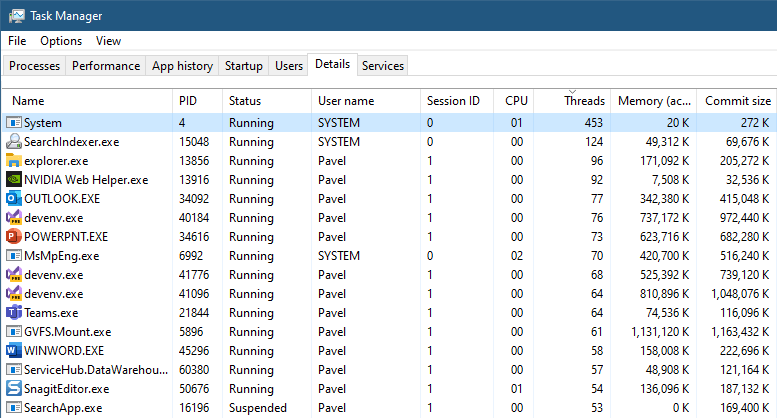
Showing processes details and sorting by thread count looks something like this:

The System process clearly has many threads. These are kernel threads created by the kernel itself and by device drivers. These threads are always running in kernel mode. For this post, I’ll disregard the System process and focus on “normal” user-mode processes.

There are other kernel processes that we should ignore, such as Registry and Memory Compression. Registry has few threads, but Memory Compression has many. It’s not shown in Task Manager (by design), but is shown in other tools, such as Process Explorer. While I’m writing this post, it has 78 threads. We should probably skip that process as well as being “out of our control”.

Notice the large number of threads in processes running the images Explorer.exe, SearchIndexer.exe, Nvidia Web helper.exe, Outlook.exe, Powerpnt.exe and MsMpEng.exe. Let’s write some code to calculate the average number of threads in a process and the standard deviation:

float ComputeStdDev(std::vector<int> const& values, float& average) {
	float total = 0;
	std::for_each(values.begin(), values.end(), 
		[&](int n) { total += n; });
	average = total / values.size();
	total = 0;
	std::for_each(values.begin(), values.end(), 
		[&](int n) { total += (n - average) * (n - average); });
	return std::sqrt(total / values.size());
}

int main() {
	auto hSnapshot = ::CreateToolhelp32Snapshot(TH32CS_SNAPPROCESS, 0);
	
	PROCESSENTRY32 pe;
	pe.dwSize = sizeof(pe);

	// skip the idle process
	::Process32First(hSnapshot, &pe);

	int processes = 0, threads = 0;
	std::vector<int> threads_per_process;
	threads_per_process.reserve(500);
	while (::Process32Next(hSnapshot, &pe)) {
		processes++;
		threads += pe.cntThreads;
		threads_per_process.push_back(pe.cntThreads);
	}
	::CloseHandle(hSnapshot);

	assert(processes == threads_per_process.size());

	printf("Process: %d Threads: %d\n", processes, threads);
	float average;
	auto sd = ComputeStdDev(threads_per_process, average);
	printf("Average threads/process: %.2f\n", average);
	printf("Std. Dev.: %.2f\n", sd);

	return 0;
}

The ComputeStdDev function computes the standard deviation and average of a vector of integers. The main function uses the ToolHelp API to enumerate processes in the system, which fortunately also provides the number of threads in each processes (stored in the threads_per_process vector. If I run this (no processes removed just yet), this is what I get:

Process: 525 Threads: 7810
Average threads/process: 14.88
Std. Dev.: 23.38

Almost 15 threads per process, with little CPU consumption in my Task Manager. The standard deviation is more telling – it’s big compared to the average, which suggests that many processes are far from the average in their thread consumption. And since a negative thread count is not possible (even zero is almost impossible), the the divergence is with higher thread numbers.

To be fair, let’s remove the System and Memory Compression processes from our calculations. Here are the changes to the while loop:

while (::Process32Next(hSnapshot, &pe)) {
	if (pe.th32ProcessID == 4 || _wcsicmp(pe.szExeFile, L"memory compression") == 0)
		continue;
//...

Here are the results:

Process: 521 Threads: 7412
Average threads/process: 14.23
Std. Dev.: 14.14

The standard deviation is definitely smaller, but still pretty big (close to the average), which does not invalidate the previous point. Some processes use lots of threads.

In an ideal world, the number of threads in a system would be the same as the number of logical processors – any more and threads might fight over processors, any less and you’re not using the full power of the machine. Obviously, each “normal” process must have at least one thread running whatever main function is available in the executable, so on my system 521 threads would be the minimum number of threads. Still – we have over 7000.

What are these threads doing, anyway? Let’s examine some processes. First, an Explorer.exe process. Here is the Threads tab shown in Process Explorer:
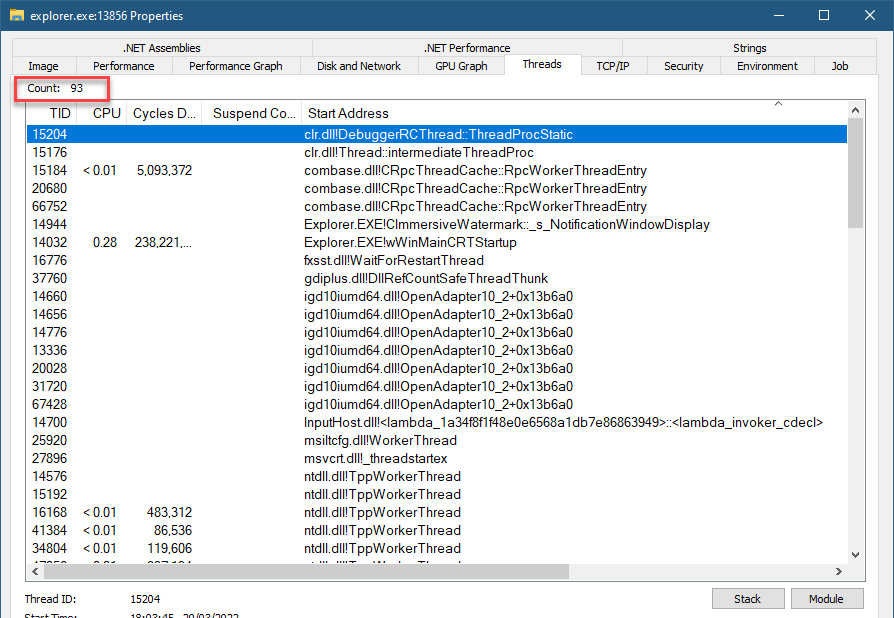
Thread list in Explorer.exe instance

93 threads. I’ve sorted the list by Start Address to get a sense of the common functions used. Let’s dig into some of them. One of the most common (in other processes as well) is ntdll!TppWorkerThread – this is a thread pool thread, likely waiting for work. Clicking the Stack button (or double clicking the entry in the list) shows the following call stack:

ntoskrnl.exe!KiSwapContext+0x76
ntoskrnl.exe!KiSwapThread+0x500
ntoskrnl.exe!KiCommitThreadWait+0x14f
ntoskrnl.exe!KeWaitForSingleObject+0x233
ntoskrnl.exe!KiSchedulerApc+0x3bd
ntoskrnl.exe!KiDeliverApc+0x2e9
ntoskrnl.exe!KiSwapThread+0x827
ntoskrnl.exe!KiCommitThreadWait+0x14f
ntoskrnl.exe!KeRemoveQueueEx+0x263
ntoskrnl.exe!IoRemoveIoCompletion+0x98
ntoskrnl.exe!NtWaitForWorkViaWorkerFactory+0x38e
ntoskrnl.exe!KiSystemServiceCopyEnd+0x25
ntdll.dll!ZwWaitForWorkViaWorkerFactory+0x14
ntdll.dll!TppWorkerThread+0x2f7
KERNEL32.DLL!BaseThreadInitThunk+0x14
ntdll.dll!RtlUserThreadStart+0x21

The system call NtWaitForWorkViaWorkerFactory is the one waiting for work (the name Worker Factory is the internal name of the thread pool type in the kernel, officially called TpWorkerFactory). The number of such threads is typically dynamic, growing and shrinking based on the amount of work provided to the thread pool(s). The minimum and maximum threads can be tweaked by APIs, but most processes are unlikely to do so.

Another function that appears a lot in the list is shcore.dll!_WrapperThreadProc. It looks like some generic function used by Explorer for its own threads. We can examine some call stacks to get a sense of what’s going on. Here is one:

ntoskrnl.exe!KiSwapContext+0x76
ntoskrnl.exe!KiSwapThread+0x500
ntoskrnl.exe!KiCommitThreadWait+0x14f
ntoskrnl.exe!KeWaitForSingleObject+0x233
ntoskrnl.exe!KiSchedulerApc+0x3bd
ntoskrnl.exe!KiDeliverApc+0x2e9
ntoskrnl.exe!KiSwapThread+0x827
ntoskrnl.exe!KiCommitThreadWait+0x14f
ntoskrnl.exe!KeWaitForSingleObject+0x233
ntoskrnl.exe!KeWaitForMultipleObjects+0x45b
win32kfull.sys!xxxRealSleepThread+0x362
win32kfull.sys!xxxSleepThread2+0xb5
win32kfull.sys!xxxRealInternalGetMessage+0xcfd
win32kfull.sys!NtUserGetMessage+0x92
win32k.sys!NtUserGetMessage+0x16
ntoskrnl.exe!KiSystemServiceCopyEnd+0x25
win32u.dll!NtUserGetMessage+0x14
USER32.dll!GetMessageW+0x2e
SHELL32.dll!_LocalServerThread+0x66
shcore.dll!_WrapperThreadProc+0xe9
KERNEL32.DLL!BaseThreadInitThunk+0x14
ntdll.dll!RtlUserThreadStart+0x21

This one seems to be waiting for UI messages, probably managing some user interface (GetMessage). We can verify with other tools. Here is my own WinSpy:

Apparently, I was wrong. This thread has the hidden window type used to receive messages targeting COM objects that leave in this Single Threaded Apartment (STA).

We can inspect WinSpy some more to see the threads and windows created by Explorer. I’ll leave that to the interested reader.

Other generic call stacks start with ucrtbase.dll!thread_start+0x42. Many of them have the following call stack (kernel part trimmed for brevity):

ntdll.dll!ZwWaitForMultipleObjects+0x14
KERNELBASE.dll!WaitForMultipleObjectsEx+0xf0
KERNELBASE.dll!WaitForMultipleObjects+0xe
cdp.dll!shared::CallbackNotifierListener::ListenerInternal::StartInternal+0x9f
cdp.dll!std::thread::_Invoke<std::tuple<<lambda_10793e1829a048bb2f8cc95974633b56> >,0>+0x2f
ucrtbase.dll!thread_start<unsigned int (__cdecl*)(void *),1>+0x42
KERNEL32.DLL!BaseThreadInitThunk+0x14
ntdll.dll!RtlUserThreadStart+0x21

A function in CDP.dll is waiting for something (WaitForMultipleObjects). I count at least 12 threads doing just that. Perhaps all these waits could be consolidated to a smaller number of threads?

Let’s tackle a different process. Here is an instance of Teams.exe. My teams is minimized to the tray and I have not interacted with it for a while:
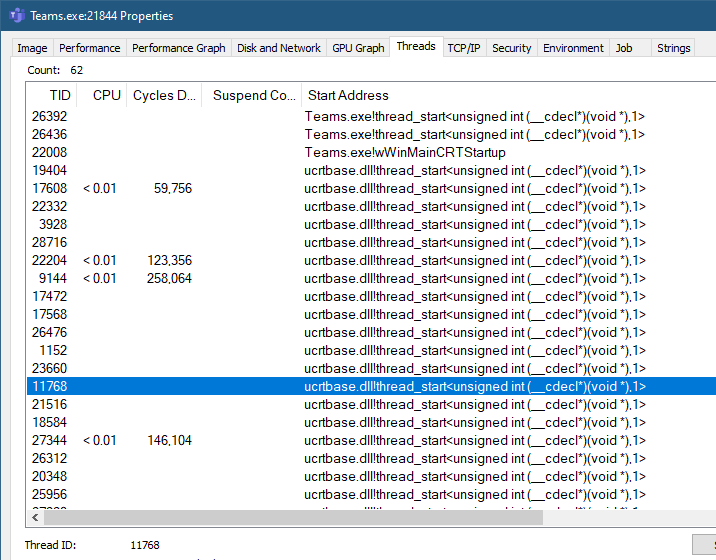
Teams threads

62 threads. Many have the same CRT wrapper for a thread created by Teams. Here are several call stacks I observed:

ntdll.dll!ZwRemoveIoCompletion+0x14
KERNELBASE.dll!GetQueuedCompletionStatus+0x4f
skypert.dll!rtnet::internal::SingleThreadIOCP::iocpLoop+0x116
skypert.dll!SplOpaqueUpperLayerThread::run+0x84
skypert.dll!auf::priv::MRMWTransport::process1+0x6c
skypert.dll!auf::ThreadPoolExecutorImp::workLoop+0x160
skypert.dll!auf::tpImpThreadTrampoline+0x47
skypert.dll!spl::threadWinDispatch+0x19
skypert.dll!spl::threadWinEntry+0x17b
ucrtbase.dll!thread_start<unsigned int (__cdecl*)(void *),1>+0x42
KERNEL32.DLL!BaseThreadInitThunk+0x14
ntdll.dll!RtlUserThreadStart+0x21
ntdll.dll!ZwWaitForAlertByThreadId+0x14
ntdll.dll!RtlSleepConditionVariableCS+0x105
KERNELBASE.dll!SleepConditionVariableCS+0x29
Teams.exe!uv_cond_wait+0x10
Teams.exe!worker+0x8d
Teams.exe!uv__thread_start+0xa2
Teams.exe!thread_start<unsigned int (__cdecl*)(void *),1>+0x50
KERNEL32.DLL!BaseThreadInitThunk+0x14
ntdll.dll!RtlUserThreadStart+0x21

You can check more threads, but you get the idea. Most threads are waiting for something – this is not the ideal activity for a thread. A thread should run (useful) code.

Last example, Word:

57 threads. Word has been minimized for more than an hour now. The clearly common call stack looks like this:

ntdll.dll!ZwWaitForAlertByThreadId+0x14
ntdll.dll!RtlSleepConditionVariableSRW+0x131
KERNELBASE.dll!SleepConditionVariableSRW+0x29
v8jsi.dll!CrashForExceptionInNonABICompliantCodeRange+0x4092f6
v8jsi.dll!CrashForExceptionInNonABICompliantCodeRange+0x11ff2
v8jsi.dll!v8_inspector::V8StackTrace::topScriptIdAsInteger+0x43ad0
ucrtbase.dll!thread_start<unsigned int (__cdecl*)(void *),1>+0x42
KERNEL32.DLL!BaseThreadInitThunk+0x14
ntdll.dll!RtlUserThreadStart+0x21

v8jsi.dll is the React Native v8 engine – it’s creating many threads, most of which are doing nothing. I found it in Outlook and PowerPoint as well.

Many applications today depend on various libraries and frameworks, some of which don’t seem to care too much about using threads economically – examples include Node.js, the Electron framework, even Java and .NET. Threads are not free – there is the ETHREAD and related data structures in the kernel, stack in kernel space, and stack in user space. Context switches and code run by the kernel scheduler when threads change states from Running to Waiting, and from Waiting to Ready are not free, either.

Many desktop/laptop systems today are very powerful and it might seem everything is fine. I don’t think so. Developers use so many layers of abstraction these days, that we sometimes forget there are actual processors that execute the code, and need to use memory and other resources. None of that is free.


Registration is open for the Windows Internals training

My schedule has been a mess in recent months, and continues to be so for the next few months. However, I am opening registration today for the Windows Internals training with some date changes from my initial plan.

Here are the dates and times (all based on London time) – 5 days total:

  • July 6: 4pm to 12am (full day)
  • July 7: 4pm to 8pm
  • July 11: 4pm to 12am (full day)
  • July 12, 13, 14, 18, 19: 4pm to 8pm

Training cost is 800 USD, if paid by an individual, or 1500 USD if paid by a company. Participants from Ukraine (please provide some proof) are welcome with a 90% discount (paying 80 USD, individual payments only).

If you’d like to register, please send me an email to zodiacon@live.com with “Windows Internals training” in the title, provide your full name, company (if any), preferred contact email, and your time zone. The basic syllabus can be found here. if you’ve sent me an email before when I posted about my upcoming classes, you don’t have to do that again – I will send full details soon.

The sessions will be recorded, so can watch any part you may be missing, or that may be somewhat overwhelming in “real time”.

As usual, if you have any questions, feel free to send me an email, or DM me on twitter (@zodiacon) or Linkedin (https://www.linkedin.com/in/pavely/).

Next Windows Internals Training

I am announcing the next 5 day Windows Internals remote training to be held in January 2022, starting on the 24th according to the followng schedule:

  • Jan 24 – 2pm to 10pm (all times are based on London time)
  • Jan 25, 26, 27 – 2pm to 6pm
  • Jan 31 – 2pm to 10pm
  • Feb 1, 2, 3 – 2pm to 6pm

The syllabus can be found here (slight changes are possible if new important topics come up).

Cost and Registration

I’m keeping the cost of these training classes relatively low. This is to make these classes accessible to more people, especially in these unusual and challenging times.

Cost: 800 USD if paid by an individual, 1500 USD if paid by a company. Multiple participants from the same company are entitled to a discount (email me for the details). Previous students of my classes are entitled to a 10% discount.

To register, send an email to zodiacon@live.com and specify “Windows Internals Training” in the title. The email should include your name, contact email, time zone, and company name (if any).

As usual, if you have any questions, feel free to send me an email, or DM me on twitter (@zodiacon) or Linkedin (https://www.linkedin.com/in/pavely/).

New Class: COM Programming

Today I’m announcing a new training – COM (Component Object Model) Programming, to be held in November.

COM is a well established technology, debuted back in 1993, and is still very much in use. In fact, the Windows Runtime is based on an enhanced version of COM. There is quite a bit of confusion and misconceptions about COM, which is one reason I decided to offer this class.

The syllabus for the 3 day class can be found here. This is the first time I will be offering this class, and also will try a new format: 6 half-days instead of 3 full days.

When: November: 8, 9, 10, 11, 15, 16. 2pm to 6pm, UT. (Technically it’s more than 3 days, as with a full day there is a lunch break not present in half days). The class will be conducted remotely using Microsoft Teams or a similar platform.

What you need to know before the class: You should be comfortable using Windows on a Power User level. Concepts such as processes, threads, DLLs, and virtual memory should be understood fairly well. You should have experience writing code in C and some C++. You don’t have to be an expert, but you must know C and basic C++ to get the most out of the class. In case you have doubts, talk to me.

Obviously, participants in my Windows Internals and (especially) Windows System Programming classes have the required knowledge for the class.

We’ll start by looking at why COM was created in the first place, and then build clients and servers, digging into various mechanisms COM provides. See the syllabus for more details.

Registration will be different than previous classes:
Early bird (paid by September 30th): 500 USD (if paid by an individual), 1100 USD (if paid by a company).
Normal (paid after September 30th): 700 USD (if paid by an individual), 1300 USD (if paid by a company).

To register, send an email to zodiacon@live.com with the title “COM Training”, and write the name(s), email(s) and time zone(s) of the participants. Multiple participants from the same company get a discount. Previous participants (individuals) of my classes get 10% off. I will reply with further instructions.

I hope to see you in November!

Processes, Threads, and Windows

The relationship between processes and threads is fairly well known – a process contains one or more threads, running within the process, using process wide resources, like handles and address space.

Where do windows (those usually-rectangular elements, not the OS) come into the picture?

The relationship between a process, its threads, and windows, along with desktop and Window Stations, can be summarized in the following figure:

A process, threads, windows, desktops and a Window Station

A window is created by a thread, and that thread is designated as the owner of the window. The creating thread becomes a UI thread (if it’s the first User/GDI call it makes), getting a message queue (provided internally by Win32k.sys in the kernel). Every occurrence in the created window causes a message to be placed in the message queue of the owner thread. This means that if a thread creates 100 windows, it’s responsible for all these windows.

“Responsible” here means that the thread must perform something known as “message pumping” – pulling messages from its message queue and processing them. Failure to do that processing would lead to the infamous “Not Responding” scenario, where all the windows created by that thread become non-responsive. Normally, a thread can read its own message queue only – other threads can’t do it for that thread – this is a single threaded UI scheme used by the Windows OS by default. The simplest message pump would look something like this:

MSG msg;
while(::GetMessage(&msg, nullptr, 0, 0)) {
    ::TranslateMessage(&msg);
    ::DispatchMessage(&msg);
}

The call to GetMessage does not return until there is a message in the queue (filling up the MSG structure), or the WM_QUIT message has been retrieved, causing GetMessage to return FALSE and the loop exited. WM_QUIT is the message typically used to signal an application to close. Here is the MSG structure definition:

typedef struct tagMSG {
  HWND   hwnd;
  UINT   message;
  WPARAM wParam;
  LPARAM lParam;
  DWORD  time;
  POINT  pt;
} MSG, *PMSG;

Once a message has been retrieved, the important call is to DispatchMessage, that looks at the window handle in the message (hwnd) and looks up the window class that this window instance is a member of, and there, finally, the window procedure – the callback to invoke for messages destined to these kinds of windows – is invoked, handling the message as appropriate or passing it along to default processing by calling DefWindowProc. (I may expand on that if there is interest in a separate post).

You can enumerate the windows owned by a thread by calling EnumThreadWindows. Let’s see an example that uses the Toolhelp API to enumerate all processes and threads in the system, and lists the windows created (owned) by each thread (if any).

We’ll start by creating a snapshot of all processes and threads (error handling mostly omitted for clarity):

#include <Windows.h>
#include <TlHelp32.h>
#include <unordered_map>
#include <string>

int main() {
	auto hSnapshot = ::CreateToolhelp32Snapshot(
        TH32CS_SNAPPROCESS | TH32CS_SNAPTHREAD, 0);

We’ll build a map of process IDs to names for easy lookup later on when we show details of a process:

PROCESSENTRY32 pe;
pe.dwSize = sizeof(pe);

// we can skip the idle process
::Process32First(hSnapshot, &pe);

std::unordered_map<DWORD, std::wstring> processes;
processes.reserve(500);

while (::Process32Next(hSnapshot, &pe)) {
	processes.insert({ pe.th32ProcessID, pe.szExeFile });
}

Now we loop through all the threads, calling EnumThreadWindows and showing the results:

THREADENTRY32 te;
te.dwSize = sizeof(te);
::Thread32First(hSnapshot, &te);

static int count = 0;

struct Data {
	DWORD Tid;
	DWORD Pid;
	PCWSTR Name;
};
do {
	if (te.th32OwnerProcessID <= 4) {
		// idle and system processes have no windows
		continue;
	}
	Data d{ 
        te.th32ThreadID, te.th32OwnerProcessID, 
        processes.at(te.th32OwnerProcessID).c_str() 
    };
	::EnumThreadWindows(te.th32ThreadID, [](auto hWnd, auto param) {
		count++;
		WCHAR text[128], className[32];
		auto data = reinterpret_cast<Data*>(param);
		int textLen = ::GetWindowText(hWnd, text, _countof(text));
		int classLen = ::GetClassName(hWnd, className, _countof(className));
		printf("TID: %6u PID: %6u (%ws) HWND: 0x%p [%ws] %ws\n",
			data->Tid, data->Pid, data->Name, hWnd,
			classLen == 0 ? L"" : className,
			textLen == 0 ? L"" : text);
		return TRUE;	// bring in the next window
		}, reinterpret_cast<LPARAM>(&d));
} while (::Thread32Next(hSnapshot, &te));
printf("Total windows: %d\n", count);

EnumThreadWindows requires the thread ID to look at, and a callback that receives a window handle and whatever was passed in as the last argument. Returning TRUE causes the callback to be invoked with the next window until the window list for that thread is complete. It’s possible to return FALSE to terminate the enumeration early.

I’m using a lambda function here, but only a non-capturing lambda can be converted to a C function pointer, so the param value is used to provide context for the lambda, with a Data instance having the thread ID, its process ID, and the process name.

The call to GetClassName returns the name of the window class, or type of window, if you will. This is similar to the relationship between objects and classes in object orientation. For example, all buttons have the class name “button”. Of course, the windows enumerated are only top level windows (have no parent) – child windows are not included. It is possible to enumerate child windows by calling EnumChildWindows.

Going the other way around – from a window handle to its owner thread and *its* owner process is possible with GetWindowThreadProcessId.

Desktops

A window is placed on a desktop, and is bound to it. More precisely, a thread is bound to a desktop once it creates its first window (or has any hook installed with SetWindowsHookEx). Before that happens, a thread can attach itself to a desktop by calling SetThreadDesktop.

Normally, a thread will use the “default” desktop, which is where a logged in user sees his or her windows appearing. It is possible to create additional desktops using the CreateDesktop API. A classic example is the desktops Sysinternals tool. See my post on desktops and windows stations for more information.

It’s possible to redirect a new process to use a different desktop (and optionally a window station) as part of the CreateProcess call. The STARTUPINFO structure has a member named lpDesktop that can be set to a string with the format “WindowStationName\DesktopName” or simply “DesktopName” to keep the parent’s window station. This could look something like this:

STARTUPINFO si = { sizeof(si) };
// WinSta0 is the interactive window station
WCHAR desktop[] = L"Winsta0\\MyOtherDesktop";
si.lpDesktop = desktop;
PROCESS_INFORMATION pi;
::CreateProcess(..., &si, &pi);

“WinSta0” is always the name of the interactive Window Station (one of its desktops can be visible to the user).

The following example creates 3 desktops and launches notepad in the default desktop and the other desktops:

void LaunchInDesktops() {
	HDESK hDesktop[4] = { ::GetThreadDesktop(::GetCurrentThreadId()) };
	for (int i = 1; i <= 3; i++) {
		hDesktop[i] = ::CreateDesktop(
			(L"Desktop" + std::to_wstring(i)).c_str(),
			nullptr, nullptr, 0, GENERIC_ALL, nullptr);
	}
	STARTUPINFO si = { sizeof(si) };
	WCHAR name[32];
	si.lpDesktop = name;
	DWORD len;
	PROCESS_INFORMATION pi;
	for (auto h : hDesktop) {
		::GetUserObjectInformation(h, UOI_NAME, name, sizeof(name), &len);
		WCHAR pname[] = L"notepad";
		if (::CreateProcess(nullptr, pname, nullptr, nullptr, FALSE,
			0, nullptr, nullptr, &si, &pi)) {
			printf("Process created: %u\n", pi.dwProcessId);
			::CloseHandle(pi.hProcess);
			::CloseHandle(pi.hThread);
		}
	}
}

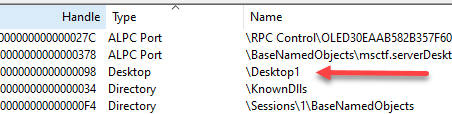
If yoy run the above function, you’ll see one Notepad window on your desktop. If you dig deeper, you’ll find 4 notepad.exe processes in Task Manager. The other three have created their windows in different desktops. Task Manager gives no indication of that, nor does the process list in Process Explorer. However, we see a hint in the list of handles of these “other” notepad processes. Here is one:

Handle named \Desktop1

Curiously enough, desktop objects are not stored as part of the kernel’s Object Manager namespace. If you double-click the handle, copy its address, and look it up in the kernel debugger, this is the result:

lkd> !object 0xFFFFAC8C12035530
Object: ffffac8c12035530  Type: (ffffac8c0f2fdbc0) Desktop
    ObjectHeader: ffffac8c12035500 (new version)
    HandleCount: 1  PointerCount: 32701
    Directory Object: 00000000  Name: Desktop1

Notice the directory object address is zero – it’s not part of any directory. It has meaning in the context of its containing Window Station.

You might think that we can use the EnumThreadWindows as demonstrated at the beginning of this post to locate the other notepad windows. Unfortunately, access is restricted and those notepad windows are not listed (more on that possibly in a future post).

We can try a different approach by using yet another enumration function – EnumDesktopWindows. Given a powerful enough desktop handle, we can enumerate all top level windows in that desktop:

void ListDesktopWindows(HDESK hDesktop) {
	::EnumDesktopWindows(hDesktop, [](auto hWnd, auto) {
		WCHAR text[128], className[32];
		int textLen = ::GetWindowText(hWnd, text, _countof(text));
		int classLen = ::GetClassName(hWnd, className, _countof(className));
		DWORD pid;
		auto tid = ::GetWindowThreadProcessId(hWnd, &pid);
		printf("TID: %6u PID: %6u HWND: 0x%p [%ws] %ws\n",
			tid, pid, hWnd, 
			classLen == 0 ? L"" : className,
			textLen == 0 ? L"" : text);
		return TRUE;
		}, 0);
}

The lambda body is very similar to the one we’ve seen earlier. The difference is that we start with a window handle with no thread ID. But it’s fairly easy to get the owner thread and process with GetWindowThreadProcessId. Here is one way to invoke this function:

auto hDesktop = ::OpenDesktop(L"Desktop1", 0, FALSE, DESKTOP_ENUMERATE);
ListDesktopWindows(hDesktop);

Here is the resulting output:

TID:   3716 PID:  23048 HWND: 0x0000000000192B26 [Touch Tooltip Window] Tooltip
TID:   3716 PID:  23048 HWND: 0x0000000001971B1A [UAC_InputIndicatorOverlayWnd]
TID:   3716 PID:  23048 HWND: 0x00000000002827F2 [UAC Input Indicator]
TID:   3716 PID:  23048 HWND: 0x0000000000142B82 [CiceroUIWndFrame] CiceroUIWndFrame
TID:   3716 PID:  23048 HWND: 0x0000000000032C7A [CiceroUIWndFrame] TF_FloatingLangBar_WndTitle
TID:  51360 PID:  23048 HWND: 0x0000000000032CD4 [Notepad] Untitled - Notepad
TID:   3716 PID:  23048 HWND: 0x0000000000032C8E [CicLoaderWndClass]
TID:  51360 PID:  23048 HWND: 0x0000000000202C62 [IME] Default IME
TID:  51360 PID:  23048 HWND: 0x0000000000032C96 [MSCTFIME UI] MSCTFIME UI

A Notepad window is clearly there. We can repeat the same exercise with the other two desktops, which I have named “Desktop2” and “Desktop3”.

Can we view and interact with these “other” notepads? The SwitchDesktop API exists for that purpose. Given a desktop handle with the DESKTOP_SWITCHDESKTOP access, SwitchDesktop changes the input desktop to the requested desktop, so that input devices redirect to that desktop. This is exactly how the Sysinternals Desktops tool works. I’ll leave the interested reader to try this out.

Window Stations

The last piece of the puzzle is a Window Station. I assume you’ve read my earlier post and understand the basics of Window Stations.

A Thread can be associated with a desktop. A process is associated with a window station, with the constraint being that any desktop used by a thread must be within the process’ window station. In other words, a process cannot use one window station and any one of its threads using a desktop that belongs to a different window station.

A process is associated with a window station upon creation – the one specified in the STARTUPINFO structure or the creator’s window station if not specified. Still, a process can associate itself with a different window station by calling SetProcessWindowStation. The constraint is that the provided window station must be part of the current session. There is one window station per session named “WinSta0”, called the interactive window station. One of its desktop can be the input desktop and have user interaction. All other window stations are non-interactive by definition, which is perfectly fine for processes that don’t require any user interface. In return, they get better isolation, because a window station contains its own set of desktops, its own clipboard and its own atom table. Windows handles, by the way, have Window Station scope.

Just like desktops, window stations can be created by calling CreateWindowStation. Window stations can be enumerated as well (in the current session) with EnumerateWindowStations.

Summary

This discussion of threads, processes, desktops, and window stations is not complete, but hopefully gives you a good idea of how things work. I may elaborate on some advanced aspects of Windows UI system in future posts.

Next Windows Kernel Programming Training

Today I’m announcing the next public remote Windows Kernel Programming training. This is a 5-day training scheduled for October: 4, 5, 7, 11, 13. Times: 12pm to 8pm, London Time.

The syllabus can be found here. It may be slightly modified by the time the class starts, but not by much. This is a development-heavy course, so be prepared to write lots of code!

Cost: 800 USD if paid by an individual, 1500 USD if paid by a company. Previous participants of the my classes get 10% discount. Multiple participants from the same company are entitled to a discount (email me for the details).

To register, send an email to zodiacon@live.com and specify “Windows Kernel Programming Training” in the title. The email should include your name, preferred email for communication, and company name (if any).

The training sessions will be recorded and provided to the participants.

Please read carefully the pre-requisites for this class. You should especially be comfortable coding in C (any C++ used in the class will be explained). In case of any doubt, talk to me.
If you have any questions, feel free to shoot me an email, or DM me on twitter (@zodiacon) or Linkedin (https://www.linkedin.com/in/pavely/).

Dynamic Symbolic Links

While teaching a Windows Internals class recently, I came across a situation which looked like a bug to me, but turned out to be something I didn’t know about – dynamic symbolic links.

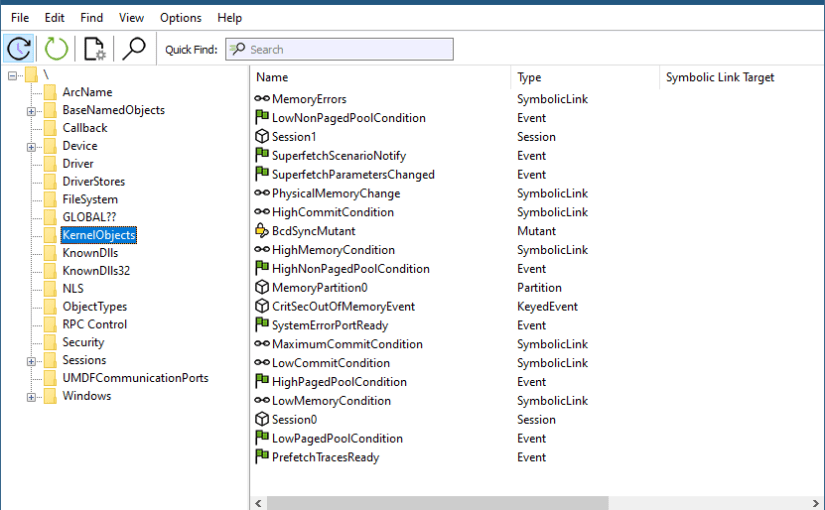
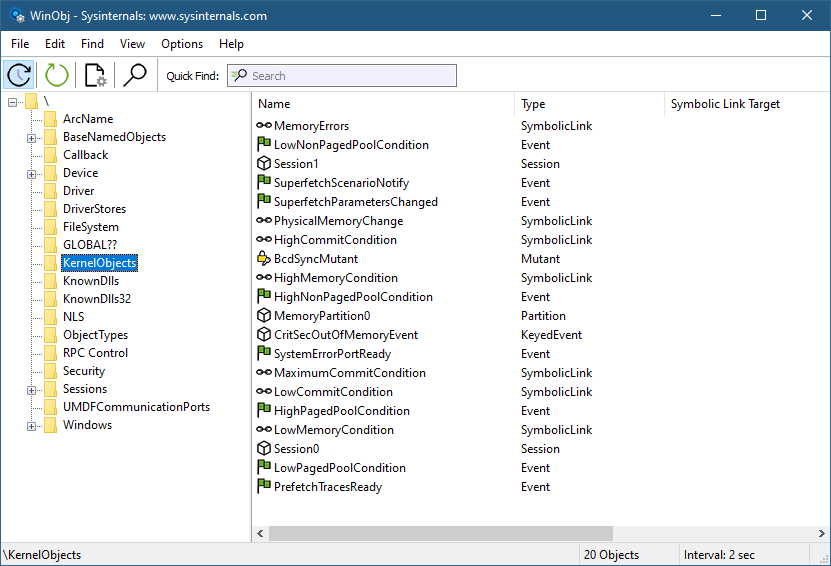
Symbolic links are Windows kernel objects that point to another object. The weird situation in question was when running WinObj from Sysinternals and navigating to the KenrelObjects object manager directory.

WinObj from Sysinternals

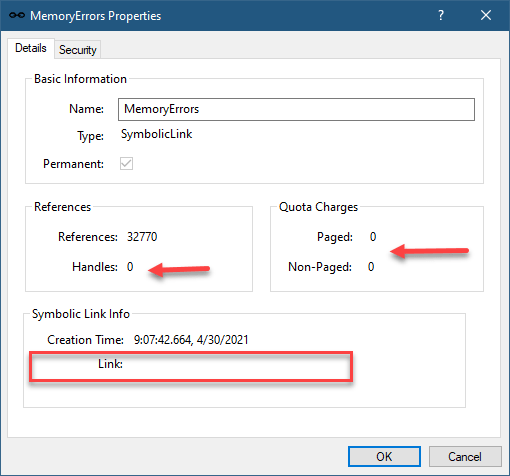
You’ll notice some symbolic link objects that look weird: MemoryErrors, PhysicalMemoryChange, HighMemoryCondition, LowMemoryCondition and a few others. The weird thing that is fairly obvious is that these symbolic link objects have empty targets. Double-clicking any one of them confirms no target, and also shows a curious zero handles, as well as quota change of zero:

Symbolic link properties

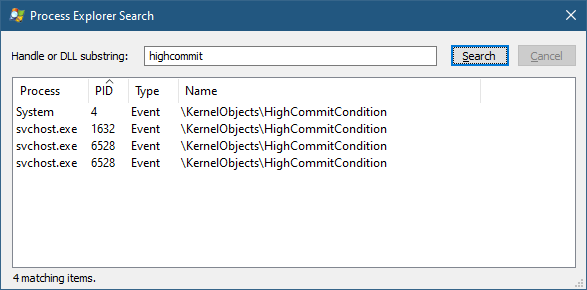
To add to the confusion, searching for any of them with Process Explorer yields something like this:

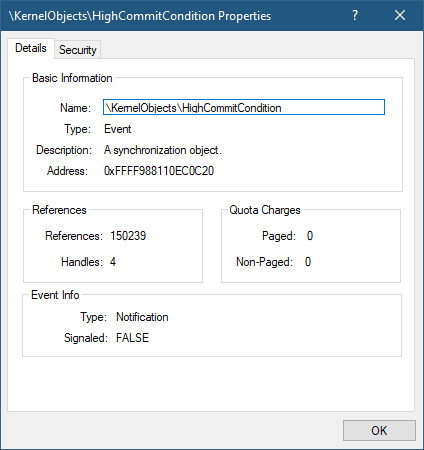
It seems these objects are events, and not symbolic links!

My first instinct was that there is a bug in WinObj (I rewrote it recently for Sysinternals, so was certain I introduced a bug). I ran an old WinObj version, but the result was the same. I tried other tools with similar functionality, and still got the same results. Maybe a bug in Process Explorer? Let’s see in the kernel debugger:

lkd> !object 0xFFFF988110EC0C20
Object: ffff988110ec0c20  Type: (ffff988110efb400) Event
    ObjectHeader: ffff988110ec0bf0 (new version)
    HandleCount: 4  PointerCount: 117418
    Directory Object: ffff828b10689530  Name: HighCommitCondition

Definitely an event and not a symbolic link. What’s going on? I debugged it in WinObj, and indeed the reported object type is a symbolic link. Maybe it’s a bug in the NtQueryDirectoryObject used to query a directory object for an object.

I asked Mark Russinovich, could there be a bug in Windows? Mark remembered that this is not a bug, but a feature of symbolic links, where objects can be created/resolved dynamically when accessing the symbolic link. Let’s see if we can see something in the debugger:

lkd> !object \kernelobjects\highmemorycondition
Object: ffff828b10659510  Type: (ffff988110e9ba60) SymbolicLink
    ObjectHeader: ffff828b106594e0 (new version)
    HandleCount: 0  PointerCount: 1
    Directory Object: ffff828b10656ce0  Name: HighMemoryCondition
    Flags: 0x000010 ( Local )
    Target String is '*** target string unavailable ***'

Clearly, there is target, but notice the flags value 0x10. This is the flag indicating the symbolic link is a dynamic one. To get further information, we need to look at the object with a “symbolic link lenses” by using the data structure the kernel uses to represent symbolic links:

lkd> dt nt!_OBJECT_SYMBOLIC_LINK ffff828b10659510

   +0x000 CreationTime     : _LARGE_INTEGER 0x01d73d87`21bd21e5
   +0x008 LinkTarget       : _UNICODE_STRING "--- memory read error at address 0x00000000`00000005 ---"
   +0x008 Callback         : 0xfffff802`08512250     long  nt!MiResolveMemoryEvent+0

   +0x010 CallbackContext  : 0x00000000`00000005 Void
   +0x018 DosDeviceDriveIndex : 0
   +0x01c Flags            : 0x10
   +0x020 AccessMask       : 0x24

The Callback member shows the function that is being called (MiResolveMemoryEvent) that “resolves” the symbolic link to the relevant event. There are currently 11 such events, their names visible with the following:

lkd> dx (nt!_UNICODE_STRING*)&nt!MiMemoryEventNames,11
(nt!_UNICODE_STRING*)&nt!MiMemoryEventNames,11                 : 0xfffff80207e02e90 [Type: _UNICODE_STRING *]
    [0]              : "\KernelObjects\LowPagedPoolCondition" [Type: _UNICODE_STRING]
    [1]              : "\KernelObjects\HighPagedPoolCondition" [Type: _UNICODE_STRING]
    [2]              : "\KernelObjects\LowNonPagedPoolCondition" [Type: _UNICODE_STRING]
    [3]              : "\KernelObjects\HighNonPagedPoolCondition" [Type: _UNICODE_STRING]
    [4]              : "\KernelObjects\LowMemoryCondition" [Type: _UNICODE_STRING]
    [5]              : "\KernelObjects\HighMemoryCondition" [Type: _UNICODE_STRING]
    [6]              : "\KernelObjects\LowCommitCondition" [Type: _UNICODE_STRING]
    [7]              : "\KernelObjects\HighCommitCondition" [Type: _UNICODE_STRING]
    [8]              : "\KernelObjects\MaximumCommitCondition" [Type: _UNICODE_STRING]
    [9]              : "\KernelObjects\MemoryErrors" [Type: _UNICODE_STRING]
    [10]             : "\KernelObjects\PhysicalMemoryChange" [Type: _UNICODE_STRING]

Creating dynamic symbolic links is only possible from kernel mode, of course, and is undocumented anyway.

At least the conundrum is solved.

Next Public Windows Internals training

I am announcing the next Windows Internals remote training to be held in July 2021 on the 12, 14, 15, 19, 21. Times: 11am to 7pm, London time.

The syllabus can be found here (slight changes are possible if new important topics come up).

Cost and Registration

I’m keeping the cost of these training classes relatively low. This is to make these classes accessible to more people, especially in these unusual and challenging times.

Cost: 800 USD if paid by an individual, 1500 USD if paid by a company. Multiple participants from the same company are entitled to a discount (email me for the details). Previous students of my classes are entitled to a 10% discount.

To register, send an email to zodiacon@live.com and specify “Windows Internals Training” in the title. The email should include your name, contact email, and company name (if any).

Later this year I plan a Windows Kernel Programming class. Stay tuned!

As usual, if you have any questions, feel free to send me an email, or DM me on twitter (@zodiacon) or Linkedin (https://www.linkedin.com/in/pavely/).

Parent Process vs. Creator Process

Normally, a process created by another process in Windows establishes a parent-child relationship between them. This relationship can be viewed in tools such as Process Explorer. Here is an example showing FoxitReader as a child process of Explorer, implying Explorer created FoxitReader. That must be the case, right?

First, it’s important to emphasize that there is no dependency between a child and a parent process in any way. For example, if the parent process terminates, the child is unaffected. The parent is used for inheriting many properties of the child process, such as current directory and environment variables (if not specified explicitly).

Windows stores the parent process ID in the process management object of the child in the kernel for posterity. This also means that the process ID, although correct, could point to a “wrong” process. This can happen if the parent dies, and the process ID is reused.

Process Explorer does not get confused in such a case, and left-justifies the process in its tree view. It knows to check the process creation time. If the “parent” was created after the child, there is no way it could be the real parent. The parent process ID can still be viewed in the process properties:

Notice the “<Non-existent Parent>” indication. Although the parent process ID is known (13636 in this case), there is no other information on that process, as it does not exist anymore, and its ID may or may not have been reused.

By the way, don’t be alarmed that Explorer has no living parent. This is expected, as it’s normally created by a process running the image UserInit.exe, that exits normally after finishing its duties.

Returning to the question raised earlier – is the parent process always the actual creator? Not necessarily.

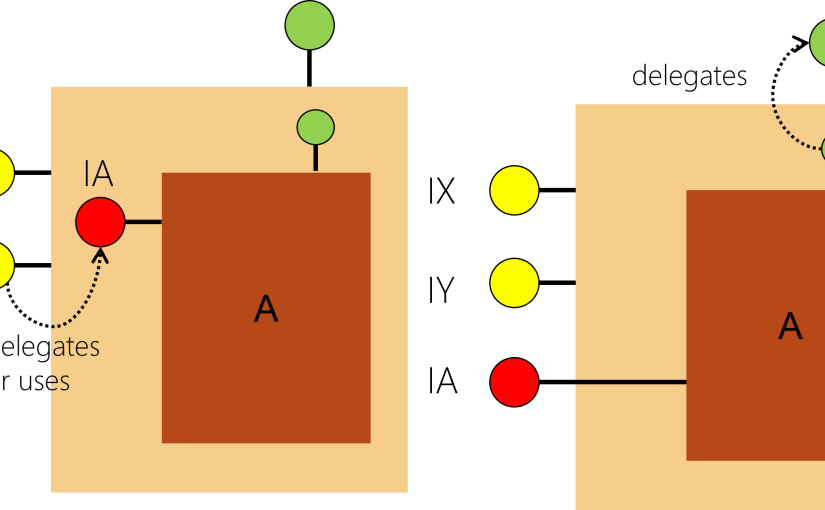
The canonical example is when a process is launched elevated (for example, by right-clicking it in Explorer and selecting “Run as Administrator”. Here is a diagram showing the major components in an elevation procedure:

First, the user right-clicks in Explorer and asks to run some App.Exe elevated. Explorer calls ShellExecute(Ex) with the verb “runas” that requests this elevation. Next, The AppInfo service is contacted to perform the operation if possible. It launches consent.exe, which shows the Yes/No message box (for true administrators) or a username/password dialog to get an admin’s approval for the elevation. Assuming this is granted, the AppInfo service calls CreateProcessAsUser to launch the App.exe elevated. To maintain the illusion that Explorer created App.exe, it stores the parent ID of Explorer into App.exe‘s new process management block. This makes it look as if Explorer had created App.exe, but is not really what happened. However, that “re-parenting” is probably a good idea in this case, giving the user the expected result.

Is it possible to specify a different parent when creating a process with CreateProcess?

It is indeed possible by using a process attribute. Here is a function that does just that (with minimal error handling):

bool CreateProcessWithParent(DWORD parentId, PWSTR commandline) {
    auto hProcess = ::OpenProcess(PROCESS_CREATE_PROCESS, FALSE, parentId);
    if (!hProcess)
        return false;

    SIZE_T size;
    //
    // call InitializeProcThreadAttributeList twice
    // first, get required size
    //
    ::InitializeProcThreadAttributeList(nullptr, 1, 0, &size);

    //
    // now allocate a buffer with the required size and call again
    //
    auto buffer = std::make_unique<BYTE[]>(size);
    auto attributes = reinterpret_cast<PPROC_THREAD_ATTRIBUTE_LIST>(buffer.get());
    ::InitializeProcThreadAttributeList(attributes, 1, 0, &size);

    //
    // add the parent attribute
    //
    ::UpdateProcThreadAttribute(attributes, 0, 
        PROC_THREAD_ATTRIBUTE_PARENT_PROCESS, 
        &hProcess, sizeof(hProcess), nullptr, nullptr);

    STARTUPINFOEX si = { sizeof(si) };
    //
    // set the attribute list
    //
    si.lpAttributeList = attributes;
    PROCESS_INFORMATION pi;

    //
    // create the process
    //
    BOOL created = ::CreateProcess(nullptr, commandline, nullptr, nullptr, 
        FALSE, EXTENDED_STARTUPINFO_PRESENT, nullptr, nullptr, 
        (STARTUPINFO*)&si, &pi);

    //
    // cleanup
    //
    ::CloseHandle(hProcess);
    ::DeleteProcThreadAttributeList(attributes);

    return created;
}

The first step is to open a handle to the “prospected” parent by calling OpenProcess with the PROCESS_CREATE_PROCESS access mask. This means you cannot choose an arbitrary process, you must have at least that access to the process. Protected (and protected light) processes, for example, cannot be used as parents in this way, as PROCESS_CREATE_PROCESS cannot be obtained for such processes.

Next, an attribute list is created with a single attribute of type PROC_THREAD_ATTRIBUTE_PARENT_PROCESS by calling InitializeProcThreadAttributeList followed by UpdateProcThreadAttribute to set up the parent handle. Finally, CreateProcess is called with the extended STARTUPINFOEX structure where the attribute list is stored. CreateProcess must know about the extended version by specifying EXTENDED_STARTUPINFO_PRESENT in its flags argument.

Here is an example where Excel supposedly created Notepad (it really didn’t). The “real” process creator is nowhere to be found.

The obvious question perhaps is whether there is any way to know which process was the real creator?

The only way that seems to be available is for kernel drivers that register for process creation notifications with PsSetCreateProcessNotifyRoutineEx (or one of its variants). When such a notification is invoked in the driver, the following structure is provided:

typedef struct _PS_CREATE_NOTIFY_INFO {
  SIZE_T              Size;
  union {
    ULONG Flags;
    struct {
      ULONG FileOpenNameAvailable : 1;
      ULONG IsSubsystemProcess : 1;
      ULONG Reserved : 30;
    };
  };
  HANDLE              ParentProcessId;
  CLIENT_ID           CreatingThreadId;
  struct _FILE_OBJECT *FileObject;
  PCUNICODE_STRING    ImageFileName;
  PCUNICODE_STRING    CommandLine;
  NTSTATUS            CreationStatus;
} PS_CREATE_NOTIFY_INFO, *PPS_CREATE_NOTIFY_INFO;

On the one hand, there is the ParentProcessId member (although it’s typed as HANDLE, it actually the parent process ID). This is the parent process as set by CreateProcess based on the code snippet in CreateProcessWithParent.

However, there is also the CreatingThreadId member of type CLIENT_ID, which is a small structure containing a process and thread IDs. This is the real creator. In most cases it’s going to have the same process ID as ParentProcessId, but not in the case where a different parent has been specified.

After this point, that information goes away, leaving only the parent ID, as it’s the one stored in the EPROCESS kernel structure of the child process.

Update: (thanks to @jdu2600)

The creator is available by listening to the process create ETW event, where the creator is the one raising the event. Here is a snapshot from my own ProcMonXv2:

Next Public (Remote) Training Classes

I am announcing the next Windows Internals remote training to be held in January 2021 on the 19, 21, 25, 27, 28. Times: 11am to 7pm, London time.

The syllabus can be found here.

I am also announcing a new training, requested by quite a few people, Windows System Programming. The dates are in February 2021: 8, 9, 11, 15, 17. Times: 12pm to 8pm, London time.

The syllabus can be found here.

Cost and Registration

I’m keeping the cost of these training classes relatively low. This is to make these classes accessible to more people, especially in these challenging times. If you register for both classes, you get 10% off the second class. Previous students of my classes get 10% off as well.

Cost: 750 USD if paid by an individual, 1500 USD if paid by a company. Multiple participants from the same company are entitled to a discount (email me for the details).

To register, send an email to zodiacon@live.com and specify “Training” in the title. The email should include the training(s) you’re interested in, your name, contact email, company name (if any) and preferred time zone. The training times have already been selected, but it’s still good to know which time zone you live in.

As usual, if you have any questions, feel free to shoot me an email, or DM me on twitter (@zodiacon) or Linkedin (https://www.linkedin.com/in/pavely/).