Mandelbrot Set – Rust Edition

It’s been a long while since I wrote a blog post. For one thing, “normal” work got in the way. As for community contributions – it has been redirected lately to Youtube videos. Usually it takes less time to record a video than it is to write a post. But posts allow for more details and nuances…

One of my pet peeves is the Mandelbrot Set – it keeps fascinating me, which led me to write a Mandelbrot viewer of sorts for some technologies/languages I am familiar with (C++, C++ AMP, C#/WPF, C#/UWP, …). I recently realized I failed to do so with Rust, my favorite language these days. This post will attempt to right that wrong.

This post assumes the reader has a basic understanding of Rust, although I’ll try to explain anything that looks complicated.

Creating a New Project

Creating a new project for the Mandelbrot Set is no different than any other Rust project:

cargo new mandelbrot

Then we go into the newly created mandelbrot directory and start some IDE from there. The most common (probably) IDE Rust devs use is Visual Studio Code with the rust-analyzer extension that does much of the heavy lifting. This works well enough, but recently I decided to switch to JetBrains RustRover, which is dedicated to Rust, and is not generic like VSCode. RustRover is free for personal use, and I prefer it over VSCode, but YMMV.

Open the directory with VSCode, RustRover, or any other IDE/editor you prefer.

Building the Mandelbrot Set

Building the Mandelbrot Set itself has little to with how its represented, so we can start with that. We need support for complex numbers, so we’ll add the num-complex crate to cargo.toml:

[dependencies]
num-complex = "0.4.6"

We’re going to work with f64 types for the complex numbers, so we can define a simpler type going forward (in main.rs):

type Complex = num_complex::Complex<f64>;

We’ll write a function that has a loop for a given iterations, and a point to check whether it belongs to the set or not, and it will return a loop index as soon as the point is determined not to be part of the set. If after all iterations, it seems it is part of the set, then the number of iterations is returned (which is the highest). This could look like this:

fn mandelbrot_color(c: &Complex, upper: u32) -> u32 {
    let mut z = Complex::ZERO;
    for i in 0..=upper {
        z = z * z + c;
        if z.norm_sqr() > 4.0 {
            return i
        }
    }
    upper
}

(Unfortunately, this WordPress client has no syntax highlighting support for Rust, so I chose C++ as the next best thing. Shame!)

The function is somewhat misnamed, as it’s not returning any color – it’s returning an index, which can be used to represent a color, as we shall see.

The function takes a Complex number and an upper limit for iterations. The Mandelbrot sequence is calculated (z multiplied by itself, added to c, becoming the new z). If its magnitude squared is greater than 4, it’s diverging, so it’s not part of the set. Its “speed” of divergence is indicated by the returned value.

At some point, we must decide how to represent the pixels we’ll eventually display. One obvious choice is a matrix of pixels, each 32-bit in size, comprising of a Red, Green, Blue, and Alpha components, each with a value between 0 and 255. Let’s go with that.

mandelbrot_color works on a single point, so we need to iterate over a matrix of pixels, and the range in the complex plane where the points to calculate reside. The function named mandelbrot is responsible for that. It takes the aforementioned parameters and in addition it takes the matrix data to modify:

fn mandelbrot(data: &mut [[u8; 4]], from: &Complex, to: &Complex, width: u32, height: u32) {
    for y in 0..height {
        for x in 0..width {
            let c = Complex::new(
                from.re + (to.re - from.re) * x as f64 / width as f64,
                from.im + (to.im - from.im) * y as f64 / height as f64,
            );
            let iter = mandelbrot_color(&c, 255);
            let index = (y * width + x) as usize;
            data[index] = [ 255 - iter as u8, 255 - iter as u8, 255 - iter as u8, 255];
        }
    }
}

The first parameter type looks complex (no pun intended), but it’s a mutable reference to a slice to an array of 4-bytes. Of course, we must ensure that the number of elements in the slice is correct, otherwise the program will panic if we go beyond the slice size. The other parameters consist of the “top left” and “bottom right” corners of the complex plane to go over, and the width and height representing the number of pixels we have to work with.

Next, we start a 2D loop that goes over all pixels. For each one, it calculates the value of c by linearly interpolating in the x and y dimensions (or real and imaginary if you prefer). Then the call is made to mandelbrot_color with the value of the point calculated (c) and an upper limit of 255. This is makes it easy to use the return value directly as a color component. In this first attempt, the code just set the value directly to the RGB components, making it a shade of gray. The alpha component is set to 255, so the color is opaque. The pixel index is calculated (index) and the 4-byte array is assigned. Notice how elegant it is – no need for C-style memcpy or something like that. The actual color values are inverted, so that if the point belongs to the set it’s black, and if it “runs away” quickly, it gravitates towards white. Of course, the reverse would also work, but the “classic” selection is to have points in the set in black.

Drawing the Set

It’s time to show something on the screen. How would we plot all the pixels with their (grayscale for now) colors? I could do something Windows-specific, maybe some interop with the Windows GDI and such. This is certainly possible, but why not take advantage of the cross-platform nature of Rust. There are many crates that can do graphics that are cross-platform, supporting at least Windows, Linux and MacOS.

There are many options here, but I decided to go with a (relatively) simple one, a crate called macroquad (which is open source of course). This library can be used to create games, but in this program we’ll use some of the basics needed to display a bitmap. Here is the updated dependencies in cargo.toml:

[dependencies]
macroquad = "0.4.14"
num-complex = "0.4.6"

We’ll add a couple of use statements to make coding less verbose:

use macroquad::prelude::*;
use macroquad::miniquad::window;

Here is the general layout of the main function when using macroquad:

#[macroquad::main("Mandelbrot")]
async fn main() {
   // init
    loop {
        // draw, handle input, ...
        next_frame().await
    }
}

This is certainly an unusual main, even by Rust standards. The main function is async, which normally isn’t allowed (because any call to await needs to return to some runtime, but there is no “returning” from main to anywhere but the OS). To make this compile (and work), macroquad provides a macro (macroquad::main) that provides the “magic”. Going into that in detail is beyond the scope of this post. Rust developers that are familiar with the tokio crate that provides a generic runtime for async/await have seen this pattern – tokio has its own “magical” macro that allows main to be async.

The point of all this is to allow calling next_frame().await that essentially waits for the vertical retrace of the monitor, keeping a steady frequency based on the monitor’s current frequency. That’s all we need to know – this loop runs 60 times per second or whatever the monitor’s frequency happens to be. Our job is to do the drawing and any other logic before “presenting” the next frame. Those familiar with concepts like double-buffering, graphic pipeline, etc. – it’s all there somewhere, but hidden from direct access for simplicty, certainly more than enough for our purposes.

Let’s begin by doing the initialization. We’ll try to keep the code as simple as possible, even if that means certain repetition. The interested reader is welcome to improve the code! Here is the first part of the initialization:

let (mut width, mut height) = window::screen_size();

let mut from = Complex::new(-1.7, -1.3);
let mut to = Complex::new(1.0, 1.3);

let mut image = Image::gen_image_color(width as u16, height as u16, BLACK);
let mut bmp = Texture2D::from_image(&image);

We start by defining width and height that hold the current window size. The window struct is provided by macroquad. Part of its simplicity is that there is just one window, so the “methods” on window are associated functions (“static” functions for you C++/C#/Java people). screen_size, despite the name, returns the window size, which can be changed by the user by dragging in the usual way, so we may need to update these variables, which is why they are declared as mutable.

Next, we initialize from and to to give a good visual of the entire Mandelbrot set. The user will be able to zoom in by selecting a rectangle with the mouse, so there variable will change as well.

Now we need that array of pixels – the Image struct (from macroquad) manages such a buffer – we create it with the get_image_color helper that fills everything with black (BLACK is a const color provided by macroquad, and is imported by the use macroquad::prelude::*. Lastly, we need an actual texture that a GPU can draw, so we create one from the bits stored in the image. Both image and bmp are mutable, because of the possibility of window size changes, as we’ll see.

The second part of the initialization consists of activating the mandelbrot function to calculate the initial image, so we have something to show when we enter the loop:

mandelbrot(image.get_image_data_mut(), &from, &to, width as u32, height as u32);
bmp.update(&image);

We call mandelbrot with the current values of from, to, width and height. The only tricky part is getting a mutable reference to the internal array stored in the image object – this is the job of get_image_data_mut. It provides the exact [[u8;4]] required by mandelbrot. The texture’s update method takes in the updated pixels.

There a few more initializations we’ll need, we’ll these later. Now, we can enter the loop, and at the very least draw the current state of the texture:

loop {
    let params = DrawTextureParams {
        dest_size: Some(Vec2::new(width,height)),
        ..Default::default()
    };
    draw_texture_ex(&bmp, 0.0, 0.0, WHITE, params);

    next_frame().await
}

Normally, we could call draw_texture to draw the texture, and that would work well before the user resize the window. However, if the window is resized, the texture would either not fill the entire window or be cut off. To deal with that, we can use the extended version that requires a DrawTextureParams struct, that has some customization options, one of which is the destination size (dest_size) that we set to the current width and height. You may be wondering what is the strange syntax with that “default” stuff. In Rust, creating a struct instance (object) manually (that is, with no “constructor” associated function to help) requires initializing all members. This is what the structure looks like (press F12 in VSCode ot RustRover to navigate to the definition):

#[derive(Debug, Clone)]
pub struct DrawTextureParams {
    pub dest_size: Option<Vec2>,
    pub source: Option<Rect>,
    pub rotation: f32,
    pub flip_x: bool,
    pub flip_y: bool,
    pub pivot: Option<Vec2>,
}

I have removed the comments that describe each member so we can focus on the essentials. The idea is that we want to change dest_size but take all the other members with their defaults. But how do we know what these defaults are? We can guess from the documentation/comments, but it would be nicer if we could get all defaults except what we care about. This is exactly what ..Default::default() means. To be more precise, this compiles because DrawTextureParams implements the Default trait (interface):

impl Default for DrawTextureParams {
    fn default() -> DrawTextureParams {
        DrawTextureParams {
            dest_size: None,
            source: None,
            rotation: 0.,
            pivot: None,
            flip_x: false,
            flip_y: false,
        }
    }
}

This is pretty much standard Rust – structs can implement this trait to make it easy to work with members directly, but still be able to use default values.

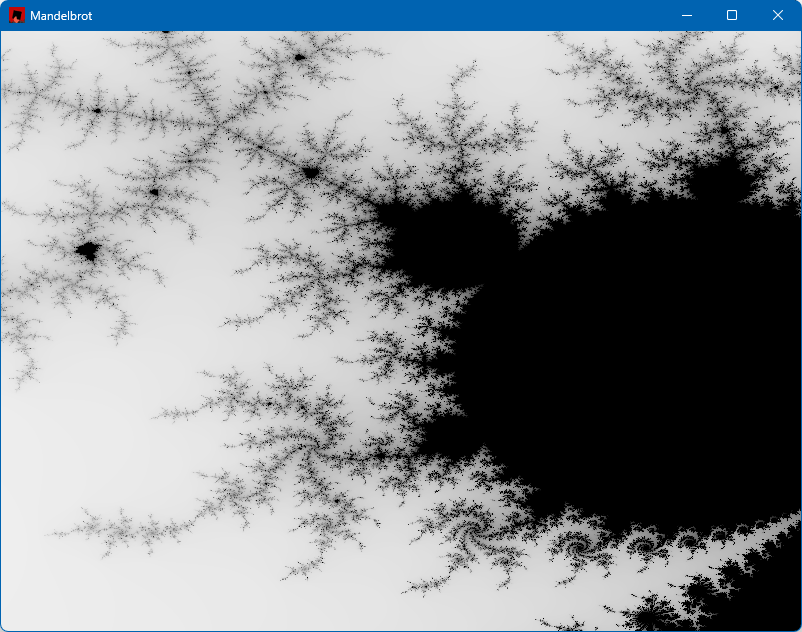
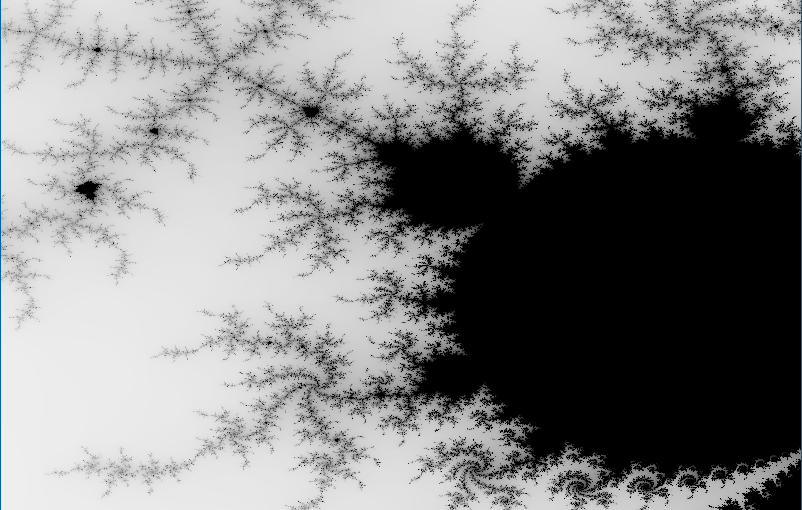
Back to draw_texture_ex: it accepts the texture to draw (on the window), the coordinates to start at (0,0), a tint color (white means no tint, try it with other values like RED or BLUE), and the last argument is our modified params. Running the application as is should show something like this:

Handling Input

So far, so good. The next step is to allow the user to drag a rectangular area to zoom into. For that we need to capture mouse input, and draw a thin rectangle. We can track whether the left mouse button is being held with a simple boolean (selecting), initialized to false in the initialization part.

For mouse input, we get convenient functions from macroquad. First, a mouse down check:

if !selecting && is_mouse_button_down(MouseButton::Left) {
     selecting = true;
     tl = Vec2::from(mouse_position());
}

If the left mouse button is down, we flip selecting and set the initial point (beginning of the drag operation) in a variable named tl (“top left”), which is of type Vec2 (provided by macroquad), which is a simple (x,y) holder. If the left mouse button is released, we need to zoom into that rectangle by calculating the new from and to and activating mandelbrot:

else if selecting && is_mouse_button_released(MouseButton::Left) {
    selecting = false;
    let br = Vec2::from(mouse_position());
    let size = to - from;
    from = Complex::new(
        from.re + tl.x as f64 * size.re / width as f64,
        from.im + tl.y as f64 * size.im / height as f64,
    );
    to = Complex::new(
        from.re + size.im * (br.x - tl.x) as f64 / width as f64,
        from.im + size.im * (br.y - tl.y) as f64 / height as f64,
    );
    mandelbrot(image.get_image_data_mut(), &from, &to, width as u32, height as u32);
    bmp.update(&image);
}

The required calculations are not complex (pun intended), middle-school level math. br (“bottom right”) keeps track of the current mouse position. Then we call mandelbrot and update the texture.

To show the selection rectangle while the user is dragging, we can draw it every frame in a natural way:

if selecting {
    let br = Vec2::from(mouse_position());
    draw_rectangle_lines(tl.x, tl.y, br.x - tl.x, br.y - tl.y, 2.0, RED);
}

The draw_rectangle_lines is used to draw a non-filled rectangle (draw_rectangle always fills it), which a thickness of 2.0 and a red color.

With this code in place, we can zoom in, here are a couple of examples:

Finishing Touches

We still don’t handle window resize. We can use a simple boolean to keep track of resize happening in a frame (size_changed). We can test in the loop if the size has changed:

let size = window::screen_size();
if size != (width as f32, height as f32) {
    // new window size
    size_changed = true;
}
(width, height) = window::screen_size();

width and height are updated with the current size regardless, so that the texture is drawn correctly. But we also want the image to match the window size. We do that inside the check for a left mouse release where we need to call mandelbrot again so we may as well update the texture appropriately:

if size_changed {
    image = Image::gen_image_color(width as u16, height as u16, BLACK);
    bmp = Texture2D::from_image(&image);
    size_changed = false;
}
mandelbrot(image.get_image_data_mut(), &from, &to, width as u32, height as u32);
bmp.update(&image);

The last two lines have not changed. The image is rebuilt if a new window size is selected.

Lastly, we need some way to reset the set to its original coordinates, if we want to zoom into other areas in the image. We could add a button, but for this example I just added a right-click that resets the values:

if is_mouse_button_pressed(MouseButton::Right) {
    from = Complex::new(-1.7, -1.3);
    to = Complex::new(1.0, 1.3);
    mandelbrot(image.get_image_data_mut(), &from, &to, width as u32, height as u32);
    bmp.update(&image);
}

What’s Next?

Are we done? Not really. Two things I’d like to add:

  • Make the Mandelbrot calculation faster. Right now it’s a single thread, we can do better.
  • Make the image colorful, not just grayscale.

We’ll deal with these items in future posts.

The full code can be found here:

Writing a Simple Driver in Rust

The Rust language ecosystem is growing each day, its popularity increasing, and with good reason. It’s the only mainstream language that provides memory and concurrency safety at compile time, with a powerful and rich build system (cargo), and a growing number of packages (crates).

My daily driver is still C++, as most of my work is about low-level system and kernel programming, where the Windows C and COM APIs are easy to consume. Rust is a system programming language, however, which means it plays, or at least can play, in the same playground as C/C++. The main snag is the verbosity required when converting C types to Rust. This “verbosity” can be alleviated with appropriate wrappers and macros. I decided to try writing a simple WDM driver that is not useless – it’s a Rust version of the “Booster” driver I demonstrate in my book (Windows Kernel Programming), that allows changing the priority of any thread to any value.

Getting Started

To prepare for building drivers, consult Windows Drivers-rs, but basically you should have a WDK installation (either normal or the EWDK). Also, the docs require installing LLVM, to gain access to the Clang compiler. I am going to assume you have these installed if you’d like to try the following yourself.

We can start by creating a new Rust library project (as a driver is a technically a DLL loaded into kernel space):

cargo new --lib booster

We can open the booster folder in VS Code, and begin are coding. First, there are some preparations to do in order for actual code to compile and link successfully. We need a build.rs file to tell cargo to link statically to the CRT. Add a build.rs file to the root booster folder, with the following code:

fn main() -> Result<(), wdk_build::ConfigError> {
    std::env::set_var("CARGO_CFG_TARGET_FEATURE", "crt-static");
    wdk_build::configure_wdk_binary_build()
}

(Syntax highlighting is imperfect because the WordPress editor I use does not support syntax highlighting for Rust)

Next, we need to edit cargo.toml and add all kinds of dependencies. The following is the minimum I could get away with:

[package]
name = "booster"
version = "0.1.0"
edition = "2021"

[package.metadata.wdk.driver-model]
driver-type = "WDM"

[lib]
crate-type = ["cdylib"]
test = false

[build-dependencies]
wdk-build = "0.3.0"

[dependencies]
wdk = "0.3.0"       
wdk-macros = "0.3.0"
wdk-alloc = "0.3.0" 
wdk-panic = "0.3.0" 
wdk-sys = "0.3.0"   

[features]
default = []
nightly = ["wdk/nightly", "wdk-sys/nightly"]

[profile.dev]
panic = "abort"
lto = true

[profile.release]
panic = "abort"
lto = true

The important parts are the WDK crates dependencies. It’s time to get to the actual code in lib.rs.

The Code

We start by removing the standard library, as it does not exist in the kernel:

#![no_std]

Next, we’ll add a few use statements to make the code less verbose:

use core::ffi::c_void;
use core::ptr::null_mut;
use alloc::vec::Vec;
use alloc::{slice, string::String};
use wdk::*;
use wdk_alloc::WdkAllocator;
use wdk_sys::ntddk::*;
use wdk_sys::*;

The wdk_sys crate provides the low level interop kernel functions. the wdk crate provides higher-level wrappers. alloc::vec::Vec is an interesting one. Since we can’t use the standard library, you would think the types like std::vec::Vec<> are not available, and technically that’s correct. However, Vec is actually defined in a lower level module named alloc::vec, that can be used outside the standard library. This works because the only requirement for Vec is to have a way to allocate and deallocate memory. Rust exposes this aspect through a global allocator object, that anyone can provide. Since we have no standard library, there is no global allocator, so one must be provided. Then, Vec (and String) can work normally:

#[global_allocator]
static GLOBAL_ALLOCATOR: WdkAllocator = WdkAllocator;

This is the global allocator provided by the WDK crates, that use ExAllocatePool2 and ExFreePool to manage allocations, just like would do manually.

Next, we add two extern crates to get the support for the allocator and a panic handler – another thing that must be provided since the standard library is not included. Cargo.toml has a setting to abort the driver (crash the system) if any code panics:

extern crate wdk_panic;
extern crate alloc;

Now it’s time to write the actual code. We start with DriverEntry, the entry point to any Windows kernel driver:

#[export_name = "DriverEntry"]
pub unsafe extern "system" fn driver_entry(
    driver: &mut DRIVER_OBJECT,
    registry_path: PUNICODE_STRING,
) -> NTSTATUS {

Those familiar with kernel drivers will recognize the function signature (kind of). The function name is driver_entry to conform to the snake_case Rust naming convention for functions, but since the linker looks for DriverEntry, we decorate the function with the export_name attribute. You could use DriverEntry and just ignore or disable the compiler’s warning, if you prefer.

We can use the familiar println! macro, that was reimplemented by calling DbgPrint, as you would if you were using C/C++. You can still call DbgPrint, mind you, but println! is just easier:

println!("DriverEntry from Rust! {:p}", &driver);
let registry_path = unicode_to_string(registry_path);
println!("Registry Path: {}", registry_path);

Unfortunately, it seems println! does not yet support a UNICODE_STRING, so we can write a function named unicode_to_string to convert a UNICODE_STRING to a normal Rust string:

fn unicode_to_string(str: PCUNICODE_STRING) -> String {
    String::from_utf16_lossy(unsafe {
        slice::from_raw_parts((*str).Buffer, (*str).Length as usize / 2)
    })
}

Back in DriverEntry, our next order of business is to create a device object with the name “\Device\Booster”:

let mut dev = null_mut();
let mut dev_name = UNICODE_STRING::default();
string_to_ustring("\\Device\\Booster", &mut dev_name);

let status = IoCreateDevice(
    driver,
    0,
    &mut dev_name,
    FILE_DEVICE_UNKNOWN,
    0,
    0u8,
    &mut dev,
);

The string_to_ustring function converts a Rust string to a UNICODE_STRING:

fn string_to_ustring(s: &str, uc: &mut UNICODE_STRING) -> Vec<u16> {
    let mut wstring: Vec<_> = s.encode_utf16().collect();
    uc.Length = wstring.len() as u16 * 2;
    uc.MaximumLength = wstring.len() as u16 * 2;
    uc.Buffer = wstring.as_mut_ptr();
    wstring
}

This may look more complex than we would like, but think of this as a function that is written once, and then just used all over the place. In fact, maybe there is such a function already, and just didn’t look hard enough. But it will do for this driver.

If device creation fails, we return a failure status:

if !nt_success(status) {
    println!("Error creating device 0x{:X}", status);
    return status;
}

nt_success is similar to the NT_SUCCESS macro provided by the WDK headers.

Next, we’ll create a symbolic link so that a standard CreateFile call could open a handle to our device:

let mut sym_name = UNICODE_STRING::default();
let _ = string_to_ustring("\\??\\Booster", &mut sym_name);
let status = IoCreateSymbolicLink(&mut sym_name, &mut dev_name);
if !nt_success(status) {
    println!("Error creating symbolic link 0x{:X}", status);
    IoDeleteDevice(dev);
    return status;
}

All that’s left to do is initialize the device object with support for Buffered I/O (we’ll use IRP_MJ_WRITE for simplicity), set the driver unload routine, and the major functions we intend to support:

    (*dev).Flags |= DO_BUFFERED_IO;

    driver.DriverUnload = Some(boost_unload);
    driver.MajorFunction[IRP_MJ_CREATE as usize] = Some(boost_create_close);
    driver.MajorFunction[IRP_MJ_CLOSE as usize] = Some(boost_create_close);
    driver.MajorFunction[IRP_MJ_WRITE as usize] = Some(boost_write);

    STATUS_SUCCESS
}

Note the use of the Rust Option<> type to indicate the presence of a callback.

The unload routine looks like this:

unsafe extern "C" fn boost_unload(driver: *mut DRIVER_OBJECT) {
    let mut sym_name = UNICODE_STRING::default();
    string_to_ustring("\\??\\Booster", &mut sym_name);
    let _ = IoDeleteSymbolicLink(&mut sym_name);
    IoDeleteDevice((*driver).DeviceObject);
}

We just call IoDeleteSymbolicLink and IoDeleteDevice, just like a normal kernel driver would.

Handling Requests

We have three request types to handle – IRP_MJ_CREATE, IRP_MJ_CLOSE, and IRP_MJ_WRITE. Create and close are trivial – just complete the IRP successfully:

unsafe extern "C" fn boost_create_close(_device: *mut DEVICE_OBJECT, irp: *mut IRP) -> NTSTATUS {
    (*irp).IoStatus.__bindgen_anon_1.Status = STATUS_SUCCESS;
    (*irp).IoStatus.Information = 0;
    IofCompleteRequest(irp, 0);
    STATUS_SUCCESS
}

The IoStatus is an IO_STATUS_BLOCK but it’s defined with a union containing Status and Pointer. This seems to be incorrect, as Information should be in a union with Pointer (not Status). Anyway, the code accesses the Status member through the “auto generated” union, and it looks ugly. Definitely something to look into further. But it works.

The real interesting function is the IRP_MJ_WRITE handler, that does the actual thread priority change. First, we’ll declare a structure to represent the request to the driver:

#[repr(C)]
struct ThreadData {
    pub thread_id: u32,
    pub priority: i32,
}

The use of repr(C) is important, to make sure the fields are laid out in memory just as they would with C/C++. This allows non-Rust clients to talk to the driver. In fact, I’ll test the driver with a C++ client I have that used the C++ version of the driver. The driver accepts the thread ID to change and the priority to use. Now we can start with boost_write:

unsafe extern "C" fn boost_write(_device: *mut DEVICE_OBJECT, irp: *mut IRP) -> NTSTATUS {
    let data = (*irp).AssociatedIrp.SystemBuffer as *const ThreadData;

First, we grab the data pointer from the SystemBuffer in the IRP, as we asked for Buffered I/O support. This is a kernel copy of the client’s buffer. Next, we’ll do some checks for errors:

let status;
loop {
    if data == null_mut() {
        status = STATUS_INVALID_PARAMETER;
        break;
    }
    if (*data).priority < 1 || (*data).priority > 31 {
        status = STATUS_INVALID_PARAMETER;
        break;
    }

The loop statement creates an infinite block that can be exited with a break. Once we verified the priority is in range, it’s time to locate the thread object:

let mut thread = null_mut();
status = PsLookupThreadByThreadId(((*data).thread_id) as *mut c_void, &mut thread);
if !nt_success(status) {
    break;
}

PsLookupThreadByThreadId is the one to use. If it fails, it means the thread ID probably does not exist, and we break. All that’s left to do is set the priority and complete the request with whatever status we have:

        KeSetPriorityThread(thread, (*data).priority);
        ObfDereferenceObject(thread as *mut c_void);
        break;
    }
    (*irp).IoStatus.__bindgen_anon_1.Status = status;
    (*irp).IoStatus.Information = 0;
    IofCompleteRequest(irp, 0);
    status
}

That’s it!

The only remaining thing is to sign the driver. It seems that the crates support signing the driver if an INF or INX files are present, but this driver is not using an INF. So we need to sign it manually before deployment. The following can be used from the root folder of the project:

signtool sign /n wdk /fd sha256 target\debug\booster.dll

The /n wdk uses a WDK test certificate typically created automatically by Visual Studio when building drivers. I just grab the first one in the store that starts with “wdk” and use it.

The silly part is the file extension – it’s a DLL and there currently is no way to change it automatically as part of cargo build. If using an INF/INX, the file extension does change to SYS. In any case, file extensions don’t really mean that much – we can rename it manually, or just leave it as DLL.

Installing the Driver

The resulting file can be installed in the “normal” way for a software driver, such as using the sc.exe tool (from an elevated command window), on a machine with test signing on. Then sc start can be used to load the driver into the system:

sc.exe sc create booster type= kernel binPath= c:\path_to_driver_file
sc.exe start booster

Testing the Driver

I used an existing C++ application that talks to the driver and expects to pass the correct structure. It looks like this:

#include <Windows.h>
#include <stdio.h>

struct ThreadData {
	int ThreadId;
	int Priority;
};

int main(int argc, const char* argv[]) {
	if (argc < 3) {
		printf("Usage: boost <tid> <priority>\n");
		return 0;
	}

	int tid = atoi(argv[1]);
	int priority = atoi(argv[2]);

	HANDLE hDevice = CreateFile(L"\\\\.\\Booster",
		GENERIC_WRITE, 0, nullptr, OPEN_EXISTING, 0,
		nullptr);

	if (hDevice == INVALID_HANDLE_VALUE) {
		printf("Failed in CreateFile: %u\n", GetLastError());
		return 1;
	}

	ThreadData data;
	data.ThreadId = tid;
	data.Priority = priority;
	DWORD ret;
	if (WriteFile(hDevice, &data, sizeof(data),
		&ret, nullptr))
		printf("Success!!\n");
	else
		printf("Error (%u)\n", GetLastError());

	CloseHandle(hDevice);

	return 0;
}

Here is the result when changing a thread’s priority to 26 (ID 9408):

Conclusion

Writing kernel drivers in Rust is possible, and I’m sure the support for this will improve quickly. The WDK crates are at version 0.3, which means there is still a way to go. To get the most out of Rust in this space, safe wrappers should be created so that the code is less verbose, does not have unsafe blocks, and enjoys the benefits Rust can provide. Note, that I may have missed some wrappers in this simple implementation.

You can find a couple of more samples for KMDF Rust drivers here.

The code for this post can be found at https://github.com/zodiacon/Booster.

Learn more about Rust at https://trainsec.net.

Structured Storage and Compound Files

Structured Storage is a Windows technology that abstracts the notions of files and directories behind COM interfaces – mainly IStorage and IStream. Its primary intent is to provide a way to have a file system hierarchy within a single physical file.

Structured Storage has been around for many years, where its most famous usage was in Microsoft Office files (*.doc, *.ppt, *.xls, etc.) – before Office moved to the extended file formats (*.docx, *.pptx, etc.). Of course, the old formats are still very much supported.

The Structured Storage interfaces (IStorage representing a directory, and IStream representing a file) are just that – interfaces. To actually use them, some implementation must be available. Windows provided an implementation of Structured Storage called Compound Files. These terms are sometime used interchangeably, but the distinction is important: Compound Files is just one implementation of Structured Storage – there could be others. Compound Files does not implement everything that could be implemented based on the defined Structured Storage interfaces, but it implements a lot, definitely enough to make it useful.

You can download an old tool (but still works well) called SSView, which can be used to graphically view the contents of physical files that were created by using the Compound File implementation. Here is a screenshot of SSView, looking at some DOC file:

Here is a more interesting example – information persisted using Sysinternals Autoruns tool (discussed later):

A more interesting hierarchy is clearly visible – although it’s all in a single file!

The Main Interfaces

The IStorage interface represents a “directory”, that can contain other directories and “files”, represented as IStream interface implementations. To get started a physical file can be created with StgCreateStorageEx or an existing file opened with StgOpenStorageEx. Both return an IStorage pointer on success. From there, methods on IStorage can be called to create or open other directories (storages) and/or files (streams).

The most useful methods on IStorage are CreateStorage, CreateStream, OpenStorage and OpenStream. Enumeration of storages/streams is possible with EnumElements. Here is an example for opening a compound file for read access (filename is from a command line argument):

CComPtr<IStorage> spStg;
auto hr = ::StgOpenStorageEx(argv[1], STGM_READ | STGM_SHARE_EXCLUSIVE,
	STGFMT_STORAGE, 0, nullptr, nullptr, __uuidof(IStorage), reinterpret_cast<void**>(&spStg));
if (FAILED(hr)) {
	printf("Failed to open file (0x%X)\n", hr);
	return hr;
}

The following demonstrates enumerating the hierarchy of a given storage, recursively:

void EnumItems(IStorage* stg, int indent = 0) {
	CComPtr<IEnumSTATSTG> spEnum;
	stg->EnumElements(0, nullptr, 0, &spEnum);
	if (spEnum == nullptr)
		return;

	STATSTG stat;
	while (S_OK == spEnum->Next(1, &stat, nullptr)) {
		if (indent)
			printf(std::string(indent, ' ').c_str());
		printf("%ws", stat.pwcsName);
		if (stat.type == STGTY_STORAGE) {
			printf(" [DIR]\n");
			CComPtr<IStorage> spSubStg;
			stg->OpenStorage(stat.pwcsName, nullptr, 
                STGM_READ | STGM_SHARE_EXCLUSIVE, 0, 0, &spSubStg);
			if (spSubStg)
				EnumItems(spSubStg, indent + 1);
		}
		else
			printf(" (%u bytes)\n", stat.cbSize.LowPart);
		::CoTaskMemFree(stat.pwcsName);
	}
}

Each item has a name, but streams (“files”) can have data. The cbSize member of STATSTG returns that size. A stream is just an abstraction over a bunch of bytes. To actually read/write from/to a stream, it needs to be opened with IStorage::OpenStream before accessing the data with IStream::Read, IStream::Write and similar methods.

More on Streams

The IStream interface is used in various places within the Windows API, not just part of Structured Storage. It represents an abstraction over a buffer, that in theory could be anywhere – that’s the nice thing about an abstraction. Given an IStream pointer, you can read, wrote, seek, copy to another stream, clone, and even commit/revert a transaction, if supported by the implementation. Compound Files, by the way, doesn’t support transactions on streams.

Outside of Structured Storage, streams can be obtained in several ways.

The CreateStreamOnHGlobal API creates a memory buffer over an optional HGLOBAL (can be NULL to allocate a new one) and returns an IStream pointer to that memory buffer. This is useful when dealing with the clipboard for example, as it requires an HGLOBAL, which may not be convenient to work with. By getting an IStream pointer, the code can work with it (maybe reading it from another stream, or manually populating it with data), and then calling GetHGlobalFromStream to get the underlying HGLOBAL before passing it to the clipboard (e.g. SetClipboardData).

A stream can also be obtained for a file directly by calling SHCreateStreamOnFile, providing a convenient access to file data, abstracted as IStream.

Another case where IStream makes an appearance is in ActiveX controls persistence.

Yet another example of using IStream is as a way to “package” information for COM object’s state that would allow creating a proxy to that object from a different apartment by calling CoMarshalInterThreadInterfaceInStream (probably the longest-name COM API), that captures the state required (as an IStream) to pass to another apartment, where the corresponding CoGetInterfaceAndReleaseStream can be called to generate a proxy to the original object, if needed.

Case Study: Autoruns

Back in 2021 when I was working for the Sysinternals team, one of my tasks was to modernize Autoruns from a GUI perspective. I thought I would take this opportunity to do a significant rewrite, so that it would be easier to maintain the tool and improve it as needed. Fortunately, Mark Russinovich was onboard with that, although my time estimate for this project was way off 🙂 But I digress.

One of the features of Autoruns is the ability to save the information provided by the tool so it can be loaded later, possibly on a different machine. This is non-trivial, as some of the information is not easy to persist, such as icons. I don’t recall if the old Autoruns persisted them, but I definitely wanted to do so.

The old Autoruns format was sequential in nature, storing structures of data linearly in the file. Any new properties that needed to be added would require offset changes, which forced changing the format “version” and make the correct decisions when reading a file in an various “old” formats.

I wanted to make persistence more flexible, so I decided to change the format completely to be a compound file. With this scheme, adding new properties would not cause any issues – a new stream may be added, but other streams are not disturbed. The code could just ignore properties (could be storages and/or streams) it wasn’t aware of. This made the format extensible by definition, immune to any offset changes, and very easy to view using tools, like SSView. The above screenshot is from an Autoruns-persisted file.

Persisting icons, by the way, becomes pretty easy, because ImageList objects, used by Autoruns to hold collection of icons can be persisted to a stream with a single function call: ImageList_Write; very convenient!

Conclusion

The Structured Storage idea is a powerful one, and the Compound File implementation provided by Windows is pretty good and flexible. One of the reasons Microsoft moved Office to a new format was the need to make files smaller, so the new extended formats are ZIP compressed. Their internal format changed as well, and is not using Compound Files for the most part. A Structured Storage file could be compressed, saving disk space, while still maintaining convenient access using storages and streams.

To learn more about COM, visit my Youtube channel at https://youtube.com/@zodiacon. To really understand and use COM, find my COM Programming courses at https://trainsec.net.


C++ Programming Masterclass Live Training

Today I’m happy to announce a new 5-day live training to take place in December, “C++ Programming Masterclass”. This is remote training presented live, where the sessions are recorded for later viewing if you miss any.

The course is scheduled for the beginning of December with 10 half-days spanning two and a half weeks.

The full syllabus, who should attend, with the exact dates and times can be found here: C++ Programming Masterclass.
Here is a quick summary of the course modules:

  • Module 1: Introduction to Modern C++
  • Module 2: C++ Fundamentals
  • Module 3: Standard Library Basics
  • Module 4: Object Oriented Design and Programming
  • Module 5: Modern Language Features and Libraries (Part 1)
  • Module 6: Templates
  • Module 7: Modern Language Features and Libraries (Part 2)
  • Module 8: The C++ Standard Library
  • Module 9: Concurrency in Modern C++

The course is currently heavily discounted, with the a price increase after November 1st. Register here: C++ Programming Masterclass

If you have any questions, feel free to get in touch via email (zodiacon@live.com), Linkedin, or X (@zodiacon)

Improving Kernel Object Type Implementation (Part 4)

In part 3 we implemented the bulk of what makes a DataStack – push, pop and clear operations. We noted a few remaining deficiencies that need to be taken care of. Let’s begin.

Object Destruction

A DataStack object is deallocated when the last reference to it removed (typically all handles are closed). Any other cleanup must be done explicitly. The DeleteProcedure member of the OBJECT_TYPE_INITIALIZER is an optional callback we can set to be called just before the structure is freed:

init.DeleteProcedure = OnDataStackDelete;

The callback is simple – it’s called with the object about to be destroyed. We can use the cleanup support from part 3 to free the dynamic state of the stacked items:

void OnDataStackDelete(_In_ PVOID Object) {
	auto ds = (DataStack*)Object;
	DsClearDataStack(ds);
}

Querying Information

The native API provides many functions starting with NtQueryInformation* with an object type like process, thread, file, etc. We’ll add a similar function for querying information about DataStack objects. A few declarations are in order, mimicking similar declarations used by other query APIs:

typedef struct _DATA_STACK_CONFIGURATION {
	ULONG MaxItemSize;
	ULONG MaxItemCount;
	ULONG_PTR MaxSize;
} DATA_STACK_CONFIGURATION;

typedef enum _DataStackInformationClass {
	DataStackItemCount,
	DataStackTotalSize,
	DataStackConfiguration,
} DataStackInformationClass;

The query API itself mimics all the other Query APIs in the native API:

NTSTATUS NTAPI NtQueryInformationDataStack(
	_In_ HANDLE DataStackHandle,
	_In_ DataStackInformationClass InformationClass,
	_Out_ PVOID Buffer,
	_In_ ULONG BufferSize,
	_Out_opt_ PULONG ReturnLength);

The implementation (in kernel mode) is not complicated, just verbose. As with other APIs, we’ll start by getting the object itself from the handle, asking for DATA_STACK_QUERY access mask:

NTSTATUS NTAPI NtQueryInformationDataStack(_In_ HANDLE DataStackHandle, 
    _In_ DataStackInformationClass InformationClass, 
    _Out_ PVOID Buffer, _In_ ULONG BufferSize, 
    _Out_opt_ PULONG ReturnLength) {
	DataStack* ds;
	auto status = ObReferenceObjectByHandleWithTag(DataStackHandle,
        DATA_STACK_QUERY, g_DataStackType,
		ExGetPreviousMode(), DataStackTag, (PVOID*)&ds, nullptr);
	if (!NT_SUCCESS(status))
		return status;

Next, we check parameters:

// if no buffer provided then ReturnLength must be 
// non-NULL and buffer size must be zero
//
if (!ARGUMENT_PRESENT(Buffer) && (!ARGUMENT_PRESENT(ReturnLength) || BufferSize != 0))
	return STATUS_INVALID_PARAMETER;
//
// if buffer provided, then size must be non-zero
//
if (ARGUMENT_PRESENT(Buffer) && BufferSize == 0)
	return STATUS_INVALID_PARAMETER;

The rest is pretty standard. Let’s look at one information class:

ULONG len = 0;
switch (InformationClass) {
	case DataStackItemCount: 
        len = sizeof(ULONG); break;
	case DataStackTotalSize: 
        len = sizeof(ULONG_PTR); break;
	case DataStackConfiguration: 
        len = sizeof(DATA_STACK_CONFIGURATION); break;
	default: 
        return STATUS_INVALID_INFO_CLASS;
}

if (BufferSize < len) {
	status = STATUS_BUFFER_TOO_SMALL;
}
else {
	if (ExGetPreviousMode() != KernelMode) {
		__try {
			if (ARGUMENT_PRESENT(Buffer))
				ProbeForWrite(Buffer, BufferSize, 1);
			if (ARGUMENT_PRESENT(ReturnLength))
				ProbeForWrite(ReturnLength, sizeof(ULONG), 1);
		}
		__except (EXCEPTION_EXECUTE_HANDLER) {
			return GetExceptionCode();
		}
	}

	switch (InformationClass) {
		case DataStackItemCount:
		{
			ExAcquireFastMutex(&ds->Lock);
			auto count = ds->Count;
			ExReleaseFastMutex(&ds->Lock);

			if (ExGetPreviousMode() != KernelMode) {
				__try {
					*(ULONG*)Buffer = count;
				}
				__except (EXCEPTION_EXECUTE_HANDLER) {
					return GetExceptionCode();
				}
			}
			else {
				*(ULONG*)Buffer = count;
			}
			break;
		}
//...
//
// set returned bytes if requested
//
if (ARGUMENT_PRESENT(ReturnLength)) {
	if (ExGetPreviousMode() != KernelMode) {
		__try {
			*ReturnLength = len;
		}
		__except (EXCEPTION_EXECUTE_HANDLER) {
			return GetExceptionCode();
		}
	}
	else {
		*ReturnLength = len;
	}
}

ObDereferenceObjectWithTag(ds, DataStackTag);
return status;

You can find the other information classes implemented in the source code in a similar fashion.

To round it up, we’ll add Win32-like APIs that call the native APIs. The Native APIs call the driver in a similar way as the other native API user-mode implementations.

BOOL WINAPI GetDataStackSize(HANDLE hDataStack, ULONG_PTR* pSize) {
	auto status = NtQueryInformationDataStack(hDataStack, 
        DataStackTotalSize, pSize, sizeof(ULONG_PTR), nullptr);
	if (!NT_SUCCESS(status))
		SetLastError(RtlNtStatusToDosError(status));
	return NT_SUCCESS(status);
}

BOOL WINAPI GetDataStackItemCount(HANDLE hDataStack, ULONG* pCount) {
	auto status = NtQueryInformationDataStack(hDataStack,
        DataStackItemCount, pCount, sizeof(ULONG), nullptr);
	if (!NT_SUCCESS(status))
		SetLastError(RtlNtStatusToDosError(status));
	return NT_SUCCESS(status);
}

BOOL WINAPI GetDataStackConfig(HANDLE hDataStack, DATA_STACK_CONFIG* pConfig) {
	auto status = NtQueryInformationDataStack(hDataStack,
        DataStackConfiguration, pConfig, 
        sizeof(DATA_STACK_CONFIG), nullptr);
	if (!NT_SUCCESS(status))
		SetLastError(RtlNtStatusToDosError(status));
	return NT_SUCCESS(status);
}

Waitable Objects

Waitable objects, also called Dispatcher objects, maintain a state called Signaled or Non-Signaled, where the meaning of “signaled” depends on the object type. For example, process objects are signaled when terminated. Same for thread objects. Job objects are signaled when all processes in the job terminate. And so on.

Waitable objects can be waited on with WaitForSingleObject / WaitForMultipleObjects and friends in the Windows API, which call native APIs like NtWaitForSingleObject / NtWaitForMultipleObjects, which eventually get to the kernel and call ObWaitForSingleObject / ObWaitForMultipleObjects which finally invoke KeWaitForSingleObject / KeWaitForMultipleObjects (both documented in the WDK).

It would be nice if DataStack objects would be dispatcher objects, where “signaled” would mean the data stack is not empty, and vice-versa. The first thing to do is make sure that the SYNCHRONIZE access mask is valid for the object type. This is the default, so nothing special to do here. GENERIC_READ also adds SYNCHRONIZE for convenience.

In order to be a dispatcher object, the structure managing the object must start with a DISPATCHER_HEADER structure (which is provided by the WDK headers). For example, KPROCESS and KTHREAD start with DISPATCHER_HEADER. Same for all other dispatcher objects – well, almost. If we look at an EJOB (using symbols), we’ll see the following:

kd> dt nt!_EJOB
   +0x000 Event            : _KEVENT
   +0x018 JobLinks         : _LIST_ENTRY
   +0x028 ProcessListHead  : _LIST_ENTRY
   +0x038 JobLock          : _ERESOURCE
...

The DISPATCHER_HEADER is in the KEVENT. In fact, a KEVENT is just a glorified DISPATCHER_HEADER:

typedef struct _KEVENT {
    DISPATCHER_HEADER Header;
} KEVENT, *PKEVENT, *PRKEVENT;

The advantage of using a KEVENT is that the event API is available – this is taken advantage of by the Job implementation. For processes and threads, the work of signaling is done internally by the Process and Thread APIs.

For the DataStack implementation, we’ll take the Job approach, as the scheduler APIs are internal and undocumented. The DataStack now looks like this:

struct DataStack {
	KEVENT Event;
	LIST_ENTRY Head;
	FAST_MUTEX Lock;
	ULONG Count;
	ULONG MaxItemCount;
	ULONG_PTR Size;
	ULONG MaxItemSize;
	ULONG_PTR MaxSize;
};

In addition, we have to initialize the event as well as the other members:

void DsInitializeDataStack(DataStack* DataStack, ...) {
//...
	KeInitializeEvent(&DataStack->Event, NotificationEvent, FALSE);
//...
}

The event is initialized as a Notification Event (Manual Reset in user mode terminology). Why? This is just a choice. We could extend the DataStack creation API to allow choosing Notification (manual reset) vs. Synchronization (auto reset) – I’ll leave that for interested coder.

Next, we need to set or reset the event when appropriate. It starts in the non-signaled state (the FALSE in KeInitializeEvent), since the data stack starts empty. In the implementation of DsPushDataStack we signal the event if the count is incremented from zero to 1:

NTSTATUS DsPushDataStack(DataStack* ds, PVOID Item, ULONG ItemSize) {
//...
	if (NT_SUCCESS(status)) {
		InsertTailList(&ds->Head, &buffer->Link);
		ds->Count++;
		ds->Size += ItemSize;
		if(ds->Count == 1)
			KeSetEvent(&ds->Event, EVENT_INCREMENT, FALSE);
	}
//...

In the pop implementation, we clear (reset) the event if the item count drops to zero:

NTSTATUS DsPopDataStack(DataStack* ds, PVOID buffer, ULONG inputSize, ULONG* itemSize) {
//...
memcpy(buffer, item->Data, item->Size);
ds->Count--;
ds->Size -= item->Size;
ExFreePool(item);
if (ds->Count == 0)
	KeClearEvent(&ds->Event);
return STATUS_SUCCESS;
//...

These operations are performed under the protection of the fast mutex, of course.

Testing

Here is one way to amend the test application to use WaitForSingleObject:

// wait 5 seconds at most for data to appear
while (WaitForSingleObject(h, 5000) == WAIT_OBJECT_0) {
	DWORD size = sizeof(buffer);
	if (!PopDataStack(h, buffer, &size) && GetLastError() != ERROR_NO_DATA) {
		printf("Error in PopDataStack (%u)\n", GetLastError());
		break;
	}
//...
	DWORD count;
	DWORD_PTR total;
	if (GetDataStackItemCount(h, &count) && GetDataStackSize(h, &total))
		printf("Data stack Item count: %u Size: %zu\n", count, total);
}

Refer to the project source code for the full sample.

Summary

This four-part series demonstrated creating a new kernel object type and using only exported functions to implement it. I hope this sheds more light on certain mechanisms used by the Windows kernel.

Implementing Kernel Object Type (Part 2)

In Part 1 we’ve seen how to create a new kernel object type. The natural next step is to implement some functionality associated with the new object type. Before we dive into that, let’s take a broader view of what we’re trying to do. For comparison purposes, we can take an existing kernel object type, such as a Semaphore or a Section, or any other object type, look at how it’s “invoked” to get an idea of what we need to do.

A word of warning: this is a code-heavy post, and assumes the reader is fairly familiar with Win32 and native API conventions, and has basic understanding of device driver writing.

The following diagram shows the call flow when creating a semaphore from user mode starting with the CreateSemaphore(Ex) API:

A process calls the officially documented CreateSemaphore, implemented in kernel32.dll. This calls the native (undocumented) API NtCreateSemaphore, converting arguments as needed from Win32 conventions to native conventions. NtCreateSemaphore has no “real” implementation in user mode, as the kernel is the only one which can create a semaphore (or any other kernel object for that matter). NtDll has code to transition the CPU to kernel mode by using the syscall machine instruction on x64. Before issuing a syscall, the code places a number into the EAX CPU register. This number – system service index, indicates what operation is being requested.

On the kernel side of things, the System Service Dispatcher uses the value in EAX as an index into the System Service Descriptor Table (SSDT) to locate the actual function to call, pointing to the real NtCreateSemaphore implementation. Semaphores are relatively simple objects, so creation is a matter of allocating memory for a KSEMAPHORE structure (and a header), done with OnCreateObject, initializing the structure, and then inserting the object into the system (ObInsertObject).

More complex objects are created similarly, although the actual creation code in the kernel may be more elaborate. Here is a similar diagram for creating a Section object:

As can be seen in the diagram, creating a section involves a private function (MiCreateSection), but the overall process is the same.

We’ll try to mimic creating a DataStack object in a similar way. However, extending NtDll for our purposes is not an option. Even using syscall to make the transition to the kernel is problematic for the following reasons:

  • There is no entry in the SSDT for something like NtCreateDataStack, and we can’t just add an entry because PatchGuard does not like when the SSDT changes.
  • Even if we could add an entry to the SSDT safely, the entry itself is tricky. On x64, it’s not a 64-bit address. Instead, it’s a 28-bit offset from the beginning of the SSDT (the lower 4 bits store the number of parameters passed on the stack), which means the function cannot be too far from the SSDT’s address. Our driver can be loaded to any address, so the offset to anything mapped may be too large to be stored in an SSDT entry.
  • We could fix that problem perhaps by adding code in spare bytes at the end of the kernel mapped PE image, and add a JMP trampoline call to our real function…

Not easy, and we still have the PatchGuard issue. Instead, we’ll go about it in a simpler way – use DeviceIoControl (or the native NtDeviceIoControlFile) to pass the parameters to our driver. The following diagram illustrates this:

We’ll keep the “Win32 API” functions and “Native APIs” implemented in the same DLL for convenience. Let’s from the top, moving from user space to kernel space. Implementing CreateDataStack involves converting Win32 style arguments to native-style arguments before calling NtCreateDataStack. Here is the beginning:

HANDLE CreateDataStack(_In_opt_ SECURITY_ATTRIBUTES* sa, 
    _In_ ULONG maxItemSize, _In_ ULONG maxItemCount, 
    _In_ ULONG_PTR maxSize, _In_opt_ PCWSTR name) {

Notice the similarity to functions like CreateSemaphore, CreateMutex, CreateFileMapping, etc. An optional name is accepted, as DataStack objects can be named.

Native APIs work with UNICODE_STRINGs and OBJECT_ATTRIBUTES, so we need to do some work to be able to call the native API:

NTSTATUS NTAPI NtCreateDataStack(_Out_ PHANDLE DataStackHandle, 
    _In_opt_ POBJECT_ATTRIBUTES DataStackAttributes, 
    _In_ ULONG MaxItemSize, _In_ ULONG MaxItemCount, ULONG_PTR MaxSize);

We start by building an OBJECT_ATTRIBUTES:

UNICODE_STRING uname{};
if (name && *name) {
	RtlInitUnicodeString(&uname, name);
}
OBJECT_ATTRIBUTES attr;
InitializeObjectAttributes(&attr, 
	uname.Length ? &uname : nullptr, 
	OBJ_CASE_INSENSITIVE | (sa && sa->bInheritHandle ? OBJ_INHERIT : 0) | (uname.Length ? OBJ_OPENIF : 0),
	uname.Length ? GetUserDirectoryRoot() : nullptr, 
	sa ? sa->lpSecurityDescriptor : nullptr);

If a name exists, we wrap it in a UNICODE_STRING. The security attributes are used, if provided. The most interesting part is the actual name (if provided). When calling a function like the following:

CreateSemaphore(nullptr, 100, 100, L"MySemaphore");

The object name is not going to be just “MySemaphore”. Instead, it’s going to be something like “\Sessions\1\BaseNamedObjects\MySemaphore”. This is because the Windows API uses “local” session-relative names by default. Our DataStack API should provide the same semantics, which means the base directory in the Object Manager’s namespace for the current session must be used. This is the job of GetUserDirectoryRoot. Here is one way to implement it:

HANDLE GetUserDirectoryRoot() {
	static HANDLE hDir;
	if (hDir)
		return hDir;

	DWORD session = 0;
	ProcessIdToSessionId(GetCurrentProcessId(), &session);

	UNICODE_STRING name;
	WCHAR path[256];
	if (session == 0)
		RtlInitUnicodeString(&name, L"\\BaseNamedObjects");
	else {
		wsprintfW(path, L"\\Sessions\\%u\\BaseNamedObjects", session);
		RtlInitUnicodeString(&name, path);
	}
	OBJECT_ATTRIBUTES dirAttr;
	InitializeObjectAttributes(&dirAttr, &name, OBJ_CASE_INSENSITIVE, nullptr, nullptr);
	NtOpenDirectoryObject(&hDir, DIRECTORY_QUERY, &dirAttr);
	return hDir;
}

We just need to do that once, since the resulting directory handle can be stored in a global/static variable for the lifetime of the process; we won’t even bother closing the handle. The native NtOpenDirectoryObject is used to open a handle to the correct directory and return it. Notice that for session 0, there is a special rule: its directory is simply “\BaseNamedObjects”.

There is a snag in the above handling, as it’s incomplete. UWP processes have their own object directory based on their AppContainer SID, which looks like “\Sessions\1\AppContainerNamedObjects\{AppContainerSid}”, which the code above is not dealing with. I’ll leave that as an exercise for the interested coder.

Back in CreateDataStack – the session-relative directory handle is stored in the OBJECT_ATTRIBUTES RootDirectory member. Now we can call the native API:

HANDLE hDataStack;
auto status = NtCreateDataStack(&hDataStack, &attr, maxItemSize, maxItemCount, maxSize);
if (NT_SUCCESS(status))
	return hDataStack;

SetLastError(RtlNtStatusToDosError(status));
return nullptr;

If we get a failed status, we convert it to a Win32 error with RtlNtStatusToDosError and call SetLastError to make it available to the caller via the usual GetLastError. Here is the full CreateDataStack function for easier reference:

HANDLE CreateDataStack(_In_opt_ SECURITY_ATTRIBUTES* sa, 
    _In_ ULONG maxItemSize, _In_ ULONG maxItemCount, 
    _In_ ULONG_PTR maxSize, _In_opt_ PCWSTR name) {
	UNICODE_STRING uname{};
	if (name && *name) {
		RtlInitUnicodeString(&uname, name);
	}
	OBJECT_ATTRIBUTES attr;
	InitializeObjectAttributes(&attr, 
		uname.Length ? &uname : nullptr, 
		OBJ_CASE_INSENSITIVE | (sa && sa->bInheritHandle ? OBJ_INHERIT : 0) | (uname.Length ? OBJ_OPENIF : 0),
		uname.Length ? GetUserDirectoryRoot() : nullptr, 
		sa ? sa->lpSecurityDescriptor : nullptr);
	
	HANDLE hDataStack;
	auto status = NtCreateDataStack(&hDataStack, &attr, maxItemSize, maxItemCount, maxSize);
	if (NT_SUCCESS(status))
		return hDataStack;

	SetLastError(RtlNtStatusToDosError(status));
	return nullptr;
}

Next, we need to handle the native implementation. Since we just call our driver, we package the arguments in a helper structure and send it to the driver via NtDeviceIoControlFile:

NTSTATUS NTAPI NtCreateDataStack(_Out_ PHANDLE DataStackHandle,
    _In_opt_ POBJECT_ATTRIBUTES DataStackAttributes, 
    _In_ ULONG MaxItemSize, _In_ ULONG MaxItemCount, ULONG_PTR MaxSize) {
	DataStackCreate data;
	data.MaxItemCount = MaxItemCount;
	data.MaxItemSize = MaxItemSize;
	data.ObjectAttributes = DataStackAttributes;
	data.MaxSize = MaxSize;

	IO_STATUS_BLOCK ioStatus;
	return NtDeviceIoControlFile(g_hDevice, nullptr, nullptr,
        nullptr, &ioStatus, IOCTL_DATASTACK_CREATE, 
        &data, sizeof(data), DataStackHandle, sizeof(HANDLE));
}

Where is g_Device coming from? When our DataStack.Dll is loaded into a process, we can open a handle to the device exposed by the driver (which we have yet to implement). In fact, if we can’t obtain a handle, the DLL should fail to load:

HANDLE g_hDevice = INVALID_HANDLE_VALUE;

bool OpenDevice() {
	UNICODE_STRING devName;
	RtlInitUnicodeString(&devName, L"\\Device\\KDataStack");
	OBJECT_ATTRIBUTES devAttr;
	InitializeObjectAttributes(&devAttr, &devName, 0, nullptr, nullptr);
	IO_STATUS_BLOCK ioStatus;
	return NT_SUCCESS(NtOpenFile(&g_hDevice, GENERIC_READ | GENERIC_WRITE, &devAttr, &ioStatus, 0, 0));
}

void CloseDevice() {
	if (g_hDevice != INVALID_HANDLE_VALUE) {
		CloseHandle(g_hDevice);
		g_hDevice = INVALID_HANDLE_VALUE;
	}
}

BOOL APIENTRY DllMain(HMODULE hModule, DWORD reason, LPVOID) {
	switch (reason) {
		case DLL_PROCESS_ATTACH:
			DisableThreadLibraryCalls(hModule);
			return OpenDevice();

		case DLL_THREAD_ATTACH:
		case DLL_THREAD_DETACH:
		case DLL_PROCESS_DETACH:
			CloseDevice();
			break;
	}
	return TRUE;
}

OpenDevice uses the native NtOpenFile to open a handle, as the driver does not provide a symbolic link to make it slightly harder to reach it directly from user mode. If OpenDevice returns false, the DLL will unload.

Kernel Space

Now we move to the kernel side of things. Our driver must create a device object and expose IOCTLs for calls made from user mode. The additions to DriverEntry are pretty standard:

extern "C" NTSTATUS
DriverEntry(PDRIVER_OBJECT DriverObject, PUNICODE_STRING RegistryPath) {
	UNREFERENCED_PARAMETER(RegistryPath);

	auto status = DsCreateDataStackObjectType();
	if (!NT_SUCCESS(status)) {
		return status;
	}

	UNICODE_STRING devName = RTL_CONSTANT_STRING(L"\\Device\\KDataStack");
	PDEVICE_OBJECT devObj;
	status = IoCreateDevice(DriverObject, 0, &devName, FILE_DEVICE_UNKNOWN, 0, FALSE, &devObj);
	if (!NT_SUCCESS(status))
		return status;

	DriverObject->DriverUnload = OnUnload;
	DriverObject->MajorFunction[IRP_MJ_CREATE] = 
    DriverObject->MajorFunction[IRP_MJ_CLOSE] =
		[](PDEVICE_OBJECT, PIRP Irp) -> NTSTATUS {
		Irp->IoStatus.Status = STATUS_SUCCESS;
		IoCompleteRequest(Irp, IO_NO_INCREMENT);
		return STATUS_SUCCESS;
		};

	DriverObject->MajorFunction[IRP_MJ_DEVICE_CONTROL] = OnDeviceControl;

	return STATUS_SUCCESS;
}

The driver creates a single device object with the name “\Device\DataStack” that was used in DllMain to open a handle to that device. IRP_MJ_CREATE and IRP_MJ_CLOSE are supported to make the driver usable. Finally, IRP_MJ_DEVICE_CONTROL handling is set up (OnDeviceControl).

The job of OnDeviceControl is to propagate the data provided by helper structures to the real implementation of the native APIs. Here is the code that covers IOCTL_DATASTACK_CREATE:

NTSTATUS OnDeviceControl(PDEVICE_OBJECT, PIRP Irp) {
	auto stack = IoGetCurrentIrpStackLocation(Irp);
	auto& dic = stack->Parameters.DeviceIoControl;
	auto len = 0U;
	auto status = STATUS_INVALID_DEVICE_REQUEST;

	switch (dic.IoControlCode) {
		case IOCTL_DATASTACK_CREATE:
		{
			auto data = (DataStackCreate*)Irp->AssociatedIrp.SystemBuffer;
			if (dic.InputBufferLength < sizeof(*data)) {
				status = STATUS_BUFFER_TOO_SMALL;
				break;
			}
			HANDLE hDataStack;
			status = NtCreateDataStack(&hDataStack, 
                data->ObjectAttributes, 
                data->MaxItemSize, 
                data->MaxItemCount, 
                data->MaxSize);
			if (NT_SUCCESS(status)) {
				len = IoIs32bitProcess(Irp) ? sizeof(ULONG) : sizeof(HANDLE);
				memcpy(data, &hDataStack, len);
			}
			break;
		}
	}

	Irp->IoStatus.Status = status;
	Irp->IoStatus.Information = len;
	IoCompleteRequest(Irp, IO_NO_INCREMENT);
	return status;
}

NtCreateDataStack is called with the unpacked arguments. The only trick here is the use of IoIs32bitProcess to check if the calling process is 32-bit. If so, 4 bytes should be copied back as the handle instead of 8 bytes.

The real work of creating a DataStack object (finally), falls on NtCreateDataStack. First, we need to have a structure that manages DataStack objects. Here it is:

struct DataStack {
	LIST_ENTRY Head;
	FAST_MUTEX Lock;
	ULONG Count;
	ULONG MaxItemCount;
	ULONG_PTR Size;
	ULONG MaxItemSize;
	ULONG_PTR MaxSize;
};

The details are not important now, since we’re dealing with object creation only. But we should initialize the structure properly when the object is created. The first major step is telling the kernel to create a new object of DataStack type:

NTSTATUS NTAPI NtCreateDataStack(_Out_ PHANDLE DataStackHandle,
    _In_opt_ POBJECT_ATTRIBUTES DataStackAttributes, 
    _In_ ULONG MaxItemSize, _In_ ULONG MaxItemCount, ULONG_PTR MaxSize) {
	auto mode = ExGetPreviousMode();
	extern POBJECT_TYPE g_DataStackType;
	//
	// sanity check
	//
	if (g_DataStackType == nullptr)
		return STATUS_NOT_FOUND;

	DataStack* ds;
	auto status = ObCreateObject(mode, g_DataStackType, DataStackAttributes, mode, 
		nullptr, sizeof(DataStack), 0, 0, (PVOID*)&ds);
	if (!NT_SUCCESS(status)) {
		KdPrint(("Error in ObCreateObject (0x%X)\n", status));
		return status;
	}

ObCreateObject looks like this:

NTSTATUS NTAPI ObCreateObject(
	_In_ KPROCESSOR_MODE ProbeMode,
	_In_ POBJECT_TYPE ObjectType,
	_In_opt_ POBJECT_ATTRIBUTES ObjectAttributes,
	_In_ KPROCESSOR_MODE OwnershipMode,
	_Inout_opt_ PVOID ParseContext,
	_In_ ULONG ObjectBodySize,
	_In_ ULONG PagedPoolCharge,
	_In_ ULONG NonPagedPoolCharge,
	_Deref_out_ PVOID* Object);

ExGetPreviousMode returns the caller’s mode (UserMode or KernelMode enum values), and based off of that we ask ObCreateObject to make the relevant probing and security checks. ObjectType is our DataStack type object, ObjectBodySize is sizeof(DataStack), our data structure. The last parameter is where the object pointer is returned.

If this succeeds, we need to initialize the structure appropriately, and then add the object to the system “officially”, where the object header would be built as well:

DsInitializeDataStack(ds, MaxItemSize, MaxItemCount, MaxSize);
HANDLE hDataStack;
status = ObInsertObject(ds, nullptr, DATA_STACK_ALL_ACCESS, 0, nullptr, &hDataStack);
if (NT_SUCCESS(status)) {
	*DataStackHandle = hDataStack;
}
else {
	KdPrint(("Error in ObInsertObject (0x%X)\n", status));
}
return status;

DsInitializeDataStack is a helper function to initialize an empty DataStack:

void DsInitializeDataStack(DataStack* DataStack, ULONG MaxItemSize, ULONG MaxItemCount, ULONG_PTR MaxSize) {
	InitializeListHead(&DataStack->Head);
	ExInitializeFastMutex(&DataStack->Lock);
	DataStack->Count = 0;
	DataStack->MaxItemCount = MaxItemCount;
	DataStack->Size = 0;
	DataStack->MaxItemSize = MaxItemSize;
	DataStack->MaxSize = MaxSize;
}

This is it for CreateDataStack and its chain of called functions. Handling OpenDataStack is similar, and simpler, as the heavy lifting is done by the kernel.

Opening an Existing DataStack Object

OpenDataStack attempts to open a handle to an existing DataStack object by name:

HANDLE OpenDataStack(_In_ ACCESS_MASK desiredAccess, _In_ BOOL inheritHandle, _In_ PCWSTR name) {
	if (name == nullptr || *name == 0) {
		SetLastError(ERROR_INVALID_NAME);
		return nullptr;
	}

	UNICODE_STRING uname;
	RtlInitUnicodeString(&uname, name);
	OBJECT_ATTRIBUTES attr;
	InitializeObjectAttributes(&attr,
		&uname,
		OBJ_CASE_INSENSITIVE | (inheritHandle ? OBJ_INHERIT : 0),
		GetUserDirectoryRoot(),
		nullptr);
	HANDLE hDataStack;
	auto status = NtOpenDataStack(&hDataStack, desiredAccess, &attr);
	if (NT_SUCCESS(status))
		return hDataStack;

	SetLastError(RtlNtStatusToDosError(status));
	return nullptr;
}

Again, from a high-level perspective it looks similar to APIs like OpenSemaphore or OpenEvent. NtOpenDataStack will make a call to the driver via NtDeviceIoControlFile, packing the arguments:

NTSTATUS NTAPI NtOpenDataStack(_Out_ PHANDLE DataStackHandle, 
    _In_ ACCESS_MASK DesiredAccess, 
    _In_ POBJECT_ATTRIBUTES DataStackAttributes) {
	DataStackOpen data;
	data.DesiredAccess = DesiredAccess;
	data.ObjectAttributes = DataStackAttributes;

	IO_STATUS_BLOCK ioStatus;
	return NtDeviceIoControlFile(g_hDevice, nullptr, nullptr, nullptr, &ioStatus,
		IOCTL_DATASTACK_OPEN, &data, sizeof(data), DataStackHandle, sizeof(HANDLE));
}

Finally, the implementation of NtOpenDataStack in the kernel is surprisingly simple:

NTSTATUS NTAPI NtOpenDataStack(_Out_ PHANDLE DataStackHandle, 
    _In_ ACCESS_MASK DesiredAccess, 
    _In_ POBJECT_ATTRIBUTES DataStackAttributes) {
	return ObOpenObjectByName(DataStackAttributes, g_DataStackType, ExGetPreviousMode(),
		nullptr, DesiredAccess, nullptr, DataStackHandle);
}

The simplicity is thanks to the generic ObOpenObjectByName kernel API, which is not documented, but is exported, that attempts to open a handle to any named object:

NTSTATUS ObOpenObjectByName(
	_In_ POBJECT_ATTRIBUTES ObjectAttributes,
	_In_ POBJECT_TYPE ObjectType,
	_In_ KPROCESSOR_MODE AccessMode,
	_Inout_opt_ PACCESS_STATE AccessState,
	_In_opt_ ACCESS_MASK DesiredAccess,
	_Inout_opt_ PVOID ParseContext,
	_Out_ PHANDLE Handle);

That’s it for creating and opening a DataStack object. Let’s test it!

Testing

After deploying the driver to a test machine, we can write simple code to create a DataStack object (named or unnamed), and see if it works. Then, we’ll close the handle:

#include <Windows.h>
#include <stdio.h>
#include "..\DataStack\DataStackAPI.h"

int main() {
	HANDLE hDataStack = CreateDataStack(nullptr, 0, 100, 10 << 20, L"MyDataStack");
	if (!hDataStack) {
		printf("Failed to create data stack (%u)\n", GetLastError());
		return 1;
	}

	printf("Handle created: 0x%p\n", hDataStack);

	auto hOpen = OpenDataStack(GENERIC_READ, FALSE, L"MyDataStack");
	if (!hOpen) {
		printf("Failed to open data stack (%u)\n", GetLastError());
		return 1;
	}

	CloseHandle(hDataStack);
	CloseHandle(hOpen);
	return 0;
}

Here is what Process Explorer shows when the handle is open, but not yet closed:

Let’s check the kernel debugger:

kd> !object \Sessions\2\BaseNamedObjects\MyDataStack
Object: ffffc785bb6e8430  Type: (ffffc785ba4fd830) DataStack
    ObjectHeader: ffffc785bb6e8400 (new version)
    HandleCount: 1  PointerCount: 32769
    Directory Object: ffff92013982fe70  Name: MyDataStack
lkd> dt nt!_OBJECT_TYPE ffffc785ba4fd830
   +0x000 TypeList         : _LIST_ENTRY [ 0xffffc785`bb6e83e0 - 0xffffc785`bb6e83e0 ]
   +0x010 Name             : _UNICODE_STRING "DataStack"
   +0x020 DefaultObject    : (null) 
   +0x028 Index            : 0x4c 'L'
   +0x02c TotalNumberOfObjects : 1
   +0x030 TotalNumberOfHandles : 1
   +0x034 HighWaterNumberOfObjects : 1
   +0x038 HighWaterNumberOfHandles : 2
...

After opening the second handle (by name), the debugger reports two handles (different run):

lkd> !object ffffc585f68e25f0
Object: ffffc585f68e25f0  Type: (ffffc585ee55df10) DataStack
    ObjectHeader: ffffc585f68e25c0 (new version)
    HandleCount: 2  PointerCount: 3
    Directory Object: ffffaf8deb3c60a0  Name: MyDataStack

The source code can be found here.

In future parts, we’ll implement the actual DataStack functionality.

Creating Kernel Object Type (Part 1)

Windows provides much of its functionality via kernel objects. Common examples are processes, threads, mutexes, semaphores, sections, and many more. We can see the object types supported on a particular Windows system by using a tool such as Object Explorer, or in a more limited way – WinObj. Here is a view from Object Explorer:

Every object type has a name (e.g. “Process”), an index, the pool to use for allocating memory for these kind of objects (typically Non Paged pool or Paged pool), and a few more properties. The “dynamic” part in the above screenshot shows that an object type keeps track of the number of objects and handles currently used for that type. Object types are themselves objects, as is perhaps evident from the fact that there is an object type called “Type” (index 2, the first one), and its number of “objects” is the number of object types supported on this version of Windows.

User mode clients use kernel objects by invoking APIs. For example, CreateProcess creates a process object and a thread object, returning handles to both. OpenProcess, on the other hand, tries to obtain a handle to an existing process object, given its process ID and the access mask requested. Similar APIs exist for other object types. All this should be fairly familiar to reader of this blog.

A New Kernel Object Type

Can we create a new kernel object type, that provides some useful functionality to user-mode (and kernel-mode) clients? Perhaps we should first ask, why would we want to do that? As an alternative, we can create a kernel driver that exposes the desired functionality through I/O control codes, invoked with DeviceIoControl by clients. We can certainly create nice wrappers that provide nicer-looking functions so that clients do not need to see the DeviceIoControl calls.

I can see at two reasons to go the “new object type” approach:

  • It’s a great learning opportunity, and could be fun 🙂
  • We get lots of things for free, such as handle and objects management (handle count, ref count), sharing capabilities, just like any other kernel object, and some common APIs clients are already familiar with, like CloseHandle.

OK, let’s assume we want to go down this route. How do we create an object type, or a “generic” kernel object, for that matter. As it turns out, the kernel functions needed are exported, but they are not documented. We’ll use them anyway 😉

We’ll create an Empty WDM Driver in Visual Studio, delete the INF file so we are left with an empty project with the correct settings for the compiler and linker. For more information on creating driver projects, consult the official documentation, or my book, “Windows Kernel Programming, 2nd edition“.

We’ll add a C++ file to the project, and write our DriverEntry routine. At first, its only job is to create a new type object:

extern "C" NTSTATUS
DriverEntry(PDRIVER_OBJECT DriverObject, PUNICODE_STRING) {
    DriverObject->DriverUnload = OnUnload;
    return DsCreateDataStackObjectType();
}

The kernel object type we’ll implement is called “DataStack”, and it’s supposed to provide a stack-like functionality. You may be wondering what’s so special about that? Every language/library under the sun has some stack data structure. Implemented as kernel objects, these data stacks offer some benefits that are normally unavailable:

  • Thread Synchronization, so the data stack can be accessed freely by clients. Data race prevention is the burden of the implementation.
  • These data stacks can be shared between processes, something not offered by any stack implementation you find in languages/libraries.

You could argue that it would be possible to implement such data stacks on top of Section (File Mapping) objects, which allow sharing of memory, with some API that does all the heavy lifting. This is true in essence, but not ideal. The section could be misused by accessing it directly without regard to the data stack implemented. And besides, it’s not the point. You could come up with another kind of object that would not lend itself to easy implementation in other ways.

Back to DriverEntry: The only call is to a helper function, whose purpose is to create the object type. Creating an object type is done with ObCreateObjectType, declared like so:

NTSTATUS NTAPI ObCreateObjectType(
	_In_ PUNICODE_STRING TypeName,
	_In_ POBJECT_TYPE_INITIALIZER ObjectTypeInitializer,
	_In_opt_ PSECURITY_DESCRIPTOR sd,
	_Deref_out_ POBJECT_TYPE* ObjectType);

TypeName is the type name for the new type, which must be unique. ObjectTypeInitializer provides various properties for the type object, some of which we’ll examine momentarily. sd is an optional security descriptor to assign to the new type object, where NULL means the kernel will provide an appropriate default. ObjectType is the returned object type pointer, if successful. The POBJECT_TYPE is not defined in all its glory in the WDK headers, so it’s treated as a PVOID, but that’s fine. We won’t need to look inside.

The simplest way to create the type object would be like so:

UNICODE_STRING typeName = RTL_CONSTANT_STRING(L"DataStack");
OBJECT_TYPE_INITIALIZER init{ sizeof(init) };
auto status = ObCreateObjectType(&typeName, &init, nullptr,
    &g_DataStackType);

The OBJECT_TYPE_INITIALIZER has a Length first member, which must be initialized to the size of the structure, as is common in many Windows APIs. The rest of the structure is zeroed out, which is good enough for our first attempt. The returned pointer lands in a global variable (g_DataStackType), that we can use if needed.

The Unload routine may try to remove the new object type like so:

void OnUnload(PDRIVER_OBJECT DriverObject) {
    UNREFERENCED_PARAMETER(DriverObject);
    ObDereferenceObject(g_DataStackType);
}

Let’s see the effect this could has when the driver is deployed and loaded. First, Here is Object Explorer on a Windows 11 VM where the driver is deployed:

Notice the new object type, with an index of 76 and the name “DataStack”. There are zero objects and zero handles for this kind of object right now (no big surprise there). Let’s see what the kernel debugger has to say:

lkd> !object \objecttypes\datastack
Object: ffff8385bd5ff570 Type: (ffff8385b26a8d00) Type
ObjectHeader: ffff8385bd5ff540 (new version)
HandleCount: 0 PointerCount: 2
Directory Object: ffffc9067828b730 Name: DataStack

Clearly there is such a object type, and it has 2 references, one of which we are holding in our kernel variable. We can examine the object in its more specific role as a object type:

lkd> dt nt!_OBJECT_TYPE ffff8385bd5ff570
   +0x000 TypeList         : _LIST_ENTRY [ 0xffff8385`bd5ff570 - 0xffff8385`bd5ff570 ]
   +0x010 Name             : _UNICODE_STRING "DataStack"
   +0x020 DefaultObject    : (null) 
   +0x028 Index            : 0x4c 'L'
   +0x02c TotalNumberOfObjects : 0
   +0x030 TotalNumberOfHandles : 0
   +0x034 HighWaterNumberOfObjects : 0
   +0x038 HighWaterNumberOfHandles : 0
   +0x040 TypeInfo         : _OBJECT_TYPE_INITIALIZER
   +0x0b8 TypeLock         : _EX_PUSH_LOCK
   +0x0c0 Key              : 0x61746144
   +0x0c8 CallbackList     : _LIST_ENTRY [ 0xffff8385`bd5ff638 - 0xffff8385`bd5ff638 ]
   +0x0d8 SeMandatoryLabelMask : 0
   +0x0dc SeTrustConstraintMask : 0

Note the Name and the fact that there are zero objects and handles.

Let’s see what happens when we unload the driver. Since we’re dereferencing our reference (g_DataStackType), the object type is still alive, as the kernel holds to another reference (this was generated in a different run of the system, so the addresses are not the same):

lkd> !object \objecttypes\datastack
Object: ffffc081d94fd330 Type: (ffffc081cd6af5e0) Type
ObjectHeader: ffffc081d94fd300 (new version)
HandleCount: 0 PointerCount: 1
Directory Object: ffff968b2c233a10 Name: DataStack

Why do we have another reference? The type object is permanent, as we can see if we examine its object header:

lkd> dt nt!_OBJECT_HEADER ffffc081d94fd300
+0x000 PointerCount : 0n1
+0x008 HandleCount : 0n0
+0x008 NextToFree : (null)
+0x010 Lock : _EX_PUSH_LOCK
+0x018 TypeIndex : 0xc5 ''
+0x019 TraceFlags : 0 ''
+0x019 DbgRefTrace : 0y0
+0x019 DbgTracePermanent : 0y0
+0x01a InfoMask : 0x3 ''
+0x01b Flags : 0x13 ''
+0x01b NewObject : 0y1
+0x01b KernelObject : 0y1
+0x01b KernelOnlyAccess : 0y0
+0x01b ExclusiveObject : 0y0
+0x01b PermanentObject : 0y1
…

We could remove the “permanent” flag from the type object by making it “temporary” (a.k.a. normal) in our Unload routine, like so:

HANDLE hType;
auto status = ObOpenObjectByPointer(g_DataStackType,
    OBJ_KERNEL_HANDLE, nullptr, 0, nullptr, KernelMode, &hType);
if (NT_SUCCESS(status)) {
    status = ZwMakeTemporaryObject(hType);
    ZwClose(hType);
}
ObDereferenceObject(g_DataStackType);

Calling ZwMakeTemporaryObject (a documented API) removes the permanent bit, so that ObDereferenceObject removes the last reference of the DataStack object type. Unfortunately, this works too well – it also causes the system to crash (BSOD), and that’s because the kernel does not expect type objects to be deleted. It makes sense, since objects of that type may still be alive. Even if the kernel could determine that no objects of that type are alive right now, and allow the deletion, what would that mean for future creations? Worse, it’s possible to create objects privately without a header (very common in the kernel), which means the kernel is unaware of these objects to begin with. The bottom line is, type objects cannot be destroyed safely. In our case, it means the driver should remain alive at all times, but regardless, it should not attempt to destroy the type object.

Object Type Customization

The code to create the DataStack object type did not do any customizations. Possible customizations are available via the OBJECT_TYPE_INITIALIZER structure:

typedef struct _OBJECT_TYPE_INITIALIZER {
	USHORT Length;
	union {
		USHORT Flags;
		struct {
			UCHAR CaseInsensitive : 1;
			UCHAR UnnamedObjectsOnly : 1;
			UCHAR UseDefaultObject : 1;
			UCHAR SecurityRequired : 1;
			UCHAR MaintainHandleCount : 1;
			UCHAR MaintainTypeList : 1;
			UCHAR SupportsObjectCallbacks : 1;
			UCHAR CacheAligned : 1;
			UCHAR UseExtendedParameters : 1;
			UCHAR _Reserved : 7;
		};
	};

	ULONG ObjectTypeCode;
	ULONG InvalidAttributes;
	GENERIC_MAPPING GenericMapping;
	ULONG ValidAccessMask;
	ULONG RetainAccess;
	POOL_TYPE PoolType;
	ULONG DefaultPagedPoolCharge;
	ULONG DefaultNonPagedPoolCharge;
	OB_DUMP_METHOD DumpProcedure;
	OB_OPEN_METHOD OpenProcedure;
	OB_CLOSE_METHOD CloseProcedure;
	OB_DELETE_METHOD DeleteProcedure;
	OB_PARSE_METHOD ParseProcedure;
	OB_SECURITY_METHOD SecurityProcedure;
	OB_QUERYNAME_METHOD QueryNameProcedure;
	OB_OKAYTOCLOSE_METHOD OkayToCloseProcedure;
	ULONG WaitObjectFlagMask;
	USHORT WaitObjectFlagOffset;
	USHORT WaitObjectPointerOffset;
} OBJECT_TYPE_INITIALIZER, * POBJECT_TYPE_INITIALIZER;

This is quite a structure. The various *Procedure members are callbacks. You can find their prototypes in the ReactOS source code, but for now you can just replace all of them with an opaque PVOID to make it easier to deal with the structure. At this point, we’ll customize our object type’s creation like so:

UNICODE_STRING typeName = RTL_CONSTANT_STRING(L"DataStack");
OBJECT_TYPE_INITIALIZER init{ sizeof(init) };
init.PoolType = NonPagedPoolNx;
init.DefaultNonPagedPoolCharge = sizeof(DataStack);
init.ValidAccessMask = DATA_STACK_ALL_ACCESS;
GENERIC_MAPPING mapping{
    STANDARD_RIGHTS_READ | DATA_STACK_QUERY,
    STANDARD_RIGHTS_WRITE | DATA_STACK_PUSH | DATA_STACK_POP | 
        DATA_STACK_CLEAR,
    STANDARD_RIGHTS_EXECUTE | SYNCHRONIZE, DATA_STACK_ALL_ACCESS
};
init.GenericMapping = mapping;

auto status = ObCreateObjectType(&typeName, &init, nullptr,
    &g_DataStackType);

The PoolType member indicates from which pool objects of this type should be allocated. I’ve selected the Non Paged pool with no execute allowed. DataStack is the structure we’ll use for the implementation of the type. We’ll see what that looks like in the next post. For now, we indicate to the kernel that the base memory consumption of objects of DataStack type is the size of that structure.

Next, we see some constants being used that I have defined in a file that is going to be shared between the driver and user mode clients that has some definitions, similar to other object kinds:

#define DATA_STACK_QUERY	0x1
#define DATA_STACK_PUSH		0x2
#define DATA_STACK_POP		0x4
#define DATA_STACK_CLEAR	0x8

#define DATA_STACK_ALL_ACCESS (STANDARD_RIGHTS_REQUIRED | SYNCHRONIZE | DATA_STACK_QUERY | DATA_STACK_PUSH | DATA_STACK_POP | DATA_STACK_CLEAR)

These #defines provide specific access mask bits for objects of the DataStack type. We’ll use these in the implementation so that only powerful-enough handles would allow the relevant access. In the object type creation we use these in the ValidAccessMask member to indicate what is valid to request by clients, and also to provide generic mapping. Generic mapping is a standard feature used by Windows to map generic rights (GENERIC_READ, GENERIC_WRITE, GENERIC_EXECUTE, and GENERIC_ALL) to specific rights appropriate for the object type. You can see these mappings in Object Explorer for all object types. For example, if a client asks for GENERIC_READ when opening a DataStack object, the access requested is going to be DATA_STACK_QUERY.

What’s Next?

We have an object type, that’s great! But we can’t create objects of this type, nor use it in any way. We’re missing the actual implementation. From a user-mode perspective, we’d like to expose an API, not much different in spirit than other object types:

NTSTATUS NTAPI NtCreateDataStack(
	_Out_ PHANDLE DataStackHandle, 
	_In_opt_ POBJECT_ATTRIBUTES DataStackAttributes, 
	_In_ ULONG MaxItemSize, 
	_In_ ULONG MaxItemCount, 
	ULONG_PTR MaxSize);
NTSTATUS NTAPI NtOpenDataStack(
	_Out_ PHANDLE DataStackHandle, 
	_In_ ACCESS_MASK DesiredAccess, 
	_In_opt_ POBJECT_ATTRIBUTES DataStackAttributes);
NTSTATUS NTAPI NtQueryDataStack(
	_In_ HANDLE DataStackHandle, 
	_In_ DataStackInformationClass InformationClass, 
	_Out_ PVOID Buffer, 
	_In_ ULONG BufferSize, 
	_Out_opt_ PULONG ReturnLength);
NTSTATUS NTAPI NtPushDataStack(
	_In_ HANDLE DataStackHandle, 
	_In_ PVOID Item, 
	_In_ ULONG ItemSize);
NTSTATUS NTAPI NtPopDataStack(
	_In_ HANDLE DataStackHandle, 
	_Out_ PVOID Buffer, 
	_Inout_ PULONG BufferSize);
NTSTATUS NTAPI NtClearDataStack(_In_ HANDLE DataStackHandle);

if you’re familiar with the Windows Native API, the “spirit” of these DataStack API is the same. The big questions are, how do we implement these APIs – in user mode and kernel mode? We’ll look into it in the next post.

I have not provided a prebuilt project for this part. Feel free to type things yourself, as there is not too much code at this point. In the next post, I’ll provide a Github repo that has all the code. See you then!

What Can You Do with APCs?

Asynchronous Procedure Calls (APCs) in Windows are objects that can be attached to threads. Every thread has its own APC queue, where an APC stores a function and arguments to call. The idea is that we’d like the a function to be executed by a specific thread, rather than some arbitrary thread. This is because the process this thread is part of is important for some reason, so the APC (when executed) has full access to that process resources.

Technically, there are user-mode, kernel-mode, and Special kernel-mode APCs, In this post I’ll discuss user mode APCs, those directly supported by the Windows API. (There is also Special user-mode APCs, but these are not generally usable). Here is a conceptual representation of a thread and its APC queues:

A Thread and its APC queues

When a user mode APC is queued to a thread (more on that later), the APC just sits there in the queue, doing nothing. To actually run the APCs currently attached to a thread, that thread must go into an alertable wait (also called alertable state). When in that state, any and all APCs in the thread’s queue execute in sequence. But how does a thread go into an alertable wait?

There are a few functions that can do that. The simplest is SleepEx, the extended Sleep function:

DWORD SleepEx(DWORD msec, BOOL alertable);

If alertable is FALSE, the function is identical to Sleep. Otherwise, the thread sleeps for the designated time (which can be zero), and if any APCs exits in its queue (or appear while it’s sleeping), will execute now, and the sleep is over, in which case the return value from SleepEx is WAIT_IO_COMPLETION rather than zero. A typical call might be SleepEx(0, TRUE) to force all queued APCs to run (if there are any). You can think of this call as a “garbage collection” of APCs. If a thread does not ever go into an alertable wait, any attached APCs will never execute.

Other ways of entering an alertable wait involve using the extended versions of the various wait functions, such as WaitForSingleObjectEx, WaitForMultipleObjectsEx, where an additional Boolean argument is accepted just like SleepEx. MsgWaitForMultipleObjectsEx can do that as well, although the alertable state is specified with a flag (MWMO_ALERTABLE) rather than a Boolean.

Now that know how user mode APCs work, we can try to put them to good use.

Asynchronous I/O Completion

The “classic” use of user mode APCs is to get notified of asynchronous I/O operations. Windows has several mechanisms for this purpose, one of which involves APCs. Specifically, the ReadFileEx and WriteFileEx APIs receive an extra parameter (compared to their non-Ex variants) that is a callback to be invoked when the asynchronous I/O operation completes. The catch is, that the callback is wrapped in an APC queued to the requesting thread, which means it can only execute if/when that thread enters an alertable wait. Here is some conceptual code:

HANDLE hFile = ::CreateFile(..., FILE_FLAG_OVERLAPPED, nullptr);
OVERLAPPED ov{};
ov.Offset = ...;
::ReadFileEx(hFile, buffer, size, &ov, OnIoCompleted);
// other work...
// from time to time, execute APCs:
::SleepEx(0, TRUE);

The Completion routine has the following prototype:

void OnIoCompletion(DWORD dwErrorCode,
    DWORD dwNumberOfBytesTransfered,
    LPOVERLAPPED lpOverlapped);

In practice, this mechanism of being notified of asynchronous /O completion is not very popular, because it’s usually inconvenient to use the same thread for completion. In fact, the thread might exit before the I/O completed. Still, it’s an option that utilizes APCs.

Injecting a DLL into a Process

It’s sometimes useful to “force” somehow another process to load a DLL you provide. The classic way of achieving that is by using the CreateRemoteThread API, where the “thread function” is set to the address of the LoadLibrary APS, because a thread’s function and LoadLibrary have the same prototype from a binary perspective – both accept a pointer. LoadLibrary is passed the path of the DLL to load. You can find a video I made to show this classic technique here: https://youtu.be/0jX9UoXYLa4. A full source code example is here: https://github.com/zodiacon/youtubecode/tree/main/Injection.

The problem with this approach is that it’s pretty visible – anti-malware kernel drivers get notified when a thread is created, and if created by a thread in a different process, that may be suspicious from the driver’s perspective. By the way, the “legitimate” usage of CreateRemoteThread is for a debugger to break in forcefully to a target process in an initial attach, by forcing a new thread in the process to call DbgBreakPoint.

Using an APC, we may be able to “persuade” an existing thread to load our DLL. This is much stealthier, since it’s an existing thread loading a DLL – a very common occurrence. To achieve that, we can use the generic QueueUserAPC API:

DWORD QueueUserAPC(
  PAPCFUNC  pfnAPC,
  HANDLE    hThread,
  ULONG_PTR dwData
);

Fortunately, an APC function has the same binary layout as a thread function – again receiving some kind of pointer. The main issue with this technique is that the target thread may not get into an alertable wait ever. To increase the probability of success, we can queue the APC to all threads in the target process – we just need one to enter an alertable wait. This works well for processes like Explorer, which have so many threads it practically always works. Here is a link to a video I made to show this technique: https://youtu.be/RBCR9Gvp5BM

A Natural Queue

Lastly, since APCs are stored in a queue, we can create a “work queue” very naturally just by utilizing APCs. If you need a queue of functions to be invoked sequentially, you could manage them yourself with the help of (say) std::queue<> in C++. But that queue is not thread-safe, so you would have to properly protect it. If you’re using .NET, you may use ConcurrentQueue<> to help with synchronization, but you still would need to build some kind of loop to pop items, invoke them, etc. With APCs, this all becomes natural and pretty easy:

void WorkQueue(HANDLE hQuitEvent) {
    while(::WaitForSingleObjectEx(hQuitEvent, INFINITE, TRUE) != WAIT_OBJECT_0)
        ;
}

Simplicity itself. An event object can be used to quit this infinite loop (SetEvent called from somewhere). The thread waits for APCs to appear in its queue, and runs them when they do, returning to waiting. Clients of this queue call QueueUserAPC to enqueue work items (callbacks) to that thread. That’s it – simple and elegant.

Summary

APCs provide a way to allow callbacks to be invoked sequentially by a target thread. Maybe you can find other creative use of APCs.

Building a Verifier DLL

The Application Verifier tool that is part of the Windows SDK provide a way to analyze processes for various types of misbehavior. The GUI provided looks like the following:

Application Verifier application window

To add an application, you can browse your file system and select an executable. The Application Verifier settings are based around the executable name only – not a full path. This is because verifier settings are stored in a subkey under Image File Execution Options with the name of the executable. For the notepad example above, you’ll find the following in the Registry:

Key for notepad.exe under the IFEO subkey

This IFEO subkey is used for NT Global Flags settings, one of which is using the Application Verifier. The GlobalFlag value is shown to be 0x100, which is the bit used for the verifier. Another way to set it without any extra information is using the GFlags tool, part of the Debugging Tools for Windows package:

GFlags tool

The Application Verifier lists a bunch of DLLs under the VerifierDLLs value. Each one must be located in the system directory (e.g., c:\Windows\System32). Full paths are not supported; this is intentional, because the list of DLLs are going to be loaded to any process running the specified executable, and it would be risky to load DLLs from arbitrary locations in the file system. The system directory, as well as the IFEO key are normally write-accessible by administrators only.

The list of verifier DLLs is selected based on the set of tests selected by the user on the right hand side of the GUI. You’ll find subkeys that are used by the system-provided verifier DLLs with more settings related to the tests selected.

The nice thing about any verifier DLL specified, is that these DLLs are loaded early in the process lifetime, by verifier.dll (in itself loaded by NTDLL.dll), before any other DLLs are loaded into the process. Even attaching a debugger to the process while launching it would “miss” the loading of these DLLs.

This behavior makes this technique attractive for injecting a DLL into arbitrary processes. It’s even possible to enable Application Verifier globally and even dynamically (without the need to restart the system), so that these DLLs are injected into all processes (except protected processes).

Writing a Verifier DLL

Application Verifier tests descriptions is not the focus of this post. Rather, we’ll look into what it takes to create such a DLL that can be injected early and automatically into processes of our choice. As we’ll see, it’s not just about mere injection. The verifier infrastructure (part of verifier.dll) provides convenient facilities to hook functions.

If we create a standard DLL, set up the verifier entries while adding our DLL to the list of verifier DLLs (possibly removing the “standard” ones), and try to run our target executable (say, notepad), we get the following nasty message box:

The process shuts down, which means that if a verifier DLL fails to be properly processed, the process terminates rather than “skipping” the DLL.

Launching notepad with WinDbg spits the following output:

ModLoad: 00007ff7`6dfa0000 00007ff7`6dfd8000   notepad.exe
ModLoad: 00007ffd`978f0000 00007ffd`97ae8000   ntdll.dll
ModLoad: 00007ffd`1f650000 00007ffd`1f6c4000   C:\Windows\System32\verifier.dll
Page heap: pid 0x10CEC: page heap enabled with flags 0x3.
AVRF: notepad.exe: pid 0x10CEC: flags 0x81643027: application verifier enabled
ModLoad: 00007ffc`cabd0000 00007ffc`cad6f000   C:\Windows\SYSTEM32\MyVerify.dll
ModLoad: 00007ffd`97650000 00007ffd`9770d000   C:\Windows\System32\KERNEL32.dll
ModLoad: 00007ffd`951b0000 00007ffd`954a6000   C:\Windows\System32\KERNELBASE.dll
AVRF: provider MyVerify.dll did not initialize correctly

Clearly the DLL did not initialize correctly, which is what the NTSTATUS 0xc0000142 was trying to tell us in the message box.

DLLs are initialized with the DllMain function that typically looks like this:

BOOL WINAPI DllMain(HMODULE hModule, DWORD reason, PVOID lpReserved) {
	switch (reason) {
		case DLL_PROCESS_ATTACH:
		case DLL_THREAD_ATTACH:
		case DLL_THREAD_DETACH:
		case DLL_PROCESS_DETACH:
			break;
	}
	return TRUE;
}

The classic four values shown are used by the DLL to run code when it’s loaded into a process (DLL_PROCESS_ATTACH), unloaded from a process (DLL_PROCESS_DETACH), a thread is created in the process (DLL_THREAD_ATTACH), and thread is exiting in the process (DLL_THREAD_DETACH). It turns out that there is a fifth value, which must be used with verifiier DLLs:

#define DLL_PROCESS_VERIFIER 4

Returning TRUE from such a case is not nearly enough. Instead, a structure expected by the caller of DllMain must be initialized and its address provided in lpReserved. The following structures and callback type definitions are needed:

typedef struct _RTL_VERIFIER_THUNK_DESCRIPTOR {
	PCHAR ThunkName;
	PVOID ThunkOldAddress;
	PVOID ThunkNewAddress;
} RTL_VERIFIER_THUNK_DESCRIPTOR, *PRTL_VERIFIER_THUNK_DESCRIPTOR;

typedef struct _RTL_VERIFIER_DLL_DESCRIPTOR {
	PWCHAR DllName;
	ULONG DllFlags;
	PVOID DllAddress;
	PRTL_VERIFIER_THUNK_DESCRIPTOR DllThunks;
} RTL_VERIFIER_DLL_DESCRIPTOR, *PRTL_VERIFIER_DLL_DESCRIPTOR;

typedef void (NTAPI* RTL_VERIFIER_DLL_LOAD_CALLBACK) (
	PWSTR DllName,
	PVOID DllBase,
	SIZE_T DllSize,
	PVOID Reserved);
typedef void (NTAPI* RTL_VERIFIER_DLL_UNLOAD_CALLBACK) (
	PWSTR DllName,
	PVOID DllBase,
	SIZE_T DllSize,
	PVOID Reserved);
typedef void (NTAPI* RTL_VERIFIER_NTDLLHEAPFREE_CALLBACK) (
	PVOID AllocationBase,
	SIZE_T AllocationSize);

typedef struct _RTL_VERIFIER_PROVIDER_DESCRIPTOR {
	ULONG Length;
	PRTL_VERIFIER_DLL_DESCRIPTOR ProviderDlls;
	RTL_VERIFIER_DLL_LOAD_CALLBACK ProviderDllLoadCallback;
	RTL_VERIFIER_DLL_UNLOAD_CALLBACK ProviderDllUnloadCallback;

	PWSTR VerifierImage;
	ULONG VerifierFlags;
	ULONG VerifierDebug;

	PVOID RtlpGetStackTraceAddress;
	PVOID RtlpDebugPageHeapCreate;
	PVOID RtlpDebugPageHeapDestroy;

	RTL_VERIFIER_NTDLLHEAPFREE_CALLBACK ProviderNtdllHeapFreeCallback;
} RTL_VERIFIER_PROVIDER_DESCRIPTOR;

That’s quite a list. The main structure is RTL_VERIFIER_PROVIDER_DESCRIPTOR
that has a pointer to an array of RTL_VERIFIER_DLL_DESCRIPTOR
(the last element in the array must end with all zeros), which in itself points to an array of RTL_VERIFIER_THUNK_DESCRIPTOR
, used for specifying functions to hook. There are a few callbacks as well. At a minimum, we can define this descriptor like so (no hooking, no special code in callbacks):

RTL_VERIFIER_DLL_DESCRIPTOR noHooks{};

RTL_VERIFIER_PROVIDER_DESCRIPTOR desc = {
	sizeof(desc),
	&noHooks,
	[](auto, auto, auto, auto) {},
	[](auto, auto, auto, auto) {},
	nullptr, 0, 0,
	nullptr, nullptr, nullptr,
	[](auto, auto) {},
};

We can define these simply as global variables and return the address of desc in the handling of DLL_PROCESS_VERIFIER:

case DLL_PROCESS_VERIFIER:
	*(PVOID*)lpReserved = &desc;
	break;

With this code in place, we can try launching notepad again (after copying MyVerify.Dll to the System32 directory). Here is the output from WinDbg:

ModLoad: 00007ff7`6dfa0000 00007ff7`6dfd8000   notepad.exe
ModLoad: 00007ffd`978f0000 00007ffd`97ae8000   ntdll.dll
ModLoad: 00007ffd`1f650000 00007ffd`1f6c4000   C:\Windows\System32\verifier.dll
Page heap: pid 0xB30C: page heap enabled with flags 0x3.
AVRF: notepad.exe: pid 0xB30C: flags 0x81643027: application verifier enabled
ModLoad: 00007ffd`25b50000 00007ffd`25cf1000   C:\Windows\SYSTEM32\MyVerify.dll
ModLoad: 00007ffd`97650000 00007ffd`9770d000   C:\Windows\System32\KERNEL32.dll
ModLoad: 00007ffd`951b0000 00007ffd`954a6000   C:\Windows\System32\KERNELBASE.dll
ModLoad: 00007ffd`963e0000 00007ffd`9640b000   C:\Windows\System32\GDI32.dll
ModLoad: 00007ffd`95790000 00007ffd`957b2000   C:\Windows\System32\win32u.dll
ModLoad: 00007ffd`95090000 00007ffd`951a7000   C:\Windows\System32\gdi32full.dll
...

This time it works. MyVerify.dll loads right after verifier.dll (which is the one managing verify DLLs).

Hooking Functions

As mentioned before, we can use the verifier engine’s support for hooking functions in arbitrary DLLs. Let’s give this a try by hooking into a couple of functions, GetMessage and CreateFile. First, we need to set up the structures for the hooks on a per-DLL basis:

RTL_VERIFIER_THUNK_DESCRIPTOR user32Hooks[] = {
	{ (PCHAR)"GetMessageW", nullptr, HookGetMessage },
	{ nullptr, nullptr, nullptr },
};

RTL_VERIFIER_THUNK_DESCRIPTOR kernelbaseHooks[] = {
	{ (PCHAR)"CreateFileW", nullptr, HookCreateFile },
	{ nullptr, nullptr, nullptr },
};

The second NULL in each triplet is where the original address of the hooked function is stored by the verifier engine. Now we fill the structure with the list of DLLs, pointing to the hook arrays:

RTL_VERIFIER_DLL_DESCRIPTOR dlls[] = {
	{ (PWCHAR)L"user32.dll", 0, nullptr, user32Hooks },
	{ (PWCHAR)L"kernelbase.dll", 0, nullptr, kernelbaseHooks },
	{ nullptr, 0, nullptr, nullptr },
};

Finally, we update the main structure with the dlls array:

RTL_VERIFIER_PROVIDER_DESCRIPTOR desc = {
	sizeof(desc),
	dlls,
	[](auto, auto, auto, auto) {},
	[](auto, auto, auto, auto) {},
	nullptr, 0, 0,
	nullptr, nullptr, nullptr,
	[](auto, auto) {},
};

The last thing is to actually implement the hooks:

BOOL WINAPI HookGetMessage(PMSG msg, HWND hWnd, UINT filterMin, UINT filterMax) {
	// get original function
	static const auto orgGetMessage = (decltype(::GetMessageW)*)user32Hooks[0].ThunkOldAddress;
	auto result = orgGetMessage(msg, hWnd, filterMin, filterMax);
	char text[128];
	sprintf_s(text, "Received message 0x%X for hWnd 0x%p\n", msg->message, msg->hwnd);
	OutputDebugStringA(text);
	return result;
}

HANDLE WINAPI HookCreateFile(PCWSTR path, DWORD access, DWORD share, LPSECURITY_ATTRIBUTES sa, DWORD cd, DWORD flags, HANDLE hTemplate) {
	// get original function
	static const auto orgCreateFile = (decltype(::CreateFileW)*)kernelbaseHooks[0].ThunkOldAddress;
	auto hFile = orgCreateFile(path, access, share, sa, cd, flags, hTemplate);
	char text[512];
	if (hFile == INVALID_HANDLE_VALUE)
		sprintf_s(text, "Failed to open file %ws (%u)\n", path, ::GetLastError());
	else
		sprintf_s(text, "Opened file %ws successfuly (0x%p)\n", path, hFile);

	OutputDebugStringA(text);
	return hFile;
}

The hooks just send some output with OutputDebugString. Here is an excerpt output when running notepad under a debugger:

ModLoad: 00007ff7`6dfa0000 00007ff7`6dfd8000   notepad.exe
ModLoad: 00007ffd`978f0000 00007ffd`97ae8000   ntdll.dll
ModLoad: 00007ffd`1f650000 00007ffd`1f6c4000   C:\Windows\System32\verifier.dll
Page heap: pid 0xEF18: page heap enabled with flags 0x3.
AVRF: notepad.exe: pid 0xEF18: flags 0x81643027: application verifier enabled
ModLoad: 00007ffd`25b80000 00007ffd`25d24000   C:\Windows\SYSTEM32\MyVerify.dll
ModLoad: 00007ffd`97650000 00007ffd`9770d000   C:\Windows\System32\KERNEL32.dll
ModLoad: 00007ffd`951b0000 00007ffd`954a6000   C:\Windows\System32\KERNELBASE.dll
ModLoad: 00007ffd`963e0000 00007ffd`9640b000   C:\Windows\System32\GDI32.dll
ModLoad: 00007ffd`95790000 00007ffd`957b2000   C:\Windows\System32\win32u.dll
ModLoad: 00007ffd`95090000 00007ffd`951a7000   C:\Windows\System32\gdi32full.dll
...
ModLoad: 00007ffd`964f0000 00007ffd`965bd000   C:\Windows\System32\OLEAUT32.dll
ModLoad: 00007ffd`96d10000 00007ffd`96d65000   C:\Windows\System32\shlwapi.dll
ModLoad: 00007ffd`965d0000 00007ffd`966e4000   C:\Windows\System32\MSCTF.dll
Opened file C:\Windows\Fonts\staticcache.dat successfuly (0x0000000000000164)
ModLoad: 00007ffd`7eac0000 00007ffd`7eb6c000   C:\Windows\System32\TextShaping.dll
ModLoad: 00007ffc`ed750000 00007ffc`ed82e000   C:\Windows\System32\efswrt.dll
ModLoad: 00007ffd`90880000 00007ffd`909d7000   C:\Windows\SYSTEM32\wintypes.dll
ModLoad: 00007ffd`8bf90000 00007ffd`8bfad000   C:\Windows\System32\MPR.dll
ModLoad: 00007ffd`8cae0000 00007ffd`8cce3000   C:\Windows\System32\twinapi.appcore.dll
Opened file C:\Windows\Registration\R000000000025.clb successfuly (0x00000000000001C4)
ModLoad: 00007ffd`823b0000 00007ffd`82416000   C:\Windows\System32\oleacc.dll
...
Received message 0x31F for hWnd 0x00000000001F1776
Received message 0xC17C for hWnd 0x00000000001F1776
Received message 0xF for hWnd 0x00000000001F1776
Received message 0xF for hWnd 0x00000000003010C0
Received message 0xF for hWnd 0x0000000000182E7A
Received message 0x113 for hWnd 0x00000000003319A8
...
ModLoad: 00007ffd`80e20000 00007ffd`80fd4000   C:\Windows\System32\WindowsCodecs.dll
ModLoad: 00007ffd`94ee0000 00007ffd`94f04000   C:\Windows\System32\profapi.dll
Opened file C:\Users\Pavel\AppData\Local\IconCache.db successfuly (0x0000000000000724)
ModLoad: 00007ffd`3e190000 00007ffd`3e1f6000   C:\Windows\System32\thumbcache.dll
Opened file C:\Users\Pavel\AppData\Local\Microsoft\Windows\Explorer\iconcache_idx.db successfuly (0x0000000000000450)
Opened file C:\Users\Pavel\AppData\Local\Microsoft\Windows\Explorer\iconcache_16.db successfuly (0x000000000000065C)
ModLoad: 00007ffd`90280000 00007ffd`90321000   C:\Windows\SYSTEM32\policymanager.dll

This application verifier technique is an interesting one, and fairly easy to use. The full example can be found at https://github.com/zodiacon/VerifierDLL.

Happy verifying!

ObjDir – Rust Version

In the previous post, I’ve shown how to write a minimal, but functional, Projected File System provider using C++. I also semi-promised to write a version of that provider in Rust. I thought we should start small, by implementing a command line tool I wrote years ago called objdir. Its purpose is to be a “command line” version of a simplified WinObj from Sysinternals. It should be able to list objects (name and type) within a given object manager namespace directory. Here are a couple of examples:

D:\>objdir \
PendingRenameMutex (Mutant)
ObjectTypes (Directory)
storqosfltport (FilterConnectionPort)
MicrosoftMalwareProtectionRemoteIoPortWD (FilterConnectionPort)
Container_Microsoft.OutlookForWindows_1.2024.214.400_x64__8wekyb3d8bbwe-S-1-5-21-3968166439-3083973779-398838822-1001 (Job)
MicrosoftDataLossPreventionPort (FilterConnectionPort)
SystemRoot (SymbolicLink)
exFAT (Device)
Sessions (Directory)
MicrosoftMalwareProtectionVeryLowIoPortWD (FilterConnectionPort)
ArcName (Directory)
PrjFltPort (FilterConnectionPort)
WcifsPort (FilterConnectionPort)
...

D:\>objdir \kernelobjects
MemoryErrors (SymbolicLink)
LowNonPagedPoolCondition (Event)
Session1 (Session)
SuperfetchScenarioNotify (Event)
SuperfetchParametersChanged (Event)
PhysicalMemoryChange (SymbolicLink)
HighCommitCondition (SymbolicLink)
BcdSyncMutant (Mutant)
HighMemoryCondition (SymbolicLink)
HighNonPagedPoolCondition (Event)
MemoryPartition0 (Partition)
...

Since enumerating object manager directories is required for our ProjFS provider, once we implement objdir in Rust, we’ll have good starting point for implementing the full provider in Rust.

This post assumes you are familiar with the fundamentals of Rust. Even if you’re not, the code should still be fairly understandable, as we’re mostly going to use unsafe rust to do the real work.

Unsafe Rust

One of the main selling points of Rust is its safety – memory and concurrency safety guaranteed at compile time. However, there are cases where access is needed that cannot be checked by the Rust compiler, such as the need to call external C functions, such as OS APIs. Rust allows this by using unsafe blocks or functions. Within unsafe blocks, certain operations are allowed which are normally forbidden; it’s up to the developer to make sure the invariants assumed by Rust are not violated – essentially making sure nothing leaks, or otherwise misused.

The Rust standard library provides some support for calling C functions, mostly in the std::ffi module (FFI=Foreign Function Interface). This is pretty bare bones, providing a C-string class, for example. That’s not rich enough, unfortunately. First, strings in Windows are mostly UTF-16, which is not the same as a classic C string, and not the same as the Rust standard String type. More importantly, any C function that needs to be invoked must be properly exposed as an extern "C" function, using the correct Rust types that provide the same binary representation as the C types.

Doing all this manually is a lot of error-prone, non-trivial, work. It only makes sense for simple and limited sets of functions. In our case, we need to use native APIs, like NtOpenDirectoryObject and NtQueryDirectoryObject. To simplify matters, there are crates available in crates.io (the master Rust crates repository) that already provide such declarations.

Adding Dependencies

Assuming you have Rust installed, open a command window and create a new project named objdir:

cargo new objdir

This will create a subdirectory named objdir, hosting the binary crate created. Now we can open cargo.toml (the manifest) and add dependencies for the following crates:

[dependencies]
ntapi = "0.4"
winapi = { version = "0.3.9", features = [ "impl-default" ] }

winapi provides most of the Windows API declarations, but does not provide native APIs. ntapi provides those additional declarations, and in fact depends on winapi for some fundamental types (which we’ll need). The feature “impl-default” indicates we would like the implementations of the standard Rust Default trait provided – we’ll need that later.

The main Function

The main function is going to accept a command line argument to indicate the directory to enumerate. If no parameters are provided, we’ll assume the root directory is requested. Here is one way to get that directory:

let dir = std::env::args().skip(1).next().unwrap_or("\\".to_owned());

(Note that unfortunately the WordPress system I’m using to write this post has no syntax highlighting for Rust, the code might be uglier than expected; I’ve set it to C++).

The args method returns an iterator. We skip the first item (the executable itself), and grab the next one with next. It returns an Option<String>, so we grab the string if there is one, or use a fixed backslash as the string.

Next, we’ll call a helper function, enum_directory that does the heavy lifting and get back a Result where success is a vector of tuples, each containing the object’s name and type (Vec<(String, String)>). Based on the result, we can display the results or report an error:

let result = enum_directory(&dir);
match result {
    Ok(objects) => {
        for (name, typename) in &objects {
            println!("{name} ({typename})");
        }
        println!("{} objects.", objects.len());
    },
    Err(status) => println!("Error: 0x{status:X}")
};

That is it for the main function.

Enumerating Objects

Since we need to use APIs defined within the winapi and ntapi crates, let’s bring them into scope for easier access at the top of the file:

use winapi::shared::ntdef::*;
use ntapi::ntobapi::*;
use ntapi::ntrtl::*;

I’m using the “glob” operator (*) to make it easy to just use the function names directly without any prefix. Why these specific modules? Based on the APIs and types we’re going to need, these are where these are defined (check the documentation for these crates).

enum_directory is where the real is done. Here its declararion:

fn enum_directory(dir: &str) -> Result<Vec<(String, String)>, NTSTATUS> {

The function accepts a string slice and returns a Result type, where the Ok variant is a vector of tuples consisting of two standard Rust strings.

The following code follows the basic logic of the EnumDirectoryObjects function from the ProjFS example in the previous post, without the capability of search or filter. We’ll add that when we work on the actual ProjFS project in a future post.

The first thing to do is open the given directory object with NtOpenDirectoryObject. For that we need to prepare an OBJECT_ATTRIBUTES and a UNICODE_STRING. Here is what that looks like:

let mut items = vec![];

unsafe {
    let mut udir = UNICODE_STRING::default();
    let wdir = string_to_wstring(&dir);
    RtlInitUnicodeString(&mut udir, wdir.as_ptr());
    let mut dir_attr = OBJECT_ATTRIBUTES::default();
    InitializeObjectAttributes(&mut dir_attr, &mut udir, OBJ_CASE_INSENSITIVE, NULL, NULL);

We start by creating an empty vector to hold the results. We don’t need any type annotation because later in the code the compiler would have enough information to deduce it on its own. We then start an unsafe block because we’re calling C APIs.

Next, we create a default-initialized UNICODE_STRING and use a helper function to convert a Rust string slice to a UTF-16 string, usable by native APIs. We’ll see this string_to_wstring helper function once we’re done with this one. The returned value is in fact a Vec<u16> – an array of UTF-16 characters.

The next step is to call RtlInitUnicodeString, to initialize the UNICODE_STRING based on the UTF-16 string we just received. Methods such as as_ptr are necessary to make the Rust compiler happy. Finally, we create a default OBJECT_ATTRIBUTES and initialize it with the udir (the UTF-16 directory string). All the types and constants used are provided by the crates we’re using.

The next step is to actually open the directory, which could fail because of insufficient access or a directory that does not exist. In that case, we just return an error. Otherwise, we move to the next step:

let mut hdir: HANDLE = NULL;
match NtOpenDirectoryObject(&mut hdir, DIRECTORY_QUERY, &mut dir_attr) {
    0 => {
        // do real work...
    },
    err => Err(err),
}

The NULL here is just a type alias for the Rust provided C void pointer with a value of zero (*mut c_void). We examine the NTSTATUS returned using a match expression: If it’s not zero (STATUS_SUCCESS), it must be an error and we return an Err object with the status. if it’s zero, we’re good to go. Now comes the real work.

We need to allocate a buffer to receive the object information in this directory and be prepared for the case the information is too big for the allocated buffer, so we may need to loop around to get the next “chunk” of data. This is how the NtQueryDirectoryObject is expected to be used. Let’s allocate a buffer using the standard Vec<> type and prepare some locals:

const LEN: u32 = 1 << 16;
let mut first = 1;
let mut buffer: Vec<u8> = Vec::with_capacity(LEN as usize);
let mut index = 0u32;
let mut size: u32 = 0;

We’re allocating 64KB, but could have chosen any number. Now the loop:

loop {
    let start = index;
    if NtQueryDirectoryObject(hdir, buffer.as_mut_ptr().cast(), LEN, 0, first, &mut index, &mut size) < 0 {
        break;
    }
    first = 0;
    let mut obuffer = buffer.as_ptr() as *const OBJECT_DIRECTORY_INFORMATION;
    for _ in 0..index - start {
        let item = *obuffer;
        let name = String::from_utf16_lossy(std::slice::from_raw_parts(item.Name.Buffer, (item.Name.Length / 2) as usize));
        let typename = String::from_utf16_lossy(std::slice::from_raw_parts(item.TypeName.Buffer, (item.TypeName.Length / 2) as usize));
        items.push((name, typename));
        obuffer = obuffer.add(1);
    }
}
Ok(items)

There are quite a few things going on here. if NtQueryDirectoryObject fails, we break out of the loop. This happens when there are is no more information to give. If there is data, buffer is cast to a OBJECT_DIRECTORY_INFORMATION pointer, and we can loop around on the items that were returned. start is used to keep track of the previous number of items delivered. first is 1 (true) the first time through the loop to force the NtQueryDirectoryObject to start from the beginning.

Once we have an item (item), its two members are extracted. item is of type OBJECT_DIRECTORY_INFORMATION and has two members: Name and TypeName (both UNICODE_STRING). Since we want to return standard Rust strings (which, by the way, are UTF-8 encoded), we must convert the UNICODE_STRINGs to Rust strings. String::from_utf16_lossy performs such a conversion, but we must specify the number of characters, because a UNICODE_STRING does not have to be NULL-terminated. The trick here is std::slice::from_raw_parts that can have a length, which is half of the number of bytes (Length member in UNICODE_STRING).

Finally, Vec<>.push is called to add the tuple (name, typename) to the vector. This is what allows the compiler to infer the vector type. Once we exit the loop, the Ok variant of Result<> is returned with the vector.

The last function used is the helper to convert a Rust string slice to a UTF-16 null-terminated string:

fn string_to_wstring(s: &str) -> Vec<u16> {
    let mut wstring: Vec<_> = s.encode_utf16().collect();
    wstring.push(0);    // null terminator
    wstring
}

And that is it. The Rust version of objdir is functional.

The full source is at zodiacon/objdir-rs: Rust version of the objdir tool (github.com)

If you want to know more about Rust, consider signing up for my upcoming Rust masterclass programming.