Introduction to eBPF for Windows

In the Linux world, the eBPF technology has been around for years. Its purpose is to allow writing programs that run within the Linux kernel. However, contrary to standard kernel modules, eBPF runs in a constrained environment, its API is limited as to not hurt the kernel. Furthermore, every eBPF program must be verified before it’s allowed to execute, to ensure it’s safe (like memory safety, no infinite loops, and more) and cannot cause any damage to the system.

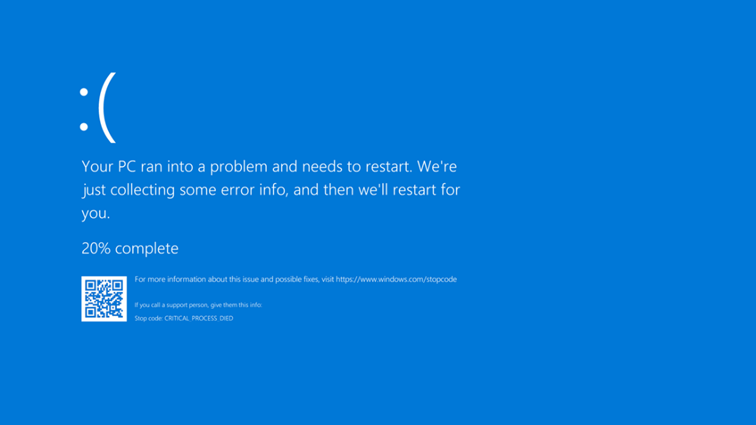
Microsoft began a project a few years ago, openly worked on Github to create a Windows version of eBPF. We all know there is an inherent risk running kernel drivers on Windows – any such driver can compromise the system in all sorts of ways, not to mention crashing it (“Blue Screen of Death“), as was painfully evident in the CrowdStrike incident on July 19, 2024. Kernel drivers cannot just go away, however. The best Microsoft can do is make every effort to ensure reliability and quality of kernel drivers. eBPF just might be a good step in that direction, as it does not allow unconstrained access to kernel APIs.

(eBPF stands for “Extended Berkley Packet Filter”, the original usage of the technology. eBPF does not stand for anything now, because its usage goes beyond network packet filtering. Look for more information online or in the book “Learning eBPF” by Liz Rice about the origins of eBPF).

The Readme file in the root of the eBPF-for-Windows repository does a good job of explaining the eBPF architecture on Windows, and how to get started. In this post, I’d like to show an example of building an eBPF program, running it, and observing the results.

Disclaimer: This post is based on my (limited) experience with eBPF for Windows.

Getting Started

There are a couple of ways to get started with eBPF on Windows, the simplest being using the MSI installer provided as part of the Releases. At the time of writing, version 0.20 is the latest one. You can grab an MSI for your VM’s platform, or even grab the full directory (Debug or Release) with all build artifacts as through you have built it yourself. This is useful for debugging purposes (PDB files are provided), and also having all the samples and tests available is beneficial if you’d like to learn more. Here, I’m going to go with the MSI for simplicity.

You will need a Virtual Machine that is configured to run in test signing mode, so that the eBPF drivers themselves (and your programs, for that matter) are able to load without being signed by a trusted certificate. Use the following elevated command line to get into test signing mode (restart is required):

bcdedit /set testsigning on

Now you can install the MSI, which presents a classic Windows installation experience – just click Next on every page.

Writing an eBPF Program

eBPF programs are classically written in C, although other options are available today (Rust, Python, …); I’ll stick with C. An eBPF program is compiled to an intermediate language, leveraging an eBPF virtual machine. This allows eBPF compiled code to be generic, based on a virtual CPU, so that it can later be compiled to the actual target processor on the system. Two modes are available for this: JIT and Native. With JIT, some entity compiles the eBPF byte code before the first invocation – this could be part of the kernel, or some entity running in user mode that then pushes the resulting code to the kernel.

The eBPF for Windows implementation provides a user-mode service that can JIT-compile eBPF byte code (provided as an ELF object file) and then pushing the result to the kernel. This JIT mode, however, is currently being deprecated, so may or may not be supported in the future. The other option is Native – the byte code is compiled to the target machine and generates a normal PE, which is in fact a kernel driver. Verification is also performed at this stage, where compilation fails if verification fails.

The details of exactly how all this works is beyond the scope of this post. The documentation in the eBPF-for-Windows repo should shed more light on the details. I may provide more information in a future post.

To actually write the eBPF program, we could use any editor, and use the clang compiler to generate the eBPF byte code, wrapped in an ELF binary file (eBPF-for-Windows tries to be as compatible as possible to the Linux way of working, so uses clang that compiles to an ELF file, not a PE). We can certainly go down that route, but to make things somewhat easier, I will be using Visual Studio and Nuget to simplify getting the required header files and libraries.

Creating the Project

We create a new C++ console application, as there is no eBPF or similar template available. We could also write normal C++ code to load the program into the kernel (once properly compiled), but I’m not going to do this in this post. Instead, we’ll use the netsh tool, that has been extended with an eBPF provided DLL that allows loading programs and a few other operations. For now, let’s continue with Visual Studio. The project I created is named TraceConnections. Its purpose is going to be counting the number of TCP connect operations that occur per process.

I rename the resulting TestConnections.cpp file to TestConnection.c so we don’t use any C++ feature – eBPF supports C only. Next, we need to use eBPF specific headers and other tools – fortunately, these are available through a Nuget package. Just open the Nuget Packages window and search for “ebpf”. You’ll find 3 packages targeting x86, ARM64 and x64. Choose the package based on the target (most likely x64) and install it:

Now we can begin coding.

Writing an eBPF Program

We start with two includes, provided by the Nuget package:

#include <bpf_helpers.h>
#include <ebpf_nethooks.h>

A eBPF program starts in a function that can have any name, but must have a prototype based on the “type” of program. For our purposes, it’s a program that “binds” to network connections. We start the function like so:

SEC("bind")
bind_action_t TraceConnections(bind_md_t* ctx) {

The function name is TraceConnections, it accepts one pointer and returns an enumeration indicating whether to allow or block the connection:

typedef enum _bind_action {
    BIND_PERMIT,   ///< Permit the bind operation.
    BIND_DENY,     ///< Deny the bind operation.
    BIND_REDIRECT, ///< Change the bind endpoint.
} bind_action_t;

This gives you an idea how easy it would be to block a connection if we so desire. The accepted pointer’s type to the main function depends on the kind of “program” we write. In this case, it’s bind_md_t providing details about the connection:

typedef struct _bind_md {
    uint8_t* app_id_start;         ///< Pointer to start of App ID.
    uint8_t* app_id_end;           ///< Pointer to end of App ID.
    uint64_t process_id;           ///< Process ID.
    uint8_t socket_address[16];    ///< Socket address to bind to.
    uint8_t socket_address_length; ///< Length in bytes of the socket address.
    bind_operation_t operation;    ///< Operation to do.
    uint8_t protocol;              ///< Protocol number (e.g., IPPROTO_TCP).
} bind_md_t;

We get some basic details, like process ID, process name, and network address. The SEC macro places the code in a section called “bind”, which is one way to tell eBPF what kind of program we’re writing.

In this example, we’d like to keep track of all processes making network connections, and just count how many such connections occur. For this purpose, we can create a helper structure:

typedef struct _process_info {
	uint32_t id;
	char name[32];
	uint32_t count;
} process_info;

We’ll keep track of the process ID, an executable name, and the count itself. The next question is where is all that going to be stored?

eBPF works with the concept of maps, which you can think of as key/value pairs, where keys could be managed in multiple ways, based on the map type. To define a map, we can build a structure with some helper macros, and place any variable(s) in a section called “.maps” in the resulting ELF object file. For this example, this is the map I defined:

struct {
	__uint(type, BPF_MAP_TYPE_HASH);
	__type(key, uint32_t);
	__type(value, process_info);
	__uint(max_entries, 1024);
} proc_map SEC(".maps");

type indicates the map type (a hash table), the key is the process ID (to uniquely identify the process being tracked), value is our process_info structure. Finally, max_entries is a hint to the map implementation, as to how many items are expected. A global variable named proc_map resperesnts our map. Now we’re ready to implement the body of our function. First, we’ll look at bind to port operations only (not unbind), and we always permit the connection to continue:

SEC("bind")
bind_action_t TraceConnections(bind_md_t* ctx) {
	if (ctx->operation == BIND_OPERATION_BIND) {
	}
	return BIND_PERMIT;
}

Next, we grab the process ID, and look it up in the map. If it’s already there, just increment the count:

uint32_t pid = (uint32_t)ctx->process_id;
process_info pi = { 0 };
process_info* p = bpf_map_lookup_elem(&proc_map, &pid);
if (p) {
	p->count++;
}

If not, we need to create a new entry by populating a new process_info:

else {
	pi.id = pid;
	memcpy(pi.name, ctx->app_id_start, 
        MIN(sizeof(pi.name), ctx->app_id_end - ctx->app_id_start));
	pi.count = 1;
	p = &pi;
}

Finally, we need to update the map with the new or updated value:

bpf_map_update_elem(&proc_map, &pid, p, 0);

The arguments are (in order): the map variable, pointer to the key, pointer to the value, and flags indicating whether to update if there is already a value, or update always, etc; zero means update if exists, or create if does not exist.

That’s almost it! Just need to add a license for verification purposes (the exact details are not important for this post):

char LICENSE[] SEC("license") = "Dual BSD/GPL";

Here is the full code for easier reference:

#include <bpf_helpers.h>
#include <ebpf_nethooks.h>

#define MIN(x, y) ((x) < (y)) ? (x) : (y)

typedef struct _process_info {
	uint32_t id;
	char name[32];
	uint32_t count;
} process_info;


struct {
	__uint(type, BPF_MAP_TYPE_HASH);
	__type(key, uint32_t);
	__type(value, process_info);
	__uint(max_entries, 1024);
} proc_map SEC(".maps");

SEC("bind")
bind_action_t TraceConnections(bind_md_t* ctx) {
	if (ctx->operation == BIND_OPERATION_BIND) {
		uint32_t pid = (uint32_t)ctx->process_id;
		process_info pi = { 0 };
		process_info* p = bpf_map_lookup_elem(&proc_map, &pid);
		if (p) {
			p->count++;
		}
		else {
			pi.id = pid;
			memcpy(pi.name, ctx->app_id_start, 
                MIN(sizeof(pi.name), ctx->app_id_end - ctx->app_id_start));
			pi.count = 1;
			p = &pi;
		}
		bpf_map_update_elem(&proc_map, &pid, p, 0);

	}
	return BIND_PERMIT;
}

char LICENSE[] SEC("license") = "Dual BSD/GPL";

Compiling the Program

This is where things get a bit hairy. First, we need a clang compiler. The Visual Studio installer offers a clang compiler and related tools, but it seems it does not support an eBPF target (use clang -print-targets to verify). Installing the official LLVM (version 18.1.8 at the time of writing) toolset provides clang that supports eBPF. Make sure you add the LLVM bin path to the system PATH environment variable to make it easier to access clang (the installation wizard will offer that option for convenience).

In order to set the command line for compilation, right-click the TestConnections.c file in Solution Explorer and choose Properties. In the General tab, change the Item Type to Custom Build Tool (check all platforms and configurations so you don’t have to repeat this later):

Click OK and open the properties again so they get refreshed. Now you can edit the custom tool command line. Here is what you need:

clang.exe -target bpf -g -O2 -Werror -I"../packages/eBPF-for-Windows.x64.0.20.0/build/native/include" -c %(FileName).c -o $(OutDir)%(FileName).o
pushd $(OutDir)
powershell -NonInteractive -ExecutionPolicy Unrestricted $(SolutionDir)packages\eBPF-for-Windows.x64.0.20.0\build\native\bin\Convert-BpfToNative.ps1 -FileName %(Filename) -IncludeDir $(SolutionDir)packages\eBPF-for-Windows.x64.0.20.0\build\native\include -Platform $(Platform) -Configuration $(Configuration) -KernelMode $true
popd

Let’s break it down. The first call is to the clang compiler to compile the eBPF code to an ELF object file. -g adds debug information, which will be useful in looking into the generated code (more on that later), -target bpf is obvious, -O2 is required for certain optimizations, -Werror treats warnings as errors, so they cannot be ignored, and -I is where the helper eBPF header are located from the Nuget package.

The next step is to compile the object file to a native SYS file – making the eBPF program bundled in a driver PE file. This is where the Convert-BpfToNative cmdlet comes into play. It has some strict requirements – it does not accept a full path name, so we must switch to the object file directory before proceeding; this is the role of pushd and popd.

Next, we have to set the two outputs in the Outputs line in the Custom Build tool config:

$(OutputPath)%(Filename).o
$(OutputPath)%(Filename).sys

Now we can build. If all goes well, a TestConnections.sys should be created in the output folder. We’ll copy it to somewhere on the target system (e.g. c:\Test).

Loading and Testing

In the target system, open an elevated command window, and type netsh. Then type ebpf to get into the ebpf extensions.

Type show programs to see there are no programs loaded. Now type add program c:\Test\Testconnections.sys. If that works, type show programs again, and you should see something like this:

netsh ebpf>show programs

ID  Pins  Links  Mode       Type           Name
====== ==== ===== ========= ============= ====================
 3     1        1 NATIVE     bind          TestConnections

We have a loaded program, and it’s running! You can verify that maps exist (your map and program IDs may be different):

netsh ebpf>show maps

                              Key  Value      Max  Inner
     ID            Map Type  Size   Size  Entries     ID  Pins  Name
=======  ==================  ====  =====  =======  =====  ====  ========
      2                hash     4     40     1024     -1     0  proc_map

We can see the map data by using a tool I’m working on, called eBPF Studio. You can download the latest release and run it on the target system (note: there is a release and debug versions for eBPF Studio. This is currently necessary because of the way the CRT is linked to the eBPF API). Run the Release version, and if it crashes, run the Debug one. Hopefully, this issue will be fixed in a future eBPF for Windows release.

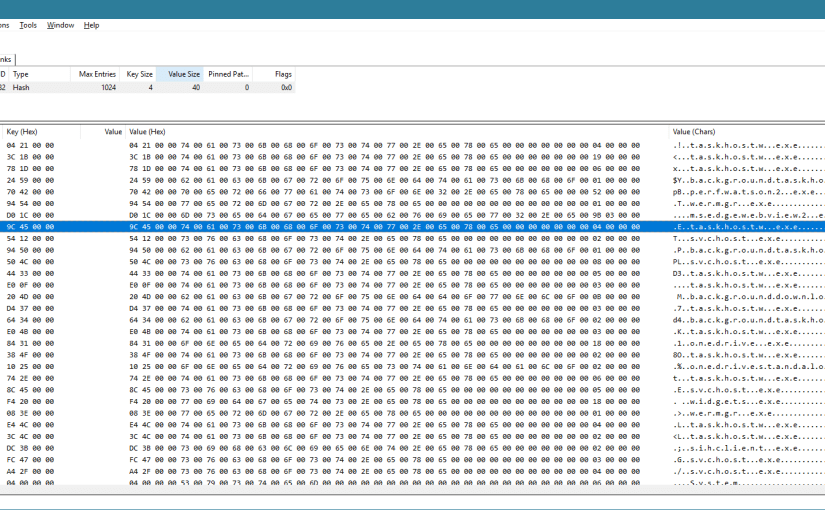
When you run eBPF Studio, it shows the programs, maps, and links (not discussed here) currently loaded into the kernel, in three separate tabs. If you click the Maps tab, you can choose a map, and its contents are shown in the bottom part:
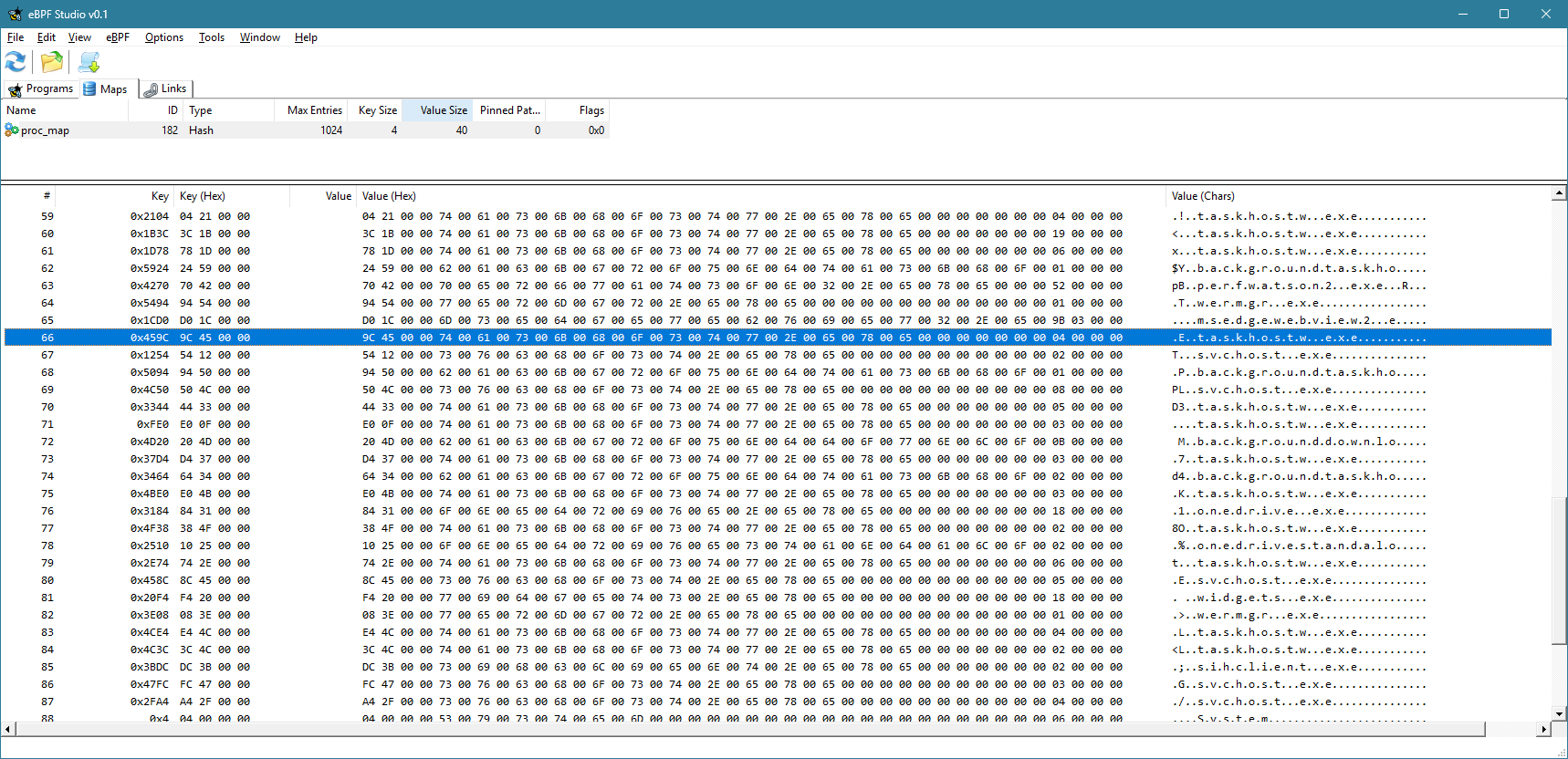
Currently, the view is not refreshed automatically. You have to click the Refresh button to refresh the maps and programs views. You can clearly see the keys (process IDs) and the values for each item in the map.

You can also use eBPF Studio to open an object file (ELF *.O files), and see their contents. Here is what you would see for TestConnections.o:

You can see the source code interspersed with eBPF “machine” instructions. Note that the -g flag mentioned earlier would allow you to see the source. Otherwise, you would only see the “assembly” instructions.

Extending the Example

Now you can add some simple functionality, like blocking a process based on its PID or executable name. I’ll leave that as an exercise to the interested reader.

The full source code is available here.

Writing a Simple Driver in Rust

The Rust language ecosystem is growing each day, its popularity increasing, and with good reason. It’s the only mainstream language that provides memory and concurrency safety at compile time, with a powerful and rich build system (cargo), and a growing number of packages (crates).

My daily driver is still C++, as most of my work is about low-level system and kernel programming, where the Windows C and COM APIs are easy to consume. Rust is a system programming language, however, which means it plays, or at least can play, in the same playground as C/C++. The main snag is the verbosity required when converting C types to Rust. This “verbosity” can be alleviated with appropriate wrappers and macros. I decided to try writing a simple WDM driver that is not useless – it’s a Rust version of the “Booster” driver I demonstrate in my book (Windows Kernel Programming), that allows changing the priority of any thread to any value.

Getting Started

To prepare for building drivers, consult Windows Drivers-rs, but basically you should have a WDK installation (either normal or the EWDK). Also, the docs require installing LLVM, to gain access to the Clang compiler. I am going to assume you have these installed if you’d like to try the following yourself.

We can start by creating a new Rust library project (as a driver is a technically a DLL loaded into kernel space):

cargo new --lib booster

We can open the booster folder in VS Code, and begin are coding. First, there are some preparations to do in order for actual code to compile and link successfully. We need a build.rs file to tell cargo to link statically to the CRT. Add a build.rs file to the root booster folder, with the following code:

fn main() -> Result<(), wdk_build::ConfigError> {
    std::env::set_var("CARGO_CFG_TARGET_FEATURE", "crt-static");
    wdk_build::configure_wdk_binary_build()
}

(Syntax highlighting is imperfect because the WordPress editor I use does not support syntax highlighting for Rust)

Next, we need to edit cargo.toml and add all kinds of dependencies. The following is the minimum I could get away with:

[package]
name = "booster"
version = "0.1.0"
edition = "2021"

[package.metadata.wdk.driver-model]
driver-type = "WDM"

[lib]
crate-type = ["cdylib"]
test = false

[build-dependencies]
wdk-build = "0.3.0"

[dependencies]
wdk = "0.3.0"       
wdk-macros = "0.3.0"
wdk-alloc = "0.3.0" 
wdk-panic = "0.3.0" 
wdk-sys = "0.3.0"   

[features]
default = []
nightly = ["wdk/nightly", "wdk-sys/nightly"]

[profile.dev]
panic = "abort"
lto = true

[profile.release]
panic = "abort"
lto = true

The important parts are the WDK crates dependencies. It’s time to get to the actual code in lib.rs.

The Code

We start by removing the standard library, as it does not exist in the kernel:

#![no_std]

Next, we’ll add a few use statements to make the code less verbose:

use core::ffi::c_void;
use core::ptr::null_mut;
use alloc::vec::Vec;
use alloc::{slice, string::String};
use wdk::*;
use wdk_alloc::WdkAllocator;
use wdk_sys::ntddk::*;
use wdk_sys::*;

The wdk_sys crate provides the low level interop kernel functions. the wdk crate provides higher-level wrappers. alloc::vec::Vec is an interesting one. Since we can’t use the standard library, you would think the types like std::vec::Vec<> are not available, and technically that’s correct. However, Vec is actually defined in a lower level module named alloc::vec, that can be used outside the standard library. This works because the only requirement for Vec is to have a way to allocate and deallocate memory. Rust exposes this aspect through a global allocator object, that anyone can provide. Since we have no standard library, there is no global allocator, so one must be provided. Then, Vec (and String) can work normally:

#[global_allocator]
static GLOBAL_ALLOCATOR: WdkAllocator = WdkAllocator;

This is the global allocator provided by the WDK crates, that use ExAllocatePool2 and ExFreePool to manage allocations, just like would do manually.

Next, we add two extern crates to get the support for the allocator and a panic handler – another thing that must be provided since the standard library is not included. Cargo.toml has a setting to abort the driver (crash the system) if any code panics:

extern crate wdk_panic;
extern crate alloc;

Now it’s time to write the actual code. We start with DriverEntry, the entry point to any Windows kernel driver:

#[export_name = "DriverEntry"]
pub unsafe extern "system" fn driver_entry(
    driver: &mut DRIVER_OBJECT,
    registry_path: PUNICODE_STRING,
) -> NTSTATUS {

Those familiar with kernel drivers will recognize the function signature (kind of). The function name is driver_entry to conform to the snake_case Rust naming convention for functions, but since the linker looks for DriverEntry, we decorate the function with the export_name attribute. You could use DriverEntry and just ignore or disable the compiler’s warning, if you prefer.

We can use the familiar println! macro, that was reimplemented by calling DbgPrint, as you would if you were using C/C++. You can still call DbgPrint, mind you, but println! is just easier:

println!("DriverEntry from Rust! {:p}", &driver);
let registry_path = unicode_to_string(registry_path);
println!("Registry Path: {}", registry_path);

Unfortunately, it seems println! does not yet support a UNICODE_STRING, so we can write a function named unicode_to_string to convert a UNICODE_STRING to a normal Rust string:

fn unicode_to_string(str: PCUNICODE_STRING) -> String {
    String::from_utf16_lossy(unsafe {
        slice::from_raw_parts((*str).Buffer, (*str).Length as usize / 2)
    })
}

Back in DriverEntry, our next order of business is to create a device object with the name “\Device\Booster”:

let mut dev = null_mut();
let mut dev_name = UNICODE_STRING::default();
string_to_ustring("\\Device\\Booster", &mut dev_name);

let status = IoCreateDevice(
    driver,
    0,
    &mut dev_name,
    FILE_DEVICE_UNKNOWN,
    0,
    0u8,
    &mut dev,
);

The string_to_ustring function converts a Rust string to a UNICODE_STRING:

fn string_to_ustring(s: &str, uc: &mut UNICODE_STRING) -> Vec<u16> {
    let mut wstring: Vec<_> = s.encode_utf16().collect();
    uc.Length = wstring.len() as u16 * 2;
    uc.MaximumLength = wstring.len() as u16 * 2;
    uc.Buffer = wstring.as_mut_ptr();
    wstring
}

This may look more complex than we would like, but think of this as a function that is written once, and then just used all over the place. In fact, maybe there is such a function already, and just didn’t look hard enough. But it will do for this driver.

If device creation fails, we return a failure status:

if !nt_success(status) {
    println!("Error creating device 0x{:X}", status);
    return status;
}

nt_success is similar to the NT_SUCCESS macro provided by the WDK headers.

Next, we’ll create a symbolic link so that a standard CreateFile call could open a handle to our device:

let mut sym_name = UNICODE_STRING::default();
let _ = string_to_ustring("\\??\\Booster", &mut sym_name);
let status = IoCreateSymbolicLink(&mut sym_name, &mut dev_name);
if !nt_success(status) {
    println!("Error creating symbolic link 0x{:X}", status);
    IoDeleteDevice(dev);
    return status;
}

All that’s left to do is initialize the device object with support for Buffered I/O (we’ll use IRP_MJ_WRITE for simplicity), set the driver unload routine, and the major functions we intend to support:

    (*dev).Flags |= DO_BUFFERED_IO;

    driver.DriverUnload = Some(boost_unload);
    driver.MajorFunction[IRP_MJ_CREATE as usize] = Some(boost_create_close);
    driver.MajorFunction[IRP_MJ_CLOSE as usize] = Some(boost_create_close);
    driver.MajorFunction[IRP_MJ_WRITE as usize] = Some(boost_write);

    STATUS_SUCCESS
}

Note the use of the Rust Option<> type to indicate the presence of a callback.

The unload routine looks like this:

unsafe extern "C" fn boost_unload(driver: *mut DRIVER_OBJECT) {
    let mut sym_name = UNICODE_STRING::default();
    string_to_ustring("\\??\\Booster", &mut sym_name);
    let _ = IoDeleteSymbolicLink(&mut sym_name);
    IoDeleteDevice((*driver).DeviceObject);
}

We just call IoDeleteSymbolicLink and IoDeleteDevice, just like a normal kernel driver would.

Handling Requests

We have three request types to handle – IRP_MJ_CREATE, IRP_MJ_CLOSE, and IRP_MJ_WRITE. Create and close are trivial – just complete the IRP successfully:

unsafe extern "C" fn boost_create_close(_device: *mut DEVICE_OBJECT, irp: *mut IRP) -> NTSTATUS {
    (*irp).IoStatus.__bindgen_anon_1.Status = STATUS_SUCCESS;
    (*irp).IoStatus.Information = 0;
    IofCompleteRequest(irp, 0);
    STATUS_SUCCESS
}

The IoStatus is an IO_STATUS_BLOCK but it’s defined with a union containing Status and Pointer. This seems to be incorrect, as Information should be in a union with Pointer (not Status). Anyway, the code accesses the Status member through the “auto generated” union, and it looks ugly. Definitely something to look into further. But it works.

The real interesting function is the IRP_MJ_WRITE handler, that does the actual thread priority change. First, we’ll declare a structure to represent the request to the driver:

#[repr(C)]
struct ThreadData {
    pub thread_id: u32,
    pub priority: i32,
}

The use of repr(C) is important, to make sure the fields are laid out in memory just as they would with C/C++. This allows non-Rust clients to talk to the driver. In fact, I’ll test the driver with a C++ client I have that used the C++ version of the driver. The driver accepts the thread ID to change and the priority to use. Now we can start with boost_write:

unsafe extern "C" fn boost_write(_device: *mut DEVICE_OBJECT, irp: *mut IRP) -> NTSTATUS {
    let data = (*irp).AssociatedIrp.SystemBuffer as *const ThreadData;

First, we grab the data pointer from the SystemBuffer in the IRP, as we asked for Buffered I/O support. This is a kernel copy of the client’s buffer. Next, we’ll do some checks for errors:

let status;
loop {
    if data == null_mut() {
        status = STATUS_INVALID_PARAMETER;
        break;
    }
    if (*data).priority < 1 || (*data).priority > 31 {
        status = STATUS_INVALID_PARAMETER;
        break;
    }

The loop statement creates an infinite block that can be exited with a break. Once we verified the priority is in range, it’s time to locate the thread object:

let mut thread = null_mut();
status = PsLookupThreadByThreadId(((*data).thread_id) as *mut c_void, &mut thread);
if !nt_success(status) {
    break;
}

PsLookupThreadByThreadId is the one to use. If it fails, it means the thread ID probably does not exist, and we break. All that’s left to do is set the priority and complete the request with whatever status we have:

        KeSetPriorityThread(thread, (*data).priority);
        ObfDereferenceObject(thread as *mut c_void);
        break;
    }
    (*irp).IoStatus.__bindgen_anon_1.Status = status;
    (*irp).IoStatus.Information = 0;
    IofCompleteRequest(irp, 0);
    status
}

That’s it!

The only remaining thing is to sign the driver. It seems that the crates support signing the driver if an INF or INX files are present, but this driver is not using an INF. So we need to sign it manually before deployment. The following can be used from the root folder of the project:

signtool sign /n wdk /fd sha256 target\debug\booster.dll

The /n wdk uses a WDK test certificate typically created automatically by Visual Studio when building drivers. I just grab the first one in the store that starts with “wdk” and use it.

The silly part is the file extension – it’s a DLL and there currently is no way to change it automatically as part of cargo build. If using an INF/INX, the file extension does change to SYS. In any case, file extensions don’t really mean that much – we can rename it manually, or just leave it as DLL.

Installing the Driver

The resulting file can be installed in the “normal” way for a software driver, such as using the sc.exe tool (from an elevated command window), on a machine with test signing on. Then sc start can be used to load the driver into the system:

sc.exe sc create booster type= kernel binPath= c:\path_to_driver_file
sc.exe start booster

Testing the Driver

I used an existing C++ application that talks to the driver and expects to pass the correct structure. It looks like this:

#include <Windows.h>
#include <stdio.h>

struct ThreadData {
	int ThreadId;
	int Priority;
};

int main(int argc, const char* argv[]) {
	if (argc < 3) {
		printf("Usage: boost <tid> <priority>\n");
		return 0;
	}

	int tid = atoi(argv[1]);
	int priority = atoi(argv[2]);

	HANDLE hDevice = CreateFile(L"\\\\.\\Booster",
		GENERIC_WRITE, 0, nullptr, OPEN_EXISTING, 0,
		nullptr);

	if (hDevice == INVALID_HANDLE_VALUE) {
		printf("Failed in CreateFile: %u\n", GetLastError());
		return 1;
	}

	ThreadData data;
	data.ThreadId = tid;
	data.Priority = priority;
	DWORD ret;
	if (WriteFile(hDevice, &data, sizeof(data),
		&ret, nullptr))
		printf("Success!!\n");
	else
		printf("Error (%u)\n", GetLastError());

	CloseHandle(hDevice);

	return 0;
}

Here is the result when changing a thread’s priority to 26 (ID 9408):

Conclusion

Writing kernel drivers in Rust is possible, and I’m sure the support for this will improve quickly. The WDK crates are at version 0.3, which means there is still a way to go. To get the most out of Rust in this space, safe wrappers should be created so that the code is less verbose, does not have unsafe blocks, and enjoys the benefits Rust can provide. Note, that I may have missed some wrappers in this simple implementation.

You can find a couple of more samples for KMDF Rust drivers here.

The code for this post can be found at https://github.com/zodiacon/Booster.

Learn more about Rust at https://trainsec.net.

Structured Storage and Compound Files

Structured Storage is a Windows technology that abstracts the notions of files and directories behind COM interfaces – mainly IStorage and IStream. Its primary intent is to provide a way to have a file system hierarchy within a single physical file.

Structured Storage has been around for many years, where its most famous usage was in Microsoft Office files (*.doc, *.ppt, *.xls, etc.) – before Office moved to the extended file formats (*.docx, *.pptx, etc.). Of course, the old formats are still very much supported.

The Structured Storage interfaces (IStorage representing a directory, and IStream representing a file) are just that – interfaces. To actually use them, some implementation must be available. Windows provided an implementation of Structured Storage called Compound Files. These terms are sometime used interchangeably, but the distinction is important: Compound Files is just one implementation of Structured Storage – there could be others. Compound Files does not implement everything that could be implemented based on the defined Structured Storage interfaces, but it implements a lot, definitely enough to make it useful.

You can download an old tool (but still works well) called SSView, which can be used to graphically view the contents of physical files that were created by using the Compound File implementation. Here is a screenshot of SSView, looking at some DOC file:

Here is a more interesting example – information persisted using Sysinternals Autoruns tool (discussed later):

A more interesting hierarchy is clearly visible – although it’s all in a single file!

The Main Interfaces

The IStorage interface represents a “directory”, that can contain other directories and “files”, represented as IStream interface implementations. To get started a physical file can be created with StgCreateStorageEx or an existing file opened with StgOpenStorageEx. Both return an IStorage pointer on success. From there, methods on IStorage can be called to create or open other directories (storages) and/or files (streams).

The most useful methods on IStorage are CreateStorage, CreateStream, OpenStorage and OpenStream. Enumeration of storages/streams is possible with EnumElements. Here is an example for opening a compound file for read access (filename is from a command line argument):

CComPtr<IStorage> spStg;
auto hr = ::StgOpenStorageEx(argv[1], STGM_READ | STGM_SHARE_EXCLUSIVE,
	STGFMT_STORAGE, 0, nullptr, nullptr, __uuidof(IStorage), reinterpret_cast<void**>(&spStg));
if (FAILED(hr)) {
	printf("Failed to open file (0x%X)\n", hr);
	return hr;
}

The following demonstrates enumerating the hierarchy of a given storage, recursively:

void EnumItems(IStorage* stg, int indent = 0) {
	CComPtr<IEnumSTATSTG> spEnum;
	stg->EnumElements(0, nullptr, 0, &spEnum);
	if (spEnum == nullptr)
		return;

	STATSTG stat;
	while (S_OK == spEnum->Next(1, &stat, nullptr)) {
		if (indent)
			printf(std::string(indent, ' ').c_str());
		printf("%ws", stat.pwcsName);
		if (stat.type == STGTY_STORAGE) {
			printf(" [DIR]\n");
			CComPtr<IStorage> spSubStg;
			stg->OpenStorage(stat.pwcsName, nullptr, 
                STGM_READ | STGM_SHARE_EXCLUSIVE, 0, 0, &spSubStg);
			if (spSubStg)
				EnumItems(spSubStg, indent + 1);
		}
		else
			printf(" (%u bytes)\n", stat.cbSize.LowPart);
		::CoTaskMemFree(stat.pwcsName);
	}
}

Each item has a name, but streams (“files”) can have data. The cbSize member of STATSTG returns that size. A stream is just an abstraction over a bunch of bytes. To actually read/write from/to a stream, it needs to be opened with IStorage::OpenStream before accessing the data with IStream::Read, IStream::Write and similar methods.

More on Streams

The IStream interface is used in various places within the Windows API, not just part of Structured Storage. It represents an abstraction over a buffer, that in theory could be anywhere – that’s the nice thing about an abstraction. Given an IStream pointer, you can read, wrote, seek, copy to another stream, clone, and even commit/revert a transaction, if supported by the implementation. Compound Files, by the way, doesn’t support transactions on streams.

Outside of Structured Storage, streams can be obtained in several ways.

The CreateStreamOnHGlobal API creates a memory buffer over an optional HGLOBAL (can be NULL to allocate a new one) and returns an IStream pointer to that memory buffer. This is useful when dealing with the clipboard for example, as it requires an HGLOBAL, which may not be convenient to work with. By getting an IStream pointer, the code can work with it (maybe reading it from another stream, or manually populating it with data), and then calling GetHGlobalFromStream to get the underlying HGLOBAL before passing it to the clipboard (e.g. SetClipboardData).

A stream can also be obtained for a file directly by calling SHCreateStreamOnFile, providing a convenient access to file data, abstracted as IStream.

Another case where IStream makes an appearance is in ActiveX controls persistence.

Yet another example of using IStream is as a way to “package” information for COM object’s state that would allow creating a proxy to that object from a different apartment by calling CoMarshalInterThreadInterfaceInStream (probably the longest-name COM API), that captures the state required (as an IStream) to pass to another apartment, where the corresponding CoGetInterfaceAndReleaseStream can be called to generate a proxy to the original object, if needed.

Case Study: Autoruns

Back in 2021 when I was working for the Sysinternals team, one of my tasks was to modernize Autoruns from a GUI perspective. I thought I would take this opportunity to do a significant rewrite, so that it would be easier to maintain the tool and improve it as needed. Fortunately, Mark Russinovich was onboard with that, although my time estimate for this project was way off 🙂 But I digress.

One of the features of Autoruns is the ability to save the information provided by the tool so it can be loaded later, possibly on a different machine. This is non-trivial, as some of the information is not easy to persist, such as icons. I don’t recall if the old Autoruns persisted them, but I definitely wanted to do so.

The old Autoruns format was sequential in nature, storing structures of data linearly in the file. Any new properties that needed to be added would require offset changes, which forced changing the format “version” and make the correct decisions when reading a file in an various “old” formats.

I wanted to make persistence more flexible, so I decided to change the format completely to be a compound file. With this scheme, adding new properties would not cause any issues – a new stream may be added, but other streams are not disturbed. The code could just ignore properties (could be storages and/or streams) it wasn’t aware of. This made the format extensible by definition, immune to any offset changes, and very easy to view using tools, like SSView. The above screenshot is from an Autoruns-persisted file.

Persisting icons, by the way, becomes pretty easy, because ImageList objects, used by Autoruns to hold collection of icons can be persisted to a stream with a single function call: ImageList_Write; very convenient!

Conclusion

The Structured Storage idea is a powerful one, and the Compound File implementation provided by Windows is pretty good and flexible. One of the reasons Microsoft moved Office to a new format was the need to make files smaller, so the new extended formats are ZIP compressed. Their internal format changed as well, and is not using Compound Files for the most part. A Structured Storage file could be compressed, saving disk space, while still maintaining convenient access using storages and streams.

To learn more about COM, visit my Youtube channel at https://youtube.com/@zodiacon. To really understand and use COM, find my COM Programming courses at https://trainsec.net.


C++ Programming Masterclass Live Training

Today I’m happy to announce a new 5-day live training to take place in December, “C++ Programming Masterclass”. This is remote training presented live, where the sessions are recorded for later viewing if you miss any.

The course is scheduled for the beginning of December with 10 half-days spanning two and a half weeks.

The full syllabus, who should attend, with the exact dates and times can be found here: C++ Programming Masterclass.

Here is a quick summary of the course modules:

  • Module 1: Introduction to Modern C++
  • Module 2: C++ Fundamentals
  • Module 3: Standard Library Basics
  • Module 4: Object Oriented Design and Programming
  • Module 5: Modern Language Features and Libraries (Part 1)
  • Module 6: Templates
  • Module 7: Modern Language Features and Libraries (Part 2)
  • Module 8: The C++ Standard Library
  • Module 9: Concurrency in Modern C++

The course is currently heavily discounted, with the a price increase after November 1st. Register here: C++ Programming Masterclass

If you have any questions, feel free to get in touch via email (zodiacon@live.com), Linkedin, or X (@zodiacon)

Improving Kernel Object Type Implementation (Part 4)

In part 3 we implemented the bulk of what makes a DataStack – push, pop and clear operations. We noted a few remaining deficiencies that need to be taken care of. Let’s begin.

Object Destruction

A DataStack object is deallocated when the last reference to it removed (typically all handles are closed). Any other cleanup must be done explicitly. The DeleteProcedure member of the OBJECT_TYPE_INITIALIZER is an optional callback we can set to be called just before the structure is freed:

init.DeleteProcedure = OnDataStackDelete;

The callback is simple – it’s called with the object about to be destroyed. We can use the cleanup support from part 3 to free the dynamic state of the stacked items:

void OnDataStackDelete(_In_ PVOID Object) {
	auto ds = (DataStack*)Object;
	DsClearDataStack(ds);
}

Querying Information

The native API provides many functions starting with NtQueryInformation* with an object type like process, thread, file, etc. We’ll add a similar function for querying information about DataStack objects. A few declarations are in order, mimicking similar declarations used by other query APIs:

typedef struct _DATA_STACK_CONFIGURATION {
	ULONG MaxItemSize;
	ULONG MaxItemCount;
	ULONG_PTR MaxSize;
} DATA_STACK_CONFIGURATION;

typedef enum _DataStackInformationClass {
	DataStackItemCount,
	DataStackTotalSize,
	DataStackConfiguration,
} DataStackInformationClass;

The query API itself mimics all the other Query APIs in the native API:

NTSTATUS NTAPI NtQueryInformationDataStack(
	_In_ HANDLE DataStackHandle,
	_In_ DataStackInformationClass InformationClass,
	_Out_ PVOID Buffer,
	_In_ ULONG BufferSize,
	_Out_opt_ PULONG ReturnLength);

The implementation (in kernel mode) is not complicated, just verbose. As with other APIs, we’ll start by getting the object itself from the handle, asking for DATA_STACK_QUERY access mask:

NTSTATUS NTAPI NtQueryInformationDataStack(_In_ HANDLE DataStackHandle, 
    _In_ DataStackInformationClass InformationClass, 
    _Out_ PVOID Buffer, _In_ ULONG BufferSize, 
    _Out_opt_ PULONG ReturnLength) {
	DataStack* ds;
	auto status = ObReferenceObjectByHandleWithTag(DataStackHandle,
        DATA_STACK_QUERY, g_DataStackType,
		ExGetPreviousMode(), DataStackTag, (PVOID*)&ds, nullptr);
	if (!NT_SUCCESS(status))
		return status;

Next, we check parameters:

// if no buffer provided then ReturnLength must be 
// non-NULL and buffer size must be zero
//
if (!ARGUMENT_PRESENT(Buffer) && (!ARGUMENT_PRESENT(ReturnLength) || BufferSize != 0))
	return STATUS_INVALID_PARAMETER;
//
// if buffer provided, then size must be non-zero
//
if (ARGUMENT_PRESENT(Buffer) && BufferSize == 0)
	return STATUS_INVALID_PARAMETER;

The rest is pretty standard. Let’s look at one information class:

ULONG len = 0;
switch (InformationClass) {
	case DataStackItemCount: 
        len = sizeof(ULONG); break;
	case DataStackTotalSize: 
        len = sizeof(ULONG_PTR); break;
	case DataStackConfiguration: 
        len = sizeof(DATA_STACK_CONFIGURATION); break;
	default: 
        return STATUS_INVALID_INFO_CLASS;
}

if (BufferSize < len) {
	status = STATUS_BUFFER_TOO_SMALL;
}
else {
	if (ExGetPreviousMode() != KernelMode) {
		__try {
			if (ARGUMENT_PRESENT(Buffer))
				ProbeForWrite(Buffer, BufferSize, 1);
			if (ARGUMENT_PRESENT(ReturnLength))
				ProbeForWrite(ReturnLength, sizeof(ULONG), 1);
		}
		__except (EXCEPTION_EXECUTE_HANDLER) {
			return GetExceptionCode();
		}
	}

	switch (InformationClass) {
		case DataStackItemCount:
		{
			ExAcquireFastMutex(&ds->Lock);
			auto count = ds->Count;
			ExReleaseFastMutex(&ds->Lock);

			if (ExGetPreviousMode() != KernelMode) {
				__try {
					*(ULONG*)Buffer = count;
				}
				__except (EXCEPTION_EXECUTE_HANDLER) {
					return GetExceptionCode();
				}
			}
			else {
				*(ULONG*)Buffer = count;
			}
			break;
		}
//...
//
// set returned bytes if requested
//
if (ARGUMENT_PRESENT(ReturnLength)) {
	if (ExGetPreviousMode() != KernelMode) {
		__try {
			*ReturnLength = len;
		}
		__except (EXCEPTION_EXECUTE_HANDLER) {
			return GetExceptionCode();
		}
	}
	else {
		*ReturnLength = len;
	}
}

ObDereferenceObjectWithTag(ds, DataStackTag);
return status;

You can find the other information classes implemented in the source code in a similar fashion.

To round it up, we’ll add Win32-like APIs that call the native APIs. The Native APIs call the driver in a similar way as the other native API user-mode implementations.

BOOL WINAPI GetDataStackSize(HANDLE hDataStack, ULONG_PTR* pSize) {
	auto status = NtQueryInformationDataStack(hDataStack, 
        DataStackTotalSize, pSize, sizeof(ULONG_PTR), nullptr);
	if (!NT_SUCCESS(status))
		SetLastError(RtlNtStatusToDosError(status));
	return NT_SUCCESS(status);
}

BOOL WINAPI GetDataStackItemCount(HANDLE hDataStack, ULONG* pCount) {
	auto status = NtQueryInformationDataStack(hDataStack,
        DataStackItemCount, pCount, sizeof(ULONG), nullptr);
	if (!NT_SUCCESS(status))
		SetLastError(RtlNtStatusToDosError(status));
	return NT_SUCCESS(status);
}

BOOL WINAPI GetDataStackConfig(HANDLE hDataStack, DATA_STACK_CONFIG* pConfig) {
	auto status = NtQueryInformationDataStack(hDataStack,
        DataStackConfiguration, pConfig, 
        sizeof(DATA_STACK_CONFIG), nullptr);
	if (!NT_SUCCESS(status))
		SetLastError(RtlNtStatusToDosError(status));
	return NT_SUCCESS(status);
}

Waitable Objects

Waitable objects, also called Dispatcher objects, maintain a state called Signaled or Non-Signaled, where the meaning of “signaled” depends on the object type. For example, process objects are signaled when terminated. Same for thread objects. Job objects are signaled when all processes in the job terminate. And so on.

Waitable objects can be waited on with WaitForSingleObject / WaitForMultipleObjects and friends in the Windows API, which call native APIs like NtWaitForSingleObject / NtWaitForMultipleObjects, which eventually get to the kernel and call ObWaitForSingleObject / ObWaitForMultipleObjects which finally invoke KeWaitForSingleObject / KeWaitForMultipleObjects (both documented in the WDK).

It would be nice if DataStack objects would be dispatcher objects, where “signaled” would mean the data stack is not empty, and vice-versa. The first thing to do is make sure that the SYNCHRONIZE access mask is valid for the object type. This is the default, so nothing special to do here. GENERIC_READ also adds SYNCHRONIZE for convenience.

In order to be a dispatcher object, the structure managing the object must start with a DISPATCHER_HEADER structure (which is provided by the WDK headers). For example, KPROCESS and KTHREAD start with DISPATCHER_HEADER. Same for all other dispatcher objects – well, almost. If we look at an EJOB (using symbols), we’ll see the following:

kd> dt nt!_EJOB
   +0x000 Event            : _KEVENT
   +0x018 JobLinks         : _LIST_ENTRY
   +0x028 ProcessListHead  : _LIST_ENTRY
   +0x038 JobLock          : _ERESOURCE
...

The DISPATCHER_HEADER is in the KEVENT. In fact, a KEVENT is just a glorified DISPATCHER_HEADER:

typedef struct _KEVENT {
    DISPATCHER_HEADER Header;
} KEVENT, *PKEVENT, *PRKEVENT;

The advantage of using a KEVENT is that the event API is available – this is taken advantage of by the Job implementation. For processes and threads, the work of signaling is done internally by the Process and Thread APIs.

For the DataStack implementation, we’ll take the Job approach, as the scheduler APIs are internal and undocumented. The DataStack now looks like this:

struct DataStack {
	KEVENT Event;
	LIST_ENTRY Head;
	FAST_MUTEX Lock;
	ULONG Count;
	ULONG MaxItemCount;
	ULONG_PTR Size;
	ULONG MaxItemSize;
	ULONG_PTR MaxSize;
};

In addition, we have to initialize the event as well as the other members:

void DsInitializeDataStack(DataStack* DataStack, ...) {
//...
	KeInitializeEvent(&DataStack->Event, NotificationEvent, FALSE);
//...
}

The event is initialized as a Notification Event (Manual Reset in user mode terminology). Why? This is just a choice. We could extend the DataStack creation API to allow choosing Notification (manual reset) vs. Synchronization (auto reset) – I’ll leave that for interested coder.

Next, we need to set or reset the event when appropriate. It starts in the non-signaled state (the FALSE in KeInitializeEvent), since the data stack starts empty. In the implementation of DsPushDataStack we signal the event if the count is incremented from zero to 1:

NTSTATUS DsPushDataStack(DataStack* ds, PVOID Item, ULONG ItemSize) {
//...
	if (NT_SUCCESS(status)) {
		InsertTailList(&ds->Head, &buffer->Link);
		ds->Count++;
		ds->Size += ItemSize;
		if(ds->Count == 1)
			KeSetEvent(&ds->Event, EVENT_INCREMENT, FALSE);
	}
//...

In the pop implementation, we clear (reset) the event if the item count drops to zero:

NTSTATUS DsPopDataStack(DataStack* ds, PVOID buffer, ULONG inputSize, ULONG* itemSize) {
//...
memcpy(buffer, item->Data, item->Size);
ds->Count--;
ds->Size -= item->Size;
ExFreePool(item);
if (ds->Count == 0)
	KeClearEvent(&ds->Event);
return STATUS_SUCCESS;
//...

These operations are performed under the protection of the fast mutex, of course.

Testing

Here is one way to amend the test application to use WaitForSingleObject:

// wait 5 seconds at most for data to appear
while (WaitForSingleObject(h, 5000) == WAIT_OBJECT_0) {
	DWORD size = sizeof(buffer);
	if (!PopDataStack(h, buffer, &size) && GetLastError() != ERROR_NO_DATA) {
		printf("Error in PopDataStack (%u)\n", GetLastError());
		break;
	}
//...
	DWORD count;
	DWORD_PTR total;
	if (GetDataStackItemCount(h, &count) && GetDataStackSize(h, &total))
		printf("Data stack Item count: %u Size: %zu\n", count, total);
}

Refer to the project source code for the full sample.

Summary

This four-part series demonstrated creating a new kernel object type and using only exported functions to implement it. I hope this sheds more light on certain mechanisms used by the Windows kernel.

Let’s Get Stacking! (Part 3)

In the first part we looked at creating a new kernel object type. In the second part we implemented creation of new DataStack objects and opening existing objects by name. In this part, we’ll implement the main functionality of a DataStack, that makes a DataStack what it is.

Before we get on with that, there is one correction I must make. A good comment from Luke (@lukethezoid) on X said that although the code returns a 32-bit HANDLE to 32-bit callers, it’s not nearly enough because all pointers passed using NtDeviceIoControlFile/DeviceIoControl would be wrong – 32-bit pointers would be passed to the 64-bit kernel and that would cause a crash unless we do some work. For example, a UNICODE_STRING provided by a 32-bit client has a different binary layout than a 64-bit one. Wow64 processes (32-bit x86 running on x64) have two versions of NtDll.Dll in their address space. One is the “native” 64-bit, and the other is a special 32-bit variant. I say “special” because it’s not the same NtDll.Dll you would find on a true 32-bit system. This is because this special DLL knows it’s on a 64-bit system, and provides conversions for parameters (pointer and structures) before invoking the “real” 64-bit DLL API. Here is a snapshot from Process Explorer showing a 32-bit process with two NtDll.Dll files – the native 64-bit loaded into a high address, while the other loaded into a low address (within the first 4GB of address space):

The changes required to support Wow64 processes are not difficult to make, but not too interesting, either, so I won’t be implementing them. Instead, 32-bit clients will be blocked from using DataStacks. We should block on the kernel side for sure, and also in user mode to fail faster. In the kernel, we could use something like this in IRP_MJ_CREATE or IRP_MJ_DEVICE_CONTROL handles:

if (IoIs32bitProcess(Irp)) {
	status = STATUS_NOT_IMPLEMENTED;
    // complete the request...
}

In user mode, we can prevent DataStack.Dll from loading in the first place in Wow64 processes:

BOOL APIENTRY DllMain(HMODULE hModule, DWORD reason, LPVOID) {
	switch (reason) {
		case DLL_PROCESS_ATTACH:
            // C++ 17
			if (BOOL wow; IsWow64Process(GetCurrentProcess(), &wow) && wow)
				return FALSE;
//...

Note, however, that on true 32-bit systems everything should work just fine, as user mode and kernel mode are bitness-aligned.

Implementing the Actual Data Stack

Now we’re ready to focus on implementing the stack functionality – push, pop, and clear.

We’ll start from user mode, and gradually move to kernel mode. First, we want nice APIs for clients to use that have “Win32” conventions like so:

BOOL WINAPI PushDataStack(_In_ HANDLE hDataStack, _In_ const PVOID buffer, _In_ DWORD size);
BOOL WINAPI PopDataStack(_In_ HANDLE hDataStack, _Out_ PVOID buffer, _Inout_ DWORD* size);
BOOL WINAPI ClearDataStack(_In_ HANDLE hDataStack);

The APIs return BOOL to indicate success/failure, and GetLastError could be used to get additional information in case of an error. Let’s start with push:

BOOL WINAPI PushDataStack(HANDLE hDataStack, const PVOID buffer, DWORD size) {
	auto status = NtPushDataStack(hDataStack, buffer, size);
	if (!NT_SUCCESS(status))
		SetLastError(RtlNtStatusToDosError(status));

	return NT_SUCCESS(status);
}

Nothing to it. Call NtPushDataStack and update the last error is needed. NtPushDataStack just packs the arguments in a helper structure and sends to the driver, just like we did with CreateDataStack and OpenDataStack:

NTSTATUS NTAPI NtPushDataStack(_In_ HANDLE DataStackHandle, 
    _In_ const PVOID Item, _In_ ULONG ItemSize) {
	DataStackPush data;
	data.DataStackHandle = DataStackHandle;
	data.Buffer = Item;
	data.Size = ItemSize;

	IO_STATUS_BLOCK ioStatus;
	return NtDeviceIoControlFile(g_hDevice, nullptr, nullptr, nullptr, &ioStatus,
		IOCTL_DATASTACK_PUSH, &data, sizeof(data), nullptr, 0);
}

Now we switch to the kernel side. The DeviceIoControl handler just forwards the arguments to the “real” NtPushDataStack:

case IOCTL_DATASTACK_PUSH:
{
	auto data = (DataStackPush*)Irp->AssociatedIrp.SystemBuffer;
	if (dic.InputBufferLength < sizeof(*data)) {
		status = STATUS_BUFFER_TOO_SMALL;
		break;
	}
	status = NtPushDataStack(data->DataStackHandle, data->Buffer, data->Size);
	break;
}

Now we’re getting to the interesting parts. First, we need to check if the arguments make sense:

NTSTATUS NTAPI NtPushDataStack(HANDLE DataStackHandle, 
    const PVOID Item, ULONG ItemSize) {
	if (ItemSize == 0)
		return STATUS_INVALID_PARAMETER_3;

	if (!ARGUMENT_PRESENT(Item))
		return STATUS_INVALID_PARAMETER_2;

If the pushed data size is zero or the pointer to the data is NULL, then it’s an error. The ARGUMENT_PRESENT macro returns true if the given pointer is not NULL. Notice that we can return specific “invalid parameter” error based on the parameter index. Unfortunately, user mode callers always get a generic ERROR_INVALID_PARAMETER regardless. But at least kernel callers can benefit from the extra detail.

Next, we need to get to the DataStack object corresponding to the given handle; in fact, the handle could be bad, or not point to a DataStack object at all. This is a job for ObReferenceObjectByHandle or one of its variants:

DataStack* ds;
auto status = ObReferenceObjectByHandleWithTag(DataStackHandle,
    DATA_STACK_PUSH, g_DataStackType, ExGetPreviousMode(), 
    DataStackTag, (PVOID*)&ds, nullptr);
if (!NT_SUCCESS(status))
	return status;

ObReferenceObjectByHandleWithTag attempts to retrieve the object pointer given a handle, a type object, and access. The added tag provides a simple way to “track” the caller taking the reference. I’ve defined DataStackTag to be used for dynamic memory allocations as well (we’ll do very soon):

const ULONG DataStackTag = 'ktsD';

It’s the same kind of tag typically provided to allocation functions. You can read the tag from right to left (that’s how it would be displayed in tools as we’ll see later) – “Dstk”, kind of short for “Data Stack”. The function also checks if the handle has the required access mask (DATA_STACK_PUSH in this case), and will fail if the handle is not powerful enough. ExGetPreviousMode is provided to the function to indicate who is the original caller – for kernel callers, any access will be granted (the access mask is not really used).

With the object in hand, we can do the work, delegated to a separate function, and then not to forget to dereference the object or it will leak:

status = DsPushDataStack(ds, Item, ItemSize);
ObDereferenceObjectWithTag(ds, DataStackTag);

return status;

Technically, we don’t have to use a separate function, but it mimics how the kernel works for complex objects: there is another layer of implementation that works with the object directly (no more handles involved).

The DataStack structure mentioned in the previous parts holds the data for the implementation, and will be treated as a classic C structure – no member functions just to mimic how the Windows kernel is implemented – almost everything in C, not C++:

struct DataStack {
	LIST_ENTRY Head;
	FAST_MUTEX Lock;
	ULONG Count;
	ULONG MaxItemCount;
	ULONG_PTR Size;
	ULONG MaxItemSize;
	ULONG_PTR MaxSize;
};

struct DataBlock {
	LIST_ENTRY Link;
	ULONG Size;
	UCHAR Data[1];
};

The “stack” will be managed by a linked list (the classic LIST_ENTRY and friends) implementation provided by the kernel. We’ll push by adding to the tail and pop by removing from the tail. (Clearly, it would be just as easy to implement a queue, rather than, or in addition to, a stack.) We need a lock to prevent corruption of the list, and a fast mutex will do the job. Count stores the number of items currently on the data stack, and Size has the total size in bytes. MaxSize and MaxItemCount are initialized when the DataStack is created and provide some control over the limits of the data stack. Values of zero indicate no special limit.

The second structure, DataBlock is the one that holds the actual data, along with its size, and of course a link to the list. Data[1] is just a placeholder, where the data is going to be copied to, assuming we allocate the correct size.

We’ll start the push implementation in an optimistic manner, and allocate the DataBlock structure with the required size based on the data provided:

NTSTATUS DsPushDataStack(DataStack* ds, PVOID Item, ULONG ItemSize) {
	auto buffer = (DataBlock*)ExAllocatePool2(POOL_FLAG_PAGED | POOL_FLAG_UNINITIALIZED, 
		ItemSize + sizeof(DataBlock), DataStackTag);
	if (buffer == nullptr)
		return STATUS_INSUFFICIENT_RESOURCES;

We use the (relatively) new ExAllocatePool2 API to allocate the memory block (ExAllocatePoolWithTag is deprecated from Windows version 2004, but you can use it with an old-enough WDK or if you turn off the deprecation warning). We allocate the buffer uninitialized, as we’ll copy the data to it very soon, so no need for zeroed buffer. Technically, we allocate one extra byte beyond what we need, but that’s not a big deal. Now we can copy the data from the client’s provided buffer, being careful to probe user-mode buffers under exception protection:

auto status = STATUS_SUCCESS;
if (ExGetPreviousMode() != KernelMode) {
	__try {
		ProbeForRead(Item, ItemSize, 1);
		memcpy(buffer->Data, Item, ItemSize);
	}
	__except (EXCEPTION_EXECUTE_HANDLER) {
		ExFreePool(buffer);
		return GetExceptionCode();
	}
}
else {
	memcpy(buffer->Data, Item, ItemSize);
}
buffer->Size = ItemSize;

If an exception occurs because of a bad user-mode buffer, we can return the exception code and that’s it. Note that ProbeForRead does not work for kernel addresses, and cannot prevent crashes – this is intentional. Only user-mode buffers are out of control from the kernel’s side.

Now we can add the item to the stack if the limits are not violated, while updating the DataStack’s stats:

ExAcquireFastMutex(&ds->Lock);
do {
	if (ds->MaxItemCount == ds->Count) {
		status = STATUS_NO_MORE_ENTRIES;
		break;
	}

	if (ds->MaxItemSize && ItemSize > ds->MaxItemSize) {
		status = STATUS_NOT_CAPABLE;
		break;
	}

	if (ds->MaxSize && ds->Size + ItemSize > ds->MaxSize) {
		status = STATUS_NOT_CAPABLE;
		break;
	}
} while (false);

if (NT_SUCCESS(status)) {
	InsertTailList(&ds->Head, &buffer->Link);
	ds->Count++;
	ds->Size += ItemSize;
}
ExReleaseFastMutex(&ds->Lock);

if (!NT_SUCCESS(status))
	ExFreePool(buffer);

return status;

First, we acquire the fast mutex to prevent data races. I opted not to use any C++ RAII type here to make things as clear as possible – we have to be careful not to return before releasing the fast mutex. Next, the do/while non-loop is used to check if any setting is violated, in which case the status is set to some failure. The status values I chose may not look perfect – the right thing to do is create new NTSTATUS values that would be specific for DataStacks, but I was too lazy. The interested reader/coder is welcome to do it right.

Inserting the item involves calling InsertTailList, and then just updating the item count and total byte size. If anything fails, we are careful to free the buffer to prevent a memory leak. This is for push.

Popping Items

The pop operation works along similar lines. In this case, the client asks to pop an item but needs to provide a large-enough buffer to store the data. We’ll use an additional size pointer argument, that on input indicates the buffer’s size, and on output indicates the actual item size. First, the “Win32” API:

BOOL WINAPI PopDataStack(HANDLE hDataStack, PVOID buffer, DWORD* size) {
	auto status = NtPopDataStack(hDataStack, buffer, size);
	if (!NT_SUCCESS(status))
		SetLastError(RtlNtStatusToDosError(status));

	return NT_SUCCESS(status);
}

Just delegating the work to the native API, which forwards to the kernel with a helper structure:

NTSTATUS NTAPI NtPopDataStack(_In_ HANDLE DataStackHandle, _In_ PVOID Buffer, _Inout_ PULONG ItemSize) {
	DataStackPop data;
	data.DataStackHandle = DataStackHandle;
	data.Buffer = Buffer;
	data.Size = ItemSize;

	IO_STATUS_BLOCK ioStatus;
	return NtDeviceIoControlFile(g_hDevice, nullptr, nullptr, nullptr, &ioStatus,
		IOCTL_DATASTACK_POP, &data, sizeof(data), nullptr, 0);
}

This should be expected by now. On the kernel side, things are more interesting. First, get the object based on the handle, then send it to the lower-layer function if successful:

NTSTATUS NTAPI NtPopDataStack(HANDLE DataStackHandle, 
    PVOID Buffer, PULONG BufferSize) {
	if (!ARGUMENT_PRESENT(BufferSize))
		return STATUS_INVALID_PARAMETER_3;

	ULONG size;
	if (ExGetPreviousMode() != KernelMode) {
		__try {
			ProbeForRead(BufferSize, sizeof(ULONG), 1);
			size = *BufferSize;
		}
		__except (EXCEPTION_EXECUTE_HANDLER) {
			return GetExceptionCode();
		}
	}
	else {
		size = *BufferSize;
	}

	if (!ARGUMENT_PRESENT(Buffer) && size != 0)
		return STATUS_INVALID_PARAMETER_2;

	DataStack* ds;
	auto status = ObReferenceObjectByHandleWithTag(DataStackHandle,
        DATA_STACK_POP, g_DataStackType, ExGetPreviousMode(), 
        DataStackTag, (PVOID*)&ds, nullptr);
	if (!NT_SUCCESS(status))
		return status;

	status = DsPopDataStack(ds, Buffer, size, BufferSize);
	ObDereferenceObjectWithTag(ds, DataStackTag);
	return status;
}

The input buffer size is extracted, being careful to probe the user mode pointer. The real work is done in DsPopDataStack. First, take the lock. Second, see if the data stack is empty – if so, no pop operation possible. If the input size is zero, return the size of the top element:

NTSTATUS DsPopDataStack(DataStack* ds, PVOID buffer, 
    ULONG inputSize, ULONG* itemSize) {
	ExAcquireFastMutex(&ds->Lock);
	__try {
		if (inputSize == 0) {
			//
			// return size of next item
			//			
			__try {
				if (ds->Count == 0) {
					//
					// stack empty
					//
					*itemSize = 0;
				}
				else {
					auto top = CONTAINING_RECORD(ds->Head.Blink, DataBlock, Link);
					*itemSize = top->Size;
				}
				return STATUS_SUCCESS;
			}
			__except (EXCEPTION_EXECUTE_HANDLER) {
				return GetExceptionCode();
			}
		}

The locking here works differently than the push implementation by using a __finally block, which is the one releasing the fast mutex. This ensures that no matter how we leave the __try block, the lock will be released for sure.

The CONTAINING_RECORD macro is used correctly to get to the item from the link (LIST_ENTRY). Technically, in this case we could just make a simple cast, as the LIST_ENTRY member is the first in a DataBlock. Notice how we get to the top item: Head.Blink, which points to the tail (last) item.

If the data stack is empty, we place zero in the item size pointer and return an error (abusing yet another existing error):

if (ds->Count == 0) {
	__try {
		*itemSize = 0;
	}
	__except (EXCEPTION_EXECUTE_HANDLER) {
		return GetExceptionCode();
	}
	return STATUS_PIPE_EMPTY;
}

If manage to get beyond this point, then there is an item, and we need to remove it, copy the data to the client’s buffer (if it’s big enough), and free the kernel’s copy of the buffer:

	auto link = RemoveTailList(&ds->Head);
	NT_ASSERT(link != &ds->Head);
	
	auto item = CONTAINING_RECORD(link, DataBlock, Link);
	__try {
		*itemSize = item->Size;
		if (inputSize < item->Size) {
			//
			// buffer too small
			// reinsert item
			//
			InsertTailList(&ds->Head, link);
			return STATUS_BUFFER_TOO_SMALL;
		}
		else {
			memcpy(buffer, item->Data, item->Size);
			ds->Count--;
			ds->Size -= item->Size;
			ExFreePool(item);
			return STATUS_SUCCESS;
		}
	}
	__except (EXCEPTION_EXECUTE_HANDLER) {
		return GetExceptionCode();
	}
}
__finally {
	ExReleaseFastMutex(&ds->Lock);
}

The call to RemoveTailList removes the top item from the list. The next assert verifies the list wasn’t empty before the removal (it can’t be as we dealt with that case in the previous code section). Remember, that if a list is empty calling RemoveTailList or RemoveHeadList returns the head’s pointer.

If the client’s buffer is too small, we reinsert the item back and bail. Otherwise, we copy the data, update the data stack’s stats and free our copy of the item.

Cleanup

The stack clear operation is relatively straightforward of them all. Here is the kernel part that matters:

NTSTATUS DsClearDataStack(DataStack* ds) {
	ExAcquireFastMutex(&ds->Lock);
	LIST_ENTRY* link;

	while ((link = RemoveHeadList(&ds->Head)) != &ds->Head) {
		auto item = CONTAINING_RECORD(link, DataBlock, Link);
		ExFreePool(item);
	}
	ds->Count = 0;
	ds->Size = 0;
	ExReleaseFastMutex(&ds->Lock);

	return STATUS_SUCCESS;
}

We take the lock, and then go over the list, removing and freeing each item. Finally, we update the stats to zero items and zero bytes.

Testing

Here is one way to test – having an executable run twice, the first instance pushes some items, and the second one popping items. main creates a data stack with a name. If it’s a new object, it assumes the role of “pusher”. Otherwise, it assumes the role of “popper”:

int main() {
	HANDLE hDataStack = CreateDataStack(nullptr, 0, 100, 
        10 << 20, L"MyDataStack");
	if (!hDataStack) {
		printf("Failed to create data stack (%u)\n", GetLastError());
		return 1;
	}

	printf("Handle created: 0x%p\n", hDataStack);

	if (GetLastError() == ERROR_ALREADY_EXISTS) {
		printf("Opened an existing object... will pop elements\n");
		PopItems(hDataStack);
	}
	else {
		Sleep(5000);

		PushString(hDataStack, "Hello, data stack!");
		PushString(hDataStack, "Pushing another string...");
		for (int i = 1; i <= 10; i++) {
			Sleep(100);
			PushDataStack(hDataStack, &i, sizeof(i));
		}
	}

	CloseHandle(hDataStack);
	return 0;
}

When creating a named object, if GetLastError returns ERROR_ALREADY_EXISTS, it means a handle is returned to an existing object. In our current implementation, this actually won’t work. We have to fix the CreateDataStack implementation like so:

HANDLE hDataStack;
auto status = NtCreateDataStack(&hDataStack, &attr, maxItemSize, maxItemCount, maxSize);
if (NT_SUCCESS(status)) {
	const NTSTATUS STATUS_OBJECT_NAME_EXISTS = 0x40000000;

	if (status == STATUS_OBJECT_NAME_EXISTS) {
		SetLastError(ERROR_ALREADY_EXISTS);
	}
	else {
		SetLastError(0);
	}
	return hDataStack;
}

After calling NtCreateDataStack we fix the returned “error” if the kernel returns STATUS_OBJECT_NAME_EXISTS. Now the previous will work correctly.

PushString is a little helper to push strings:

bool PushString(HANDLE h, std::string const& text) {
	auto ok = PushDataStack(h, (PVOID)text.c_str(), (ULONG)text.length() + 1);
	if (!ok)
		printf("Error in PushString: %u\n", GetLastError());
	return ok;
}

Finally, PopItems does some popping:

void PopItems(HANDLE h) {
	BYTE buffer[256];

	auto tick = GetTickCount64();
	while (GetTickCount64() - tick < 10000) {
		DWORD size = sizeof(buffer);
		if (!PopDataStack(h, buffer, &size) && GetLastError() != ERROR_NO_DATA) {
			printf("Error in PopDataStack (%u)\n", GetLastError());
			break;
		}
		if (size) {
			printf("Popped %u bytes: ", size);
			if (size > sizeof(int))
				printf("%s\n", (PCSTR)buffer);
			else
				printf("%d\n", *(int*)buffer);
		}
		Sleep(300);
	}
}

Not very exciting, but is good enough for this simple test. Here is some output, first from the “pusher” and then the “popper”:

E:\Test>DSTest.exe
Handle created: 0x00000000000000F8
E:\Test>DSTest.exe
Handle created: 0x0000000000000104
Opened an existing object... will popup elements
Popped 4 bytes: 2
Popped 4 bytes: 5
Popped 4 bytes: 8
Popped 4 bytes: 10
Popped 4 bytes: 9
Popped 4 bytes: 7
Popped 4 bytes: 6
Popped 4 bytes: 4
Popped 4 bytes: 3
Popped 4 bytes: 1
Popped 26 bytes: Pushing another string...
Popped 19 bytes: Hello, data stack!

What’s Next?

Are we done? Not quite. Astute readers may have noticed a little problem. What happens if a DataStack object is destroyed (e.g., the last handle to it is closed), but the stack is not empty? That memory will leak, as we have no “desctructor”. Running the “pusher” a few times without a second process that pops items results in a leak. Here is my PoolMonX tool showing the leak:

Notice the “Dstk” tag and the number of allocations being higher that deallocations.

Another feature we are missing is the ability to wait on a DataStack until data is available, if the stack is empty, maybe by calling the WaitForSingleObject API. It would be nice to have that.

Yet another missing element is the ability to query DataStack objects – how much memory is being used, how many items, etc.

We’ll deal with these aspects in the next part.

Creating Kernel Object Type (Part 1)

Windows provides much of its functionality via kernel objects. Common examples are processes, threads, mutexes, semaphores, sections, and many more. We can see the object types supported on a particular Windows system by using a tool such as Object Explorer, or in a more limited way – WinObj. Here is a view from Object Explorer:

Every object type has a name (e.g. “Process”), an index, the pool to use for allocating memory for these kind of objects (typically Non Paged pool or Paged pool), and a few more properties. The “dynamic” part in the above screenshot shows that an object type keeps track of the number of objects and handles currently used for that type. Object types are themselves objects, as is perhaps evident from the fact that there is an object type called “Type” (index 2, the first one), and its number of “objects” is the number of object types supported on this version of Windows.

User mode clients use kernel objects by invoking APIs. For example, CreateProcess creates a process object and a thread object, returning handles to both. OpenProcess, on the other hand, tries to obtain a handle to an existing process object, given its process ID and the access mask requested. Similar APIs exist for other object types. All this should be fairly familiar to reader of this blog.

A New Kernel Object Type

Can we create a new kernel object type, that provides some useful functionality to user-mode (and kernel-mode) clients? Perhaps we should first ask, why would we want to do that? As an alternative, we can create a kernel driver that exposes the desired functionality through I/O control codes, invoked with DeviceIoControl by clients. We can certainly create nice wrappers that provide nicer-looking functions so that clients do not need to see the DeviceIoControl calls.

I can see at two reasons to go the “new object type” approach:

  • It’s a great learning opportunity, and could be fun 🙂
  • We get lots of things for free, such as handle and objects management (handle count, ref count), sharing capabilities, just like any other kernel object, and some common APIs clients are already familiar with, like CloseHandle.

OK, let’s assume we want to go down this route. How do we create an object type, or a “generic” kernel object, for that matter. As it turns out, the kernel functions needed are exported, but they are not documented. We’ll use them anyway 😉

We’ll create an Empty WDM Driver in Visual Studio, delete the INF file so we are left with an empty project with the correct settings for the compiler and linker. For more information on creating driver projects, consult the official documentation, or my book, “Windows Kernel Programming, 2nd edition“.

We’ll add a C++ file to the project, and write our DriverEntry routine. At first, its only job is to create a new type object:

extern "C" NTSTATUS
DriverEntry(PDRIVER_OBJECT DriverObject, PUNICODE_STRING) {
    DriverObject->DriverUnload = OnUnload;
    return DsCreateDataStackObjectType();
}

The kernel object type we’ll implement is called “DataStack”, and it’s supposed to provide a stack-like functionality. You may be wondering what’s so special about that? Every language/library under the sun has some stack data structure. Implemented as kernel objects, these data stacks offer some benefits that are normally unavailable:

  • Thread Synchronization, so the data stack can be accessed freely by clients. Data race prevention is the burden of the implementation.
  • These data stacks can be shared between processes, something not offered by any stack implementation you find in languages/libraries.

You could argue that it would be possible to implement such data stacks on top of Section (File Mapping) objects, which allow sharing of memory, with some API that does all the heavy lifting. This is true in essence, but not ideal. The section could be misused by accessing it directly without regard to the data stack implemented. And besides, it’s not the point. You could come up with another kind of object that would not lend itself to easy implementation in other ways.

Back to DriverEntry: The only call is to a helper function, whose purpose is to create the object type. Creating an object type is done with ObCreateObjectType, declared like so:

NTSTATUS NTAPI ObCreateObjectType(
	_In_ PUNICODE_STRING TypeName,
	_In_ POBJECT_TYPE_INITIALIZER ObjectTypeInitializer,
	_In_opt_ PSECURITY_DESCRIPTOR sd,
	_Deref_out_ POBJECT_TYPE* ObjectType);

TypeName is the type name for the new type, which must be unique. ObjectTypeInitializer provides various properties for the type object, some of which we’ll examine momentarily. sd is an optional security descriptor to assign to the new type object, where NULL means the kernel will provide an appropriate default. ObjectType is the returned object type pointer, if successful. The POBJECT_TYPE is not defined in all its glory in the WDK headers, so it’s treated as a PVOID, but that’s fine. We won’t need to look inside.

The simplest way to create the type object would be like so:

UNICODE_STRING typeName = RTL_CONSTANT_STRING(L"DataStack");
OBJECT_TYPE_INITIALIZER init{ sizeof(init) };
auto status = ObCreateObjectType(&typeName, &init, nullptr,
    &g_DataStackType);

The OBJECT_TYPE_INITIALIZER has a Length first member, which must be initialized to the size of the structure, as is common in many Windows APIs. The rest of the structure is zeroed out, which is good enough for our first attempt. The returned pointer lands in a global variable (g_DataStackType), that we can use if needed.

The Unload routine may try to remove the new object type like so:

void OnUnload(PDRIVER_OBJECT DriverObject) {
    UNREFERENCED_PARAMETER(DriverObject);
    ObDereferenceObject(g_DataStackType);
}

Let’s see the effect this could has when the driver is deployed and loaded. First, Here is Object Explorer on a Windows 11 VM where the driver is deployed:

Notice the new object type, with an index of 76 and the name “DataStack”. There are zero objects and zero handles for this kind of object right now (no big surprise there). Let’s see what the kernel debugger has to say:

lkd> !object \objecttypes\datastack
Object: ffff8385bd5ff570 Type: (ffff8385b26a8d00) Type
ObjectHeader: ffff8385bd5ff540 (new version)
HandleCount: 0 PointerCount: 2
Directory Object: ffffc9067828b730 Name: DataStack

Clearly there is such a object type, and it has 2 references, one of which we are holding in our kernel variable. We can examine the object in its more specific role as a object type:

lkd> dt nt!_OBJECT_TYPE ffff8385bd5ff570
   +0x000 TypeList         : _LIST_ENTRY [ 0xffff8385`bd5ff570 - 0xffff8385`bd5ff570 ]
   +0x010 Name             : _UNICODE_STRING "DataStack"
   +0x020 DefaultObject    : (null) 
   +0x028 Index            : 0x4c 'L'
   +0x02c TotalNumberOfObjects : 0
   +0x030 TotalNumberOfHandles : 0
   +0x034 HighWaterNumberOfObjects : 0
   +0x038 HighWaterNumberOfHandles : 0
   +0x040 TypeInfo         : _OBJECT_TYPE_INITIALIZER
   +0x0b8 TypeLock         : _EX_PUSH_LOCK
   +0x0c0 Key              : 0x61746144
   +0x0c8 CallbackList     : _LIST_ENTRY [ 0xffff8385`bd5ff638 - 0xffff8385`bd5ff638 ]
   +0x0d8 SeMandatoryLabelMask : 0
   +0x0dc SeTrustConstraintMask : 0

Note the Name and the fact that there are zero objects and handles.

Let’s see what happens when we unload the driver. Since we’re dereferencing our reference (g_DataStackType), the object type is still alive, as the kernel holds to another reference (this was generated in a different run of the system, so the addresses are not the same):

lkd> !object \objecttypes\datastack
Object: ffffc081d94fd330 Type: (ffffc081cd6af5e0) Type
ObjectHeader: ffffc081d94fd300 (new version)
HandleCount: 0 PointerCount: 1
Directory Object: ffff968b2c233a10 Name: DataStack

Why do we have another reference? The type object is permanent, as we can see if we examine its object header:

lkd> dt nt!_OBJECT_HEADER ffffc081d94fd300
+0x000 PointerCount : 0n1
+0x008 HandleCount : 0n0
+0x008 NextToFree : (null)
+0x010 Lock : _EX_PUSH_LOCK
+0x018 TypeIndex : 0xc5 ''
+0x019 TraceFlags : 0 ''
+0x019 DbgRefTrace : 0y0
+0x019 DbgTracePermanent : 0y0
+0x01a InfoMask : 0x3 ''
+0x01b Flags : 0x13 ''
+0x01b NewObject : 0y1
+0x01b KernelObject : 0y1
+0x01b KernelOnlyAccess : 0y0
+0x01b ExclusiveObject : 0y0
+0x01b PermanentObject : 0y1
…

We could remove the “permanent” flag from the type object by making it “temporary” (a.k.a. normal) in our Unload routine, like so:

HANDLE hType;
auto status = ObOpenObjectByPointer(g_DataStackType,
    OBJ_KERNEL_HANDLE, nullptr, 0, nullptr, KernelMode, &hType);
if (NT_SUCCESS(status)) {
    status = ZwMakeTemporaryObject(hType);
    ZwClose(hType);
}
ObDereferenceObject(g_DataStackType);

Calling ZwMakeTemporaryObject (a documented API) removes the permanent bit, so that ObDereferenceObject removes the last reference of the DataStack object type. Unfortunately, this works too well – it also causes the system to crash (BSOD), and that’s because the kernel does not expect type objects to be deleted. It makes sense, since objects of that type may still be alive. Even if the kernel could determine that no objects of that type are alive right now, and allow the deletion, what would that mean for future creations? Worse, it’s possible to create objects privately without a header (very common in the kernel), which means the kernel is unaware of these objects to begin with. The bottom line is, type objects cannot be destroyed safely. In our case, it means the driver should remain alive at all times, but regardless, it should not attempt to destroy the type object.

Object Type Customization

The code to create the DataStack object type did not do any customizations. Possible customizations are available via the OBJECT_TYPE_INITIALIZER structure:

typedef struct _OBJECT_TYPE_INITIALIZER {
	USHORT Length;
	union {
		USHORT Flags;
		struct {
			UCHAR CaseInsensitive : 1;
			UCHAR UnnamedObjectsOnly : 1;
			UCHAR UseDefaultObject : 1;
			UCHAR SecurityRequired : 1;
			UCHAR MaintainHandleCount : 1;
			UCHAR MaintainTypeList : 1;
			UCHAR SupportsObjectCallbacks : 1;
			UCHAR CacheAligned : 1;
			UCHAR UseExtendedParameters : 1;
			UCHAR _Reserved : 7;
		};
	};

	ULONG ObjectTypeCode;
	ULONG InvalidAttributes;
	GENERIC_MAPPING GenericMapping;
	ULONG ValidAccessMask;
	ULONG RetainAccess;
	POOL_TYPE PoolType;
	ULONG DefaultPagedPoolCharge;
	ULONG DefaultNonPagedPoolCharge;
	OB_DUMP_METHOD DumpProcedure;
	OB_OPEN_METHOD OpenProcedure;
	OB_CLOSE_METHOD CloseProcedure;
	OB_DELETE_METHOD DeleteProcedure;
	OB_PARSE_METHOD ParseProcedure;
	OB_SECURITY_METHOD SecurityProcedure;
	OB_QUERYNAME_METHOD QueryNameProcedure;
	OB_OKAYTOCLOSE_METHOD OkayToCloseProcedure;
	ULONG WaitObjectFlagMask;
	USHORT WaitObjectFlagOffset;
	USHORT WaitObjectPointerOffset;
} OBJECT_TYPE_INITIALIZER, * POBJECT_TYPE_INITIALIZER;

This is quite a structure. The various *Procedure members are callbacks. You can find their prototypes in the ReactOS source code, but for now you can just replace all of them with an opaque PVOID to make it easier to deal with the structure. At this point, we’ll customize our object type’s creation like so:

UNICODE_STRING typeName = RTL_CONSTANT_STRING(L"DataStack");
OBJECT_TYPE_INITIALIZER init{ sizeof(init) };
init.PoolType = NonPagedPoolNx;
init.DefaultNonPagedPoolCharge = sizeof(DataStack);
init.ValidAccessMask = DATA_STACK_ALL_ACCESS;
GENERIC_MAPPING mapping{
    STANDARD_RIGHTS_READ | DATA_STACK_QUERY,
    STANDARD_RIGHTS_WRITE | DATA_STACK_PUSH | DATA_STACK_POP | 
        DATA_STACK_CLEAR,
    STANDARD_RIGHTS_EXECUTE | SYNCHRONIZE, DATA_STACK_ALL_ACCESS
};
init.GenericMapping = mapping;

auto status = ObCreateObjectType(&typeName, &init, nullptr,
    &g_DataStackType);

The PoolType member indicates from which pool objects of this type should be allocated. I’ve selected the Non Paged pool with no execute allowed. DataStack is the structure we’ll use for the implementation of the type. We’ll see what that looks like in the next post. For now, we indicate to the kernel that the base memory consumption of objects of DataStack type is the size of that structure.

Next, we see some constants being used that I have defined in a file that is going to be shared between the driver and user mode clients that has some definitions, similar to other object kinds:

#define DATA_STACK_QUERY	0x1
#define DATA_STACK_PUSH		0x2
#define DATA_STACK_POP		0x4
#define DATA_STACK_CLEAR	0x8

#define DATA_STACK_ALL_ACCESS (STANDARD_RIGHTS_REQUIRED | SYNCHRONIZE | DATA_STACK_QUERY | DATA_STACK_PUSH | DATA_STACK_POP | DATA_STACK_CLEAR)

These #defines provide specific access mask bits for objects of the DataStack type. We’ll use these in the implementation so that only powerful-enough handles would allow the relevant access. In the object type creation we use these in the ValidAccessMask member to indicate what is valid to request by clients, and also to provide generic mapping. Generic mapping is a standard feature used by Windows to map generic rights (GENERIC_READ, GENERIC_WRITE, GENERIC_EXECUTE, and GENERIC_ALL) to specific rights appropriate for the object type. You can see these mappings in Object Explorer for all object types. For example, if a client asks for GENERIC_READ when opening a DataStack object, the access requested is going to be DATA_STACK_QUERY.

What’s Next?

We have an object type, that’s great! But we can’t create objects of this type, nor use it in any way. We’re missing the actual implementation. From a user-mode perspective, we’d like to expose an API, not much different in spirit than other object types:

NTSTATUS NTAPI NtCreateDataStack(
	_Out_ PHANDLE DataStackHandle, 
	_In_opt_ POBJECT_ATTRIBUTES DataStackAttributes, 
	_In_ ULONG MaxItemSize, 
	_In_ ULONG MaxItemCount, 
	ULONG_PTR MaxSize);
NTSTATUS NTAPI NtOpenDataStack(
	_Out_ PHANDLE DataStackHandle, 
	_In_ ACCESS_MASK DesiredAccess, 
	_In_opt_ POBJECT_ATTRIBUTES DataStackAttributes);
NTSTATUS NTAPI NtQueryDataStack(
	_In_ HANDLE DataStackHandle, 
	_In_ DataStackInformationClass InformationClass, 
	_Out_ PVOID Buffer, 
	_In_ ULONG BufferSize, 
	_Out_opt_ PULONG ReturnLength);
NTSTATUS NTAPI NtPushDataStack(
	_In_ HANDLE DataStackHandle, 
	_In_ PVOID Item, 
	_In_ ULONG ItemSize);
NTSTATUS NTAPI NtPopDataStack(
	_In_ HANDLE DataStackHandle, 
	_Out_ PVOID Buffer, 
	_Inout_ PULONG BufferSize);
NTSTATUS NTAPI NtClearDataStack(_In_ HANDLE DataStackHandle);

if you’re familiar with the Windows Native API, the “spirit” of these DataStack API is the same. The big questions are, how do we implement these APIs – in user mode and kernel mode? We’ll look into it in the next post.

I have not provided a prebuilt project for this part. Feel free to type things yourself, as there is not too much code at this point. In the next post, I’ll provide a Github repo that has all the code. See you then!

Rust – the Ultimate Programming Language?

Rust has been reported as “most loved language” by some developer surveys, promising safety not available with other mainstream languages. What does that safety really mean? Let’s look deeper.

The idea of a “safe” language has been a hot topic for some time now, where Rust apparently reigns supreme. But what is that “safety”? The primary safety referred to is memory safety.

Languages such as C and C++ allow the programmer to access any memory location without any checks. For example, you can access an array element beyond the size of the array and the compiler wouldn’t know – it will happily compile the code, only to crash at runtime, if you’re lucky. If you are unlucky, some random memory would be accessed, which may cause incorrect behavior, which is worse. Rust guarantees that such random memory access will not compile, or if it does compile, it will panic (crash) at runtime rather than accessing memory outside the bounds of the array.

Is Rust the only language that provides this kind of memory safety? Not really. Other languages provide similar safety guarantees, such as Python, C#, and Java. One extra nicety you get with Rust is the unavailability of a null reference/pointer – there is no null in safe Rust.

“Safe” Rust? Rust has two personalities – one being Safe Rust – the “normal” Rust developers typically use, but there is a second, mostly hidden part of Rust – unsafe Rust. Unsafe Rust has all the capabilities (and dangers) of unsafe languages, just like C and C++. With unsafe Rust, you can (attempt) to access any memory location, and do things the Rust compiler will not normally allow. Ideally, Rust developers won’t use unsafe Rust, but nothing stops them from doing so. A canonical example is mutating a global variable – it must be done in an unsafe context:

static mut myglobal:i32 = 0;

fn do_work() {
    //myglobal += 1;  // does not compile

    unsafe {
        myglobal += 1;
    }
}

Unsafe is the power behind safe Rust. At the end of the day, hardware (like CPUs) is “unsafe” – it will do anything it’s told, attempt to access any memory location, etc. This is why safe Rust is provided – it wraps (in many cases) unsafe code, which is necessary to get things done. Safe Rust must trust Unsafe Rust implicitly – the compiler has no way of verifying the correctness of unsafe code. As long as developers use safe Rust, they get a guarantee from the Rust compiler and well-debugged unsafe Rust libraries, that their code would not misbehave as it relates to memory safety.

The Second Rust Safety

You may be wondering why, in the above example, is the access to a mutable global variable requires an unsafe context? This brings in the second part of Rust safety, which really sets it apart from other memory-safe languages – safety in a concurrent environment.

Typical code is multithreaded these days, at least for the purpose of utilizing today’s multicore systems. Writing correct multithreaded code, however, is far from trivial. Latent bugs may lurk in code for years, only manifesting at what appears to be random times, making these bugs difficult to fix as it’s difficult to reproduce. Bugs that cannot be reliably reproduced cannot be truly fixed.

For example, languages such as C# and Java will allow you to access shared data concurrently from multiple threads, where at least one of the threads is writing to the shared data. This is the definition of a data race, something to avoid at all costs. These languages provide facilities to deal with data races, but there is no enforcement in using them correctly (or at all). For example, C# has the lock keyword that can be used to execute a block of code by one thread at a time, avoiding a data race if that block accesses the shared data. What happens if another block of code accesses the same shared data without using the correct lock statement (using the same internal lock) or no lock at all? You get a data race again, and because of timing, it would occur at unpredictable times, making it difficult to identify, let alone fix.

This is where Rust offers a different approach. Its famous ownership model, which caters for memory safety is also the one providing concurrency safety. If you try to access shared data from multiple threads, the compiler will refuse to compile the code. This is exactly what happens in the global variable example. The compiler cannot prove that every piece of code accesses the global variable in a multithreaded-safe way. To use safe code, the data to be protected can be wrapped in a Mutex:

static myglobal2: Mutex<i32> = Mutex::new(0);

fn do_work() {
    let mut data = myglobal2.lock().unwrap();
    *data += 1;
}

Notice the Mutex is not mutable. With the above code, there is no way to access the shared data without going through the mutex. This is really powerful, and is not offered by other memory-safe languages. The code may look a bit weird, “dereferencing” the integer, but this is necessary in this case as the returned object from lock().unwrap() is not an integer reference, but a wrapper type where the deref operator is overloaded. With an i32, a Mutex is not really needed, as atomic<i32> would be more efficient and easier to use, but with more interesting objects, this is not too bad, such as the following thread-safe access to a Vec<i32>:

static mydata: Mutex<Vec<i32>> = Mutex::new(Vec::new());

fn do_work() {
    let mut v = mydata.lock().unwrap();
    v.push(42);
}

Is it all Rainbows and Unicorns?

Not quite. Rust is known for its steep learning curve. As any beginning Rust developer knows, it sometimes feels like a fight between the developer and the Rust compiler. With time, developers learn to appreciate the compiler, as it makes sure nasty stuff does not happen at runtime. But because of this strong guarantee, seemingly simple things turn out to be not so simple. For example, consider this simple function that returns the longer of two strings (technically string slices):

fn longest(a: &str, b: &str) -> &str {
    if a.len() > b.len() {
        a
    }
    else {
        b
    }
}

This function fails compilation with an error:

error[E0106]: missing lifetime specifier
  --> src/main.rs:26:33
   |
26 | fn longest(a: &str, b: &str) -> &str {
   |               ----     ----     ^ expected named lifetime parameter
   |
   = help: this function's return type contains a borrowed value, but the signature does not say whether it is borrowed from `a` or `b`
help: consider introducing a named lifetime parameter
   |
26 | fn longest<'a>(a: &'a str, b: &'a str) -> &'a str {
   |           ++++     ++          ++          ++

One of the powers of the Rust compiler is its explanations and suggestions, that help in resolving compiler errors in many cases, like this one. Lifetime specifiers introduce complexities when working with references (to whatever), because the compiler must be sure that the references don’t potentially outlive the objects they are referencing. If the compiler can’t prove it, it will fail compilation. The problem with the above code is that the compiler can’t tell which reference would be returned from calls to the longest function. Every call could return either a reference to a or to b. But why is that a problem? Here is an example:

let s1 = String::from("Hello");
let s3;

{
    let s2 = String::from("Goodbye");
    s3 = longest(&s1, &s2);
}

println!("Longest: {}", s3);

Here, s3 should reference either s1 or s2, but s2 only lives in the inner scope, which means that s3 potentially could reference a dead string; the Rust compiler cannot take that chance. Lifetime annotations tell the compiler what to expect:

fn longest<'a>(a: &'a str, b: &'a str) -> &'a str {
    if a.len() > b.len() {
        a
    }
    else {
        b
    }
}

The syntax looks weird before you get used to it (I won’t get into the details here), but the annotations specify that a, b and the returned reference all have the same lifetime. This makes the compiler happy in that it knows what is allowed to be passed in when calling longest. In particular, it will fail compilation of the call to longest above with the following error:

error[E0597]: `s2` does not live long enough
  --> src/main.rs:18:27
   |
17 |         let s2 = String::from("Goodbye");
   |             -- binding `s2` declared here
18 |         s3 = longest(&s1, &s2);
   |                           ^^^ borrowed value does not live long enough
19 |     }
   |     - `s2` dropped here while still borrowed
20 |
21 |     println!("Longest: {}", s3);
   |                             -- borrow later used here

This means that if s1 and s2 don’t have the same lifetimes, the code fails to compile.

Fortunately, lifetime annotations are not needed in the majority of cases (there are a few lifetime elision rules that help), and in many cases references are not returned or stored. Still, this is another new concept Rust developers need to learn which has no equivalent in other languages.

So, is Rust the Ultimate Language?

It’s not enough to have an elegant, performant, or whatever programming language to succeed. There are other factors, which are even more important. Just look at Python – it has terrible performance, but still extremely popular. Here are some factors I consider necessary for a language to thrive:

  • The language itself
  • Libraries availability
  • Ecosystem and community
  • Tooling

Libraries are critical – reinventing the wheel is not an option if software is to be delivered reliably and quickly enough. For Rust, the library ecosystem is large and growing rapidly. Just look at https://crates.io.

Tooling is another major one. Rust has its own package manager, cargo, which is extremely flexible and powerful, adding a lot to the ease of using external packages, and many other configurations. The other part of “tooling” is an IDE. This is where I thing Rust is still lacking. The most popular IDE used for Rust development is Visual Studio Code, with an extension called rust-analyzer. The extension is powerful and always improving, but VS Code itself is very generic, and is not geared towards Rust in particular.

Personally, myself being a user of Visual Studio mostly, I feel the difference. When working with C# or C++ in Visual Studio, the integration is tight and powerful. The debugger is more flexible and powerful than what VS Code can offer with its generality. Visual Studio “supports” Rust as well with the same rust-analyzer extension that is used in VS Code, but it’s not the same experience, and it feels like a “foreign” extension. Unfortunately, Microsoft doesn’t seem to have a plan for providing first-class support for Rust in Visual Studio even though they claim to use Rust a lot, even within the Windows OS.

One new tool worth mentioning is Jetbrain’s RustRover, which is dedicated to Rust. Personally, I feel some of the Jetbrains tools to be more complex to use than I would have liked, but it’s probably a matter of getting used to these tools.

Conclusion

Rust is going places, that’s for sure. It has lots of power and flexibility, and can be used for anything, from low-level stuff like UEFI application, to web applications, other server application, and the cloud. There are some parts of Rust syntax and philosophy that I don’t completely agree with, but any language has compromises.

There is no “perfect programming language”, of course, although I dreamed of creating one in my youth 🙂

CrowdStrike and the Formidable BSOD

Millions of machines around the world crashed a few days ago, showing the dreaded “Blue Screen of Death” (BSOD), affecting banks, airports, hospitals, and many other businesses, all using the Windows OS and CrowdStrike’s Endpoint Detection and Response (EDR) software. What was going on? How can such a calamity happen in one single swoop?

First, foul play was suspected – a cyber security attack perhaps. But it turned out to be a bad update of CrowdStrike’s “Falcon” software agent that caused all this mess. What is a BSOD anyway?

Code running on Windows can run in two primary modes – user mode and kernel mode. User mode is restricted in its access, which cannot harm the OS. This is the mode applications run with – such as Explorer, Word, Notepad, and any other application. Kernel mode, however, has (almost) unlimited power. But, as the American hero movies like to say, “With great power comes great responsibility” – and this is where things can go wrong.

Kernel code is trusted, by definition, because it can do anything. The Windows kernel is the main part of kernel space, but third-party components may be installed in the kernel, called device drivers. Classic device drivers are required to manage hardware devices – connecting them to the rest of the OS. The fact that you can move your cursor with the mouse, see something on the screen, hear game sounds, etc., means there are device drivers dealing with the hardware correctly, some of which are not written by Microsoft.

If a driver misbehaves, such as causing an exception to occur, the system crashes with the infamous BSOD. This is not some kind of punishment, but a protection mechanism. If a driver misbehaves (or any other kernel component), it is best to stop now, rather than letting the code continue execution which might cause more damage, like data corruption, and even prevent Windows from starting successfully.

Third party drivers are the only entities that Microsoft has no full control over. Drivers must be properly signed, but that only guarantees that they have not been tampered with, as it does not necessarily guarantee quality.

Most Windows systems have some Anti-virus or EDR software protecting them. By default, you get Windows Defender, but there are more powerful EDRs out there, CrowdStrike’s Falcon being one of the leaders in this space.

The “incident” involved a bad update that caused a BSOD when Windows restarted. Restarting again did not help, as a BSOD was showing immediately because of a bug in the driver when it’s loaded and initialized. The only recourse was to boot the system in Safe Mode, where only a minimal set of drivers is loaded, disable the problematic driver, and reboot again. Unfortunately, this has to be done manually on millions of machines.

The Windows kernel treats all kernel components in the same way, regardless of whether that component is from Microsoft or not. Any driver, no matter how insignificant, that causes an unhandled exception, will crash the system with a BSOD. Maybe it would be wise to somehow designate drivers as “important” or “not that important” so they may be treated differently in case of failure. But that is not how Windows works, and in any case, an anti-malware driver is likely to be tagged as “important”.

This entire incident certainly raises questions and concerns – a single point of failure has shown itself in full force. Perhaps a different approach to handling kernel components should be considered.

Personally, I was never comfortable with Windows uniform treatment of kernel components and drivers, but in practice it’s unclear what would be a good way to deal with such exceptions. One alternative is to write drivers in user mode, and many are written in this way, especially to handle relatively slow devices, like USB devices. This works well, but is not good enough for an EDR’s needs.

Perhaps specifically for anti-malware drivers, any unhandled exception should be treated differently by disabling the driver in some way. Not easy to do – the driver has typically registered with the kernel (e.g. PsSetCreateProcessNotifyRoutineEx and others), its callbacks may be running right now – how would the kernel “disable” it safely. I don’t think there is a safe way to do that without significant changes in driver protocols. The best one case do (in theory) is issue a BSOD, but disable the offending driver automatically, so that the next restart will work, and a warning can be issued to the user.

This is not ideal, but is certainly better than the alternative experienced in the recent crash. Why is it not ideal? First, the system will be unprotected, unless some default (like Defender) would automatically take over. Second, it’s difficult to determine with 100% certainty that the driver causing the crash is the ultimate culprit. For example, another (buggy) driver may write to anywhere in kernel space, including memory that may belong to our anti-malware driver, and that write operation does not cause an immediate crash since the memory is valid. Later, our driver will stumble upon the bad data and crash. Even so, some kind of mechanism to prevent the widespread crash must be set in place.

Building a Verifier DLL

The Application Verifier tool that is part of the Windows SDK provide a way to analyze processes for various types of misbehavior. The GUI provided looks like the following:

Application Verifier application window

To add an application, you can browse your file system and select an executable. The Application Verifier settings are based around the executable name only – not a full path. This is because verifier settings are stored in a subkey under Image File Execution Options with the name of the executable. For the notepad example above, you’ll find the following in the Registry:

Key for notepad.exe under the IFEO subkey

This IFEO subkey is used for NT Global Flags settings, one of which is using the Application Verifier. The GlobalFlag value is shown to be 0x100, which is the bit used for the verifier. Another way to set it without any extra information is using the GFlags tool, part of the Debugging Tools for Windows package:

GFlags tool

The Application Verifier lists a bunch of DLLs under the VerifierDLLs value. Each one must be located in the system directory (e.g., c:\Windows\System32). Full paths are not supported; this is intentional, because the list of DLLs are going to be loaded to any process running the specified executable, and it would be risky to load DLLs from arbitrary locations in the file system. The system directory, as well as the IFEO key are normally write-accessible by administrators only.

The list of verifier DLLs is selected based on the set of tests selected by the user on the right hand side of the GUI. You’ll find subkeys that are used by the system-provided verifier DLLs with more settings related to the tests selected.

The nice thing about any verifier DLL specified, is that these DLLs are loaded early in the process lifetime, by verifier.dll (in itself loaded by NTDLL.dll), before any other DLLs are loaded into the process. Even attaching a debugger to the process while launching it would “miss” the loading of these DLLs.

This behavior makes this technique attractive for injecting a DLL into arbitrary processes. It’s even possible to enable Application Verifier globally and even dynamically (without the need to restart the system), so that these DLLs are injected into all processes (except protected processes).

Writing a Verifier DLL

Application Verifier tests descriptions is not the focus of this post. Rather, we’ll look into what it takes to create such a DLL that can be injected early and automatically into processes of our choice. As we’ll see, it’s not just about mere injection. The verifier infrastructure (part of verifier.dll) provides convenient facilities to hook functions.

If we create a standard DLL, set up the verifier entries while adding our DLL to the list of verifier DLLs (possibly removing the “standard” ones), and try to run our target executable (say, notepad), we get the following nasty message box:

The process shuts down, which means that if a verifier DLL fails to be properly processed, the process terminates rather than “skipping” the DLL.

Launching notepad with WinDbg spits the following output:

ModLoad: 00007ff7`6dfa0000 00007ff7`6dfd8000   notepad.exe
ModLoad: 00007ffd`978f0000 00007ffd`97ae8000   ntdll.dll
ModLoad: 00007ffd`1f650000 00007ffd`1f6c4000   C:\Windows\System32\verifier.dll
Page heap: pid 0x10CEC: page heap enabled with flags 0x3.
AVRF: notepad.exe: pid 0x10CEC: flags 0x81643027: application verifier enabled
ModLoad: 00007ffc`cabd0000 00007ffc`cad6f000   C:\Windows\SYSTEM32\MyVerify.dll
ModLoad: 00007ffd`97650000 00007ffd`9770d000   C:\Windows\System32\KERNEL32.dll
ModLoad: 00007ffd`951b0000 00007ffd`954a6000   C:\Windows\System32\KERNELBASE.dll
AVRF: provider MyVerify.dll did not initialize correctly

Clearly the DLL did not initialize correctly, which is what the NTSTATUS 0xc0000142 was trying to tell us in the message box.

DLLs are initialized with the DllMain function that typically looks like this:

BOOL WINAPI DllMain(HMODULE hModule, DWORD reason, PVOID lpReserved) {
	switch (reason) {
		case DLL_PROCESS_ATTACH:
		case DLL_THREAD_ATTACH:
		case DLL_THREAD_DETACH:
		case DLL_PROCESS_DETACH:
			break;
	}
	return TRUE;
}

The classic four values shown are used by the DLL to run code when it’s loaded into a process (DLL_PROCESS_ATTACH), unloaded from a process (DLL_PROCESS_DETACH), a thread is created in the process (DLL_THREAD_ATTACH), and thread is exiting in the process (DLL_THREAD_DETACH). It turns out that there is a fifth value, which must be used with verifiier DLLs:

#define DLL_PROCESS_VERIFIER 4

Returning TRUE from such a case is not nearly enough. Instead, a structure expected by the caller of DllMain must be initialized and its address provided in lpReserved. The following structures and callback type definitions are needed:

typedef struct _RTL_VERIFIER_THUNK_DESCRIPTOR {
	PCHAR ThunkName;
	PVOID ThunkOldAddress;
	PVOID ThunkNewAddress;
} RTL_VERIFIER_THUNK_DESCRIPTOR, *PRTL_VERIFIER_THUNK_DESCRIPTOR;

typedef struct _RTL_VERIFIER_DLL_DESCRIPTOR {
	PWCHAR DllName;
	ULONG DllFlags;
	PVOID DllAddress;
	PRTL_VERIFIER_THUNK_DESCRIPTOR DllThunks;
} RTL_VERIFIER_DLL_DESCRIPTOR, *PRTL_VERIFIER_DLL_DESCRIPTOR;

typedef void (NTAPI* RTL_VERIFIER_DLL_LOAD_CALLBACK) (
	PWSTR DllName,
	PVOID DllBase,
	SIZE_T DllSize,
	PVOID Reserved);
typedef void (NTAPI* RTL_VERIFIER_DLL_UNLOAD_CALLBACK) (
	PWSTR DllName,
	PVOID DllBase,
	SIZE_T DllSize,
	PVOID Reserved);
typedef void (NTAPI* RTL_VERIFIER_NTDLLHEAPFREE_CALLBACK) (
	PVOID AllocationBase,
	SIZE_T AllocationSize);

typedef struct _RTL_VERIFIER_PROVIDER_DESCRIPTOR {
	ULONG Length;
	PRTL_VERIFIER_DLL_DESCRIPTOR ProviderDlls;
	RTL_VERIFIER_DLL_LOAD_CALLBACK ProviderDllLoadCallback;
	RTL_VERIFIER_DLL_UNLOAD_CALLBACK ProviderDllUnloadCallback;

	PWSTR VerifierImage;
	ULONG VerifierFlags;
	ULONG VerifierDebug;

	PVOID RtlpGetStackTraceAddress;
	PVOID RtlpDebugPageHeapCreate;
	PVOID RtlpDebugPageHeapDestroy;

	RTL_VERIFIER_NTDLLHEAPFREE_CALLBACK ProviderNtdllHeapFreeCallback;
} RTL_VERIFIER_PROVIDER_DESCRIPTOR;

That’s quite a list. The main structure is RTL_VERIFIER_PROVIDER_DESCRIPTOR
that has a pointer to an array of RTL_VERIFIER_DLL_DESCRIPTOR
(the last element in the array must end with all zeros), which in itself points to an array of RTL_VERIFIER_THUNK_DESCRIPTOR
, used for specifying functions to hook. There are a few callbacks as well. At a minimum, we can define this descriptor like so (no hooking, no special code in callbacks):

RTL_VERIFIER_DLL_DESCRIPTOR noHooks{};

RTL_VERIFIER_PROVIDER_DESCRIPTOR desc = {
	sizeof(desc),
	&noHooks,
	[](auto, auto, auto, auto) {},
	[](auto, auto, auto, auto) {},
	nullptr, 0, 0,
	nullptr, nullptr, nullptr,
	[](auto, auto) {},
};

We can define these simply as global variables and return the address of desc in the handling of DLL_PROCESS_VERIFIER:

case DLL_PROCESS_VERIFIER:
	*(PVOID*)lpReserved = &desc;
	break;

With this code in place, we can try launching notepad again (after copying MyVerify.Dll to the System32 directory). Here is the output from WinDbg:

ModLoad: 00007ff7`6dfa0000 00007ff7`6dfd8000   notepad.exe
ModLoad: 00007ffd`978f0000 00007ffd`97ae8000   ntdll.dll
ModLoad: 00007ffd`1f650000 00007ffd`1f6c4000   C:\Windows\System32\verifier.dll
Page heap: pid 0xB30C: page heap enabled with flags 0x3.
AVRF: notepad.exe: pid 0xB30C: flags 0x81643027: application verifier enabled
ModLoad: 00007ffd`25b50000 00007ffd`25cf1000   C:\Windows\SYSTEM32\MyVerify.dll
ModLoad: 00007ffd`97650000 00007ffd`9770d000   C:\Windows\System32\KERNEL32.dll
ModLoad: 00007ffd`951b0000 00007ffd`954a6000   C:\Windows\System32\KERNELBASE.dll
ModLoad: 00007ffd`963e0000 00007ffd`9640b000   C:\Windows\System32\GDI32.dll
ModLoad: 00007ffd`95790000 00007ffd`957b2000   C:\Windows\System32\win32u.dll
ModLoad: 00007ffd`95090000 00007ffd`951a7000   C:\Windows\System32\gdi32full.dll
...

This time it works. MyVerify.dll loads right after verifier.dll (which is the one managing verify DLLs).

Hooking Functions

As mentioned before, we can use the verifier engine’s support for hooking functions in arbitrary DLLs. Let’s give this a try by hooking into a couple of functions, GetMessage and CreateFile. First, we need to set up the structures for the hooks on a per-DLL basis:

RTL_VERIFIER_THUNK_DESCRIPTOR user32Hooks[] = {
	{ (PCHAR)"GetMessageW", nullptr, HookGetMessage },
	{ nullptr, nullptr, nullptr },
};

RTL_VERIFIER_THUNK_DESCRIPTOR kernelbaseHooks[] = {
	{ (PCHAR)"CreateFileW", nullptr, HookCreateFile },
	{ nullptr, nullptr, nullptr },
};

The second NULL in each triplet is where the original address of the hooked function is stored by the verifier engine. Now we fill the structure with the list of DLLs, pointing to the hook arrays:

RTL_VERIFIER_DLL_DESCRIPTOR dlls[] = {
	{ (PWCHAR)L"user32.dll", 0, nullptr, user32Hooks },
	{ (PWCHAR)L"kernelbase.dll", 0, nullptr, kernelbaseHooks },
	{ nullptr, 0, nullptr, nullptr },
};

Finally, we update the main structure with the dlls array:

RTL_VERIFIER_PROVIDER_DESCRIPTOR desc = {
	sizeof(desc),
	dlls,
	[](auto, auto, auto, auto) {},
	[](auto, auto, auto, auto) {},
	nullptr, 0, 0,
	nullptr, nullptr, nullptr,
	[](auto, auto) {},
};

The last thing is to actually implement the hooks:

BOOL WINAPI HookGetMessage(PMSG msg, HWND hWnd, UINT filterMin, UINT filterMax) {
	// get original function
	static const auto orgGetMessage = (decltype(::GetMessageW)*)user32Hooks[0].ThunkOldAddress;
	auto result = orgGetMessage(msg, hWnd, filterMin, filterMax);
	char text[128];
	sprintf_s(text, "Received message 0x%X for hWnd 0x%p\n", msg->message, msg->hwnd);
	OutputDebugStringA(text);
	return result;
}

HANDLE WINAPI HookCreateFile(PCWSTR path, DWORD access, DWORD share, LPSECURITY_ATTRIBUTES sa, DWORD cd, DWORD flags, HANDLE hTemplate) {
	// get original function
	static const auto orgCreateFile = (decltype(::CreateFileW)*)kernelbaseHooks[0].ThunkOldAddress;
	auto hFile = orgCreateFile(path, access, share, sa, cd, flags, hTemplate);
	char text[512];
	if (hFile == INVALID_HANDLE_VALUE)
		sprintf_s(text, "Failed to open file %ws (%u)\n", path, ::GetLastError());
	else
		sprintf_s(text, "Opened file %ws successfuly (0x%p)\n", path, hFile);

	OutputDebugStringA(text);
	return hFile;
}

The hooks just send some output with OutputDebugString. Here is an excerpt output when running notepad under a debugger:

ModLoad: 00007ff7`6dfa0000 00007ff7`6dfd8000   notepad.exe
ModLoad: 00007ffd`978f0000 00007ffd`97ae8000   ntdll.dll
ModLoad: 00007ffd`1f650000 00007ffd`1f6c4000   C:\Windows\System32\verifier.dll
Page heap: pid 0xEF18: page heap enabled with flags 0x3.
AVRF: notepad.exe: pid 0xEF18: flags 0x81643027: application verifier enabled
ModLoad: 00007ffd`25b80000 00007ffd`25d24000   C:\Windows\SYSTEM32\MyVerify.dll
ModLoad: 00007ffd`97650000 00007ffd`9770d000   C:\Windows\System32\KERNEL32.dll
ModLoad: 00007ffd`951b0000 00007ffd`954a6000   C:\Windows\System32\KERNELBASE.dll
ModLoad: 00007ffd`963e0000 00007ffd`9640b000   C:\Windows\System32\GDI32.dll
ModLoad: 00007ffd`95790000 00007ffd`957b2000   C:\Windows\System32\win32u.dll
ModLoad: 00007ffd`95090000 00007ffd`951a7000   C:\Windows\System32\gdi32full.dll
...
ModLoad: 00007ffd`964f0000 00007ffd`965bd000   C:\Windows\System32\OLEAUT32.dll
ModLoad: 00007ffd`96d10000 00007ffd`96d65000   C:\Windows\System32\shlwapi.dll
ModLoad: 00007ffd`965d0000 00007ffd`966e4000   C:\Windows\System32\MSCTF.dll
Opened file C:\Windows\Fonts\staticcache.dat successfuly (0x0000000000000164)
ModLoad: 00007ffd`7eac0000 00007ffd`7eb6c000   C:\Windows\System32\TextShaping.dll
ModLoad: 00007ffc`ed750000 00007ffc`ed82e000   C:\Windows\System32\efswrt.dll
ModLoad: 00007ffd`90880000 00007ffd`909d7000   C:\Windows\SYSTEM32\wintypes.dll
ModLoad: 00007ffd`8bf90000 00007ffd`8bfad000   C:\Windows\System32\MPR.dll
ModLoad: 00007ffd`8cae0000 00007ffd`8cce3000   C:\Windows\System32\twinapi.appcore.dll
Opened file C:\Windows\Registration\R000000000025.clb successfuly (0x00000000000001C4)
ModLoad: 00007ffd`823b0000 00007ffd`82416000   C:\Windows\System32\oleacc.dll
...
Received message 0x31F for hWnd 0x00000000001F1776
Received message 0xC17C for hWnd 0x00000000001F1776
Received message 0xF for hWnd 0x00000000001F1776
Received message 0xF for hWnd 0x00000000003010C0
Received message 0xF for hWnd 0x0000000000182E7A
Received message 0x113 for hWnd 0x00000000003319A8
...
ModLoad: 00007ffd`80e20000 00007ffd`80fd4000   C:\Windows\System32\WindowsCodecs.dll
ModLoad: 00007ffd`94ee0000 00007ffd`94f04000   C:\Windows\System32\profapi.dll
Opened file C:\Users\Pavel\AppData\Local\IconCache.db successfuly (0x0000000000000724)
ModLoad: 00007ffd`3e190000 00007ffd`3e1f6000   C:\Windows\System32\thumbcache.dll
Opened file C:\Users\Pavel\AppData\Local\Microsoft\Windows\Explorer\iconcache_idx.db successfuly (0x0000000000000450)
Opened file C:\Users\Pavel\AppData\Local\Microsoft\Windows\Explorer\iconcache_16.db successfuly (0x000000000000065C)
ModLoad: 00007ffd`90280000 00007ffd`90321000   C:\Windows\SYSTEM32\policymanager.dll

This application verifier technique is an interesting one, and fairly easy to use. The full example can be found at https://github.com/zodiacon/VerifierDLL.

Happy verifying!