Building a Verifier DLL

The Application Verifier tool that is part of the Windows SDK provide a way to analyze processes for various types of misbehavior. The GUI provided looks like the following:
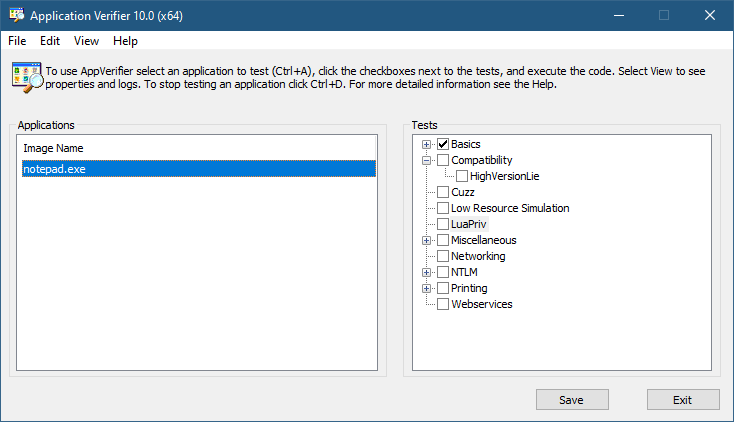
Application Verifier application window

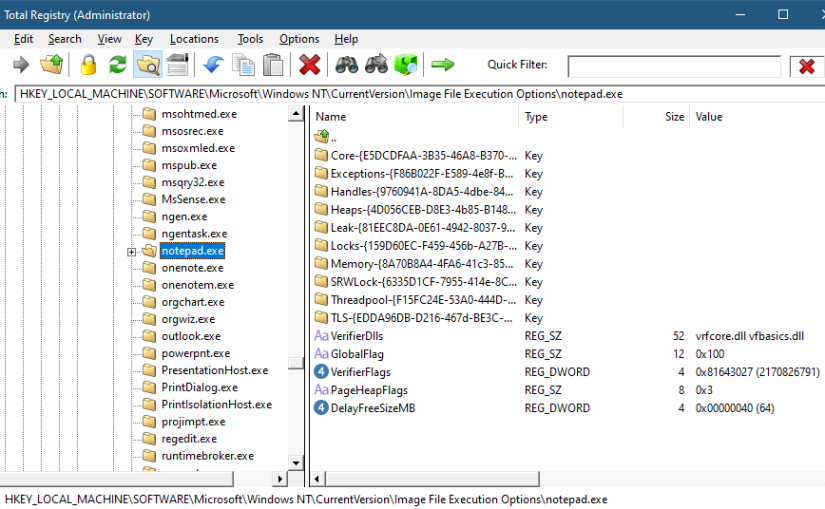
To add an application, you can browse your file system and select an executable. The Application Verifier settings are based around the executable name only – not a full path. This is because verifier settings are stored in a subkey under Image File Execution Options with the name of the executable. For the notepad example above, you’ll find the following in the Registry:
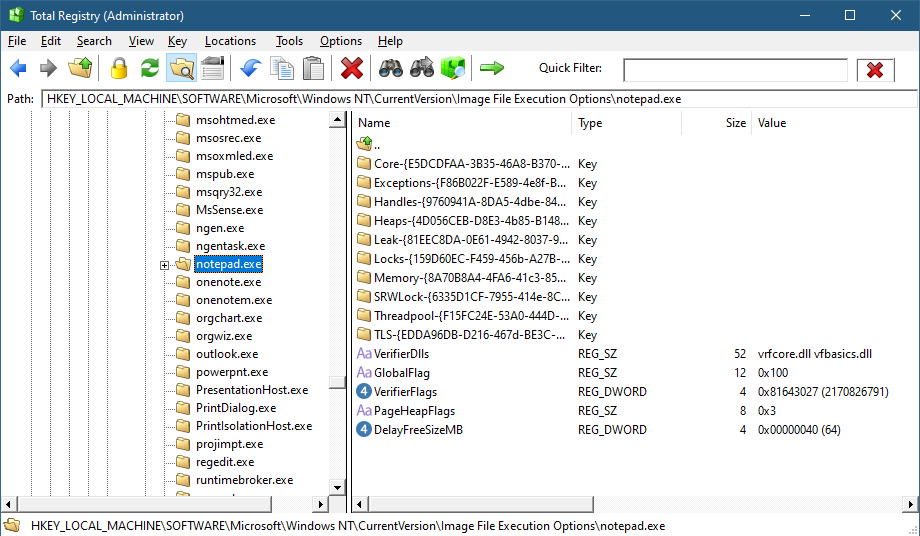
Key for notepad.exe under the IFEO subkey

This IFEO subkey is used for NT Global Flags settings, one of which is using the Application Verifier. The GlobalFlag value is shown to be 0x100, which is the bit used for the verifier. Another way to set it without any extra information is using the GFlags tool, part of the Debugging Tools for Windows package:
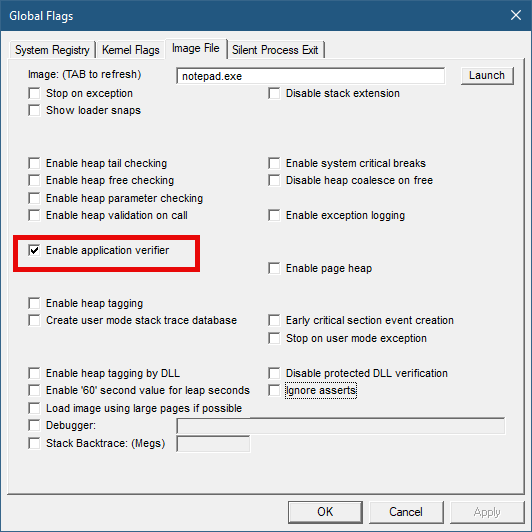
GFlags tool

The Application Verifier lists a bunch of DLLs under the VerifierDLLs value. Each one must be located in the system directory (e.g., c:\Windows\System32). Full paths are not supported; this is intentional, because the list of DLLs are going to be loaded to any process running the specified executable, and it would be risky to load DLLs from arbitrary locations in the file system. The system directory, as well as the IFEO key are normally write-accessible by administrators only.

The list of verifier DLLs is selected based on the set of tests selected by the user on the right hand side of the GUI. You’ll find subkeys that are used by the system-provided verifier DLLs with more settings related to the tests selected.

The nice thing about any verifier DLL specified, is that these DLLs are loaded early in the process lifetime, by verifier.dll (in itself loaded by NTDLL.dll), before any other DLLs are loaded into the process. Even attaching a debugger to the process while launching it would “miss” the loading of these DLLs.

This behavior makes this technique attractive for injecting a DLL into arbitrary processes. It’s even possible to enable Application Verifier globally and even dynamically (without the need to restart the system), so that these DLLs are injected into all processes (except protected processes).

Writing a Verifier DLL

Application Verifier tests descriptions is not the focus of this post. Rather, we’ll look into what it takes to create such a DLL that can be injected early and automatically into processes of our choice. As we’ll see, it’s not just about mere injection. The verifier infrastructure (part of verifier.dll) provides convenient facilities to hook functions.

If we create a standard DLL, set up the verifier entries while adding our DLL to the list of verifier DLLs (possibly removing the “standard” ones), and try to run our target executable (say, notepad), we get the following nasty message box:
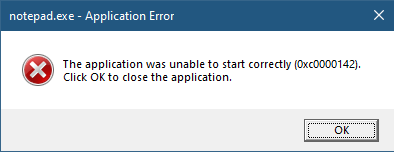
The process shuts down, which means that if a verifier DLL fails to be properly processed, the process terminates rather than “skipping” the DLL.

Launching notepad with WinDbg spits the following output:

ModLoad: 00007ff7`6dfa0000 00007ff7`6dfd8000   notepad.exe
ModLoad: 00007ffd`978f0000 00007ffd`97ae8000   ntdll.dll
ModLoad: 00007ffd`1f650000 00007ffd`1f6c4000   C:\Windows\System32\verifier.dll
Page heap: pid 0x10CEC: page heap enabled with flags 0x3.
AVRF: notepad.exe: pid 0x10CEC: flags 0x81643027: application verifier enabled
ModLoad: 00007ffc`cabd0000 00007ffc`cad6f000   C:\Windows\SYSTEM32\MyVerify.dll
ModLoad: 00007ffd`97650000 00007ffd`9770d000   C:\Windows\System32\KERNEL32.dll
ModLoad: 00007ffd`951b0000 00007ffd`954a6000   C:\Windows\System32\KERNELBASE.dll
AVRF: provider MyVerify.dll did not initialize correctly

Clearly the DLL did not initialize correctly, which is what the NTSTATUS 0xc0000142 was trying to tell us in the message box.

DLLs are initialized with the DllMain function that typically looks like this:

BOOL WINAPI DllMain(HMODULE hModule, DWORD reason, PVOID lpReserved) {
	switch (reason) {
		case DLL_PROCESS_ATTACH:
		case DLL_THREAD_ATTACH:
		case DLL_THREAD_DETACH:
		case DLL_PROCESS_DETACH:
			break;
	}
	return TRUE;
}

The classic four values shown are used by the DLL to run code when it’s loaded into a process (DLL_PROCESS_ATTACH), unloaded from a process (DLL_PROCESS_DETACH), a thread is created in the process (DLL_THREAD_ATTACH), and thread is exiting in the process (DLL_THREAD_DETACH). It turns out that there is a fifth value, which must be used with verifiier DLLs:

#define DLL_PROCESS_VERIFIER 4

Returning TRUE from such a case is not nearly enough. Instead, a structure expected by the caller of DllMain must be initialized and its address provided in lpReserved. The following structures and callback type definitions are needed:

typedef struct _RTL_VERIFIER_THUNK_DESCRIPTOR {
	PCHAR ThunkName;
	PVOID ThunkOldAddress;
	PVOID ThunkNewAddress;
} RTL_VERIFIER_THUNK_DESCRIPTOR, *PRTL_VERIFIER_THUNK_DESCRIPTOR;

typedef struct _RTL_VERIFIER_DLL_DESCRIPTOR {
	PWCHAR DllName;
	ULONG DllFlags;
	PVOID DllAddress;
	PRTL_VERIFIER_THUNK_DESCRIPTOR DllThunks;
} RTL_VERIFIER_DLL_DESCRIPTOR, *PRTL_VERIFIER_DLL_DESCRIPTOR;

typedef void (NTAPI* RTL_VERIFIER_DLL_LOAD_CALLBACK) (
	PWSTR DllName,
	PVOID DllBase,
	SIZE_T DllSize,
	PVOID Reserved);
typedef void (NTAPI* RTL_VERIFIER_DLL_UNLOAD_CALLBACK) (
	PWSTR DllName,
	PVOID DllBase,
	SIZE_T DllSize,
	PVOID Reserved);
typedef void (NTAPI* RTL_VERIFIER_NTDLLHEAPFREE_CALLBACK) (
	PVOID AllocationBase,
	SIZE_T AllocationSize);

typedef struct _RTL_VERIFIER_PROVIDER_DESCRIPTOR {
	ULONG Length;
	PRTL_VERIFIER_DLL_DESCRIPTOR ProviderDlls;
	RTL_VERIFIER_DLL_LOAD_CALLBACK ProviderDllLoadCallback;
	RTL_VERIFIER_DLL_UNLOAD_CALLBACK ProviderDllUnloadCallback;

	PWSTR VerifierImage;
	ULONG VerifierFlags;
	ULONG VerifierDebug;

	PVOID RtlpGetStackTraceAddress;
	PVOID RtlpDebugPageHeapCreate;
	PVOID RtlpDebugPageHeapDestroy;

	RTL_VERIFIER_NTDLLHEAPFREE_CALLBACK ProviderNtdllHeapFreeCallback;
} RTL_VERIFIER_PROVIDER_DESCRIPTOR;

That’s quite a list. The main structure is RTL_VERIFIER_PROVIDER_DESCRIPTOR
that has a pointer to an array of RTL_VERIFIER_DLL_DESCRIPTOR
(the last element in the array must end with all zeros), which in itself points to an array of RTL_VERIFIER_THUNK_DESCRIPTOR
, used for specifying functions to hook. There are a few callbacks as well. At a minimum, we can define this descriptor like so (no hooking, no special code in callbacks):

RTL_VERIFIER_DLL_DESCRIPTOR noHooks{};

RTL_VERIFIER_PROVIDER_DESCRIPTOR desc = {
	sizeof(desc),
	&noHooks,
	[](auto, auto, auto, auto) {},
	[](auto, auto, auto, auto) {},
	nullptr, 0, 0,
	nullptr, nullptr, nullptr,
	[](auto, auto) {},
};

We can define these simply as global variables and return the address of desc in the handling of DLL_PROCESS_VERIFIER:

case DLL_PROCESS_VERIFIER:
	*(PVOID*)lpReserved = &desc;
	break;

With this code in place, we can try launching notepad again (after copying MyVerify.Dll to the System32 directory). Here is the output from WinDbg:

ModLoad: 00007ff7`6dfa0000 00007ff7`6dfd8000   notepad.exe
ModLoad: 00007ffd`978f0000 00007ffd`97ae8000   ntdll.dll
ModLoad: 00007ffd`1f650000 00007ffd`1f6c4000   C:\Windows\System32\verifier.dll
Page heap: pid 0xB30C: page heap enabled with flags 0x3.
AVRF: notepad.exe: pid 0xB30C: flags 0x81643027: application verifier enabled
ModLoad: 00007ffd`25b50000 00007ffd`25cf1000   C:\Windows\SYSTEM32\MyVerify.dll
ModLoad: 00007ffd`97650000 00007ffd`9770d000   C:\Windows\System32\KERNEL32.dll
ModLoad: 00007ffd`951b0000 00007ffd`954a6000   C:\Windows\System32\KERNELBASE.dll
ModLoad: 00007ffd`963e0000 00007ffd`9640b000   C:\Windows\System32\GDI32.dll
ModLoad: 00007ffd`95790000 00007ffd`957b2000   C:\Windows\System32\win32u.dll
ModLoad: 00007ffd`95090000 00007ffd`951a7000   C:\Windows\System32\gdi32full.dll
...

This time it works. MyVerify.dll loads right after verifier.dll (which is the one managing verify DLLs).

Hooking Functions

As mentioned before, we can use the verifier engine’s support for hooking functions in arbitrary DLLs. Let’s give this a try by hooking into a couple of functions, GetMessage and CreateFile. First, we need to set up the structures for the hooks on a per-DLL basis:

RTL_VERIFIER_THUNK_DESCRIPTOR user32Hooks[] = {
	{ (PCHAR)"GetMessageW", nullptr, HookGetMessage },
	{ nullptr, nullptr, nullptr },
};

RTL_VERIFIER_THUNK_DESCRIPTOR kernelbaseHooks[] = {
	{ (PCHAR)"CreateFileW", nullptr, HookCreateFile },
	{ nullptr, nullptr, nullptr },
};

The second NULL in each triplet is where the original address of the hooked function is stored by the verifier engine. Now we fill the structure with the list of DLLs, pointing to the hook arrays:

RTL_VERIFIER_DLL_DESCRIPTOR dlls[] = {
	{ (PWCHAR)L"user32.dll", 0, nullptr, user32Hooks },
	{ (PWCHAR)L"kernelbase.dll", 0, nullptr, kernelbaseHooks },
	{ nullptr, 0, nullptr, nullptr },
};

Finally, we update the main structure with the dlls array:

RTL_VERIFIER_PROVIDER_DESCRIPTOR desc = {
	sizeof(desc),
	dlls,
	[](auto, auto, auto, auto) {},
	[](auto, auto, auto, auto) {},
	nullptr, 0, 0,
	nullptr, nullptr, nullptr,
	[](auto, auto) {},
};

The last thing is to actually implement the hooks:

BOOL WINAPI HookGetMessage(PMSG msg, HWND hWnd, UINT filterMin, UINT filterMax) {
	// get original function
	static const auto orgGetMessage = (decltype(::GetMessageW)*)user32Hooks[0].ThunkOldAddress;
	auto result = orgGetMessage(msg, hWnd, filterMin, filterMax);
	char text[128];
	sprintf_s(text, "Received message 0x%X for hWnd 0x%p\n", msg->message, msg->hwnd);
	OutputDebugStringA(text);
	return result;
}

HANDLE WINAPI HookCreateFile(PCWSTR path, DWORD access, DWORD share, LPSECURITY_ATTRIBUTES sa, DWORD cd, DWORD flags, HANDLE hTemplate) {
	// get original function
	static const auto orgCreateFile = (decltype(::CreateFileW)*)kernelbaseHooks[0].ThunkOldAddress;
	auto hFile = orgCreateFile(path, access, share, sa, cd, flags, hTemplate);
	char text[512];
	if (hFile == INVALID_HANDLE_VALUE)
		sprintf_s(text, "Failed to open file %ws (%u)\n", path, ::GetLastError());
	else
		sprintf_s(text, "Opened file %ws successfuly (0x%p)\n", path, hFile);

	OutputDebugStringA(text);
	return hFile;
}

The hooks just send some output with OutputDebugString. Here is an excerpt output when running notepad under a debugger:

ModLoad: 00007ff7`6dfa0000 00007ff7`6dfd8000   notepad.exe
ModLoad: 00007ffd`978f0000 00007ffd`97ae8000   ntdll.dll
ModLoad: 00007ffd`1f650000 00007ffd`1f6c4000   C:\Windows\System32\verifier.dll
Page heap: pid 0xEF18: page heap enabled with flags 0x3.
AVRF: notepad.exe: pid 0xEF18: flags 0x81643027: application verifier enabled
ModLoad: 00007ffd`25b80000 00007ffd`25d24000   C:\Windows\SYSTEM32\MyVerify.dll
ModLoad: 00007ffd`97650000 00007ffd`9770d000   C:\Windows\System32\KERNEL32.dll
ModLoad: 00007ffd`951b0000 00007ffd`954a6000   C:\Windows\System32\KERNELBASE.dll
ModLoad: 00007ffd`963e0000 00007ffd`9640b000   C:\Windows\System32\GDI32.dll
ModLoad: 00007ffd`95790000 00007ffd`957b2000   C:\Windows\System32\win32u.dll
ModLoad: 00007ffd`95090000 00007ffd`951a7000   C:\Windows\System32\gdi32full.dll
...
ModLoad: 00007ffd`964f0000 00007ffd`965bd000   C:\Windows\System32\OLEAUT32.dll
ModLoad: 00007ffd`96d10000 00007ffd`96d65000   C:\Windows\System32\shlwapi.dll
ModLoad: 00007ffd`965d0000 00007ffd`966e4000   C:\Windows\System32\MSCTF.dll
Opened file C:\Windows\Fonts\staticcache.dat successfuly (0x0000000000000164)
ModLoad: 00007ffd`7eac0000 00007ffd`7eb6c000   C:\Windows\System32\TextShaping.dll
ModLoad: 00007ffc`ed750000 00007ffc`ed82e000   C:\Windows\System32\efswrt.dll
ModLoad: 00007ffd`90880000 00007ffd`909d7000   C:\Windows\SYSTEM32\wintypes.dll
ModLoad: 00007ffd`8bf90000 00007ffd`8bfad000   C:\Windows\System32\MPR.dll
ModLoad: 00007ffd`8cae0000 00007ffd`8cce3000   C:\Windows\System32\twinapi.appcore.dll
Opened file C:\Windows\Registration\R000000000025.clb successfuly (0x00000000000001C4)
ModLoad: 00007ffd`823b0000 00007ffd`82416000   C:\Windows\System32\oleacc.dll
...
Received message 0x31F for hWnd 0x00000000001F1776
Received message 0xC17C for hWnd 0x00000000001F1776
Received message 0xF for hWnd 0x00000000001F1776
Received message 0xF for hWnd 0x00000000003010C0
Received message 0xF for hWnd 0x0000000000182E7A
Received message 0x113 for hWnd 0x00000000003319A8
...
ModLoad: 00007ffd`80e20000 00007ffd`80fd4000   C:\Windows\System32\WindowsCodecs.dll
ModLoad: 00007ffd`94ee0000 00007ffd`94f04000   C:\Windows\System32\profapi.dll
Opened file C:\Users\Pavel\AppData\Local\IconCache.db successfuly (0x0000000000000724)
ModLoad: 00007ffd`3e190000 00007ffd`3e1f6000   C:\Windows\System32\thumbcache.dll
Opened file C:\Users\Pavel\AppData\Local\Microsoft\Windows\Explorer\iconcache_idx.db successfuly (0x0000000000000450)
Opened file C:\Users\Pavel\AppData\Local\Microsoft\Windows\Explorer\iconcache_16.db successfuly (0x000000000000065C)
ModLoad: 00007ffd`90280000 00007ffd`90321000   C:\Windows\SYSTEM32\policymanager.dll

This application verifier technique is an interesting one, and fairly easy to use. The full example can be found at https://github.com/zodiacon/VerifierDLL.

Happy verifying!
Minimal Executables

Here is a simple experiment to try: open Visual Studio and create a C++ console application. All that app is doing is display “hello world” to the console:

#include <stdio.h>

int main() {
	printf("Hello, world!\n");
	return 0;
}

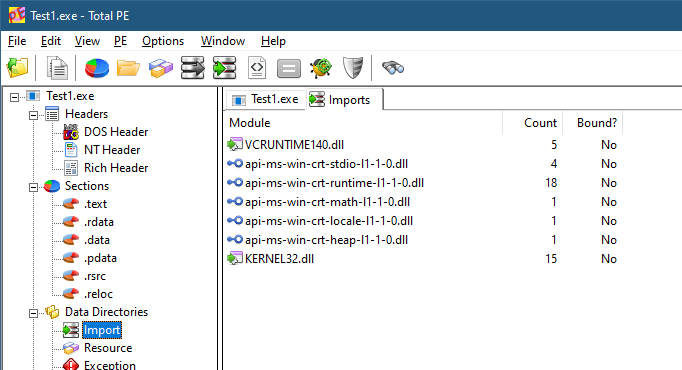
Build the executable in Release build and check its size. I get 11KB (x64). Not too bad, perhaps. However, if we check the dependencies of this executable (using the dumpbin command line tool or any PE Viewer), we’ll find the following in the Import directory:

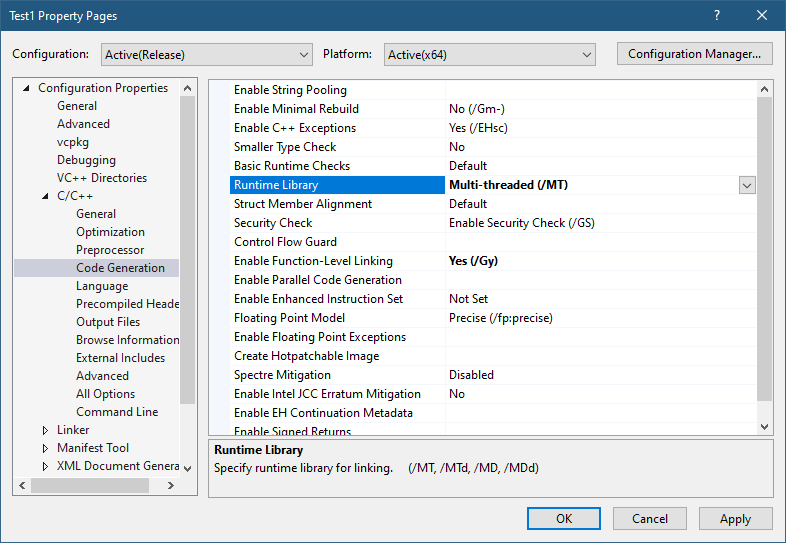
There are two dependencies: Kernel32.dll and VCRuntime140.dll. This means these DLLs will load at process start time no matter what. If any of these DLLs is not found, the process will crash. We can’t get rid of Kernel32 easily, but we may be able to link statically to the CRT. Here is the required change to VS project properties:

After building, the resulting executable jumps to 136KB in size! Remember, it’s a “hello, world” application. The Imports directory in a PE viewer now show Kernel32.dll as the only dependency.

Is that best we can do? Why do we need the CRT in the first place? One obvious reason is the usage of the printf function, which is implemented by the CRT. Maybe we can use something else without depending on the CRT. There are other reasons the CRT is needed. Here are a few:

  • The CRT is the one calling our main function with the correct argc and argv. This is expected behavior by developers.
  • Any C++ global objects that have constructors are executed by the CRT before the main function is invoked.
  • Other expected behaviors are provided by the CRT, such as correct handling of the errno (global) variable, which is not really global, but uses Thread-Local-Storage behind the scenes to make it per-thread.
  • The CRT implements the new and delete C++ operators, without which much of the C++ standard library wouldn’t work without major customization.

Still, we may be OK doing things outside the CRT, taking care of ourselves. Let’s see if we can pull it off. Let’s tell the linker that we’re not interested in the CRT:

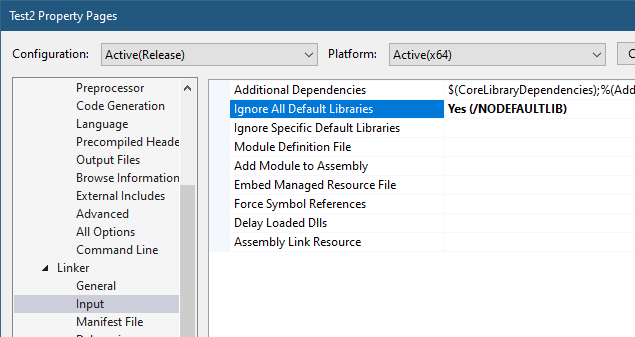
Setting “Ignore All Default Libraries” tells the linker we’re not interested in linking with the CRT in any way. Building the app now gives some linker errors:

1>Test2.obj : error LNK2001: unresolved external symbol __security_check_cookie
1>Test2.obj : error LNK2001: unresolved external symbol __imp___acrt_iob_func
1>Test2.obj : error LNK2001: unresolved external symbol __imp___stdio_common_vfprintf
1>LINK : error LNK2001: unresolved external symbol mainCRTStartup
1>D:\Dev\Minimal\x64\Release\Test2.exe : fatal error LNK1120: 4 unresolved externals

One thing we expected is the missing printf implementation. What about the other errors? We have the missing “security cookie” implementation, which is a feature of the CRT to try to detect stack overrun by placing a “cookie” – some number – before making certain function calls and making sure that cookie is still there after returning. We’ll have to settle without this feature. The main missing piece is mainCRTStartup, which is the default entry point that the linker is expecting. We can change the name, or overwrite main to have that name.

First, let’s try to fix the linker errors before reimplementing the printf functionality. We’ll remove the printf call and rebuild. Things are improving:

>Test2.obj : error LNK2001: unresolved external symbol __security_check_cookie
1>LINK : error LNK2001: unresolved external symbol mainCRTStartup
1>D:\Dev\Minimal\x64\Release\Test2.exe : fatal error LNK1120: 2 unresolved externals

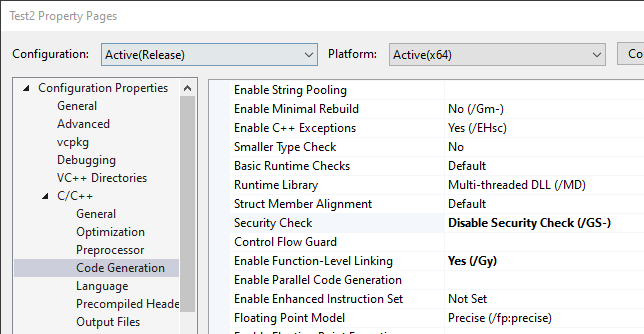
The “security cookie” feature can be removed with another compiler option:

When rebuilding, we get a warning about the “/sdl” (Security Developer Lifecycle) option conflicting with removing the security cookie, which we can remove as well. Regardless, the final linker error remains – mainCRTStartup.

We can rename main to mainCRTStartup and “implement” printf by going straight to the console API (part of Kernel32.Dll):

#include <Windows.h>

int mainCRTStartup() {
	char text[] = "Hello, World!\n";
	::WriteConsoleA(::GetStdHandle(STD_OUTPUT_HANDLE),
		text, (DWORD)strlen(text), nullptr, nullptr);

	return 0;
}

This compiles and links ok, and we get the expected output. The file size is only 4KB! An improvement even over the initial project. The dependencies are still just Kernel32.DLL, with the only two functions used:

You may be thinking that although we replaced printf, that’s wasn’t the full power of printf – it supports various format specifiers, etc., which are going to be difficult to reimplement. Is this just a futile exercise?

Not necessarily. Remember that every user mode process always links with NTDLL.dll, which means the API in NtDll is always available. As it turns out, a lot of functionality that is implemented by the CRT is also implemented in NTDLL. printf is not there, but the next best thing is – sprintf and the other similar formatting functions. They would fill a buffer with the result, and then we could call WriteConsole to spit it to the console. Problem solved!

Removing the CRT

Well, almost. Let’s add a definition for sprintf_s (we’ll be nice and go with the “safe” version), and then use it:

#include <Windows.h>

extern "C" int __cdecl sprintf_s(
	char* buffer,
	size_t sizeOfBuffer,
	const char* format,	...);

int mainCRTStartup() {
	char text[64];
	sprintf_s(text, _countof(text), "Hello, world from process %u\n", ::GetCurrentProcessId());
	::WriteConsoleA(::GetStdHandle(STD_OUTPUT_HANDLE),
		text, (DWORD)strlen(text), nullptr, nullptr);

	return 0;
}

Unfortunately, this does not link: sprintf_s is an unresolved external, just like strlen. It makes sense, since the linker does not know where to look for it. Let’s help out by adding the import library for NtDll:

#pragma comment(lib, "ntdll")

This should work, but one error persists – sprintf_s; strlen however, is resolved. The reason is that the import library for NtDll provided by Microsoft does not have an import entry for sprintf_s and other CRT-like functions. Why? No good reason I can think of. What can we do? One option is to create an NtDll.lib import library of our own and use it. In fact, some people have already done that. One such file can be found as part of my NativeApps repository (it’s called NtDll64.lib, as the name does not really matter). The other option is to link dynamically. Let’s do that:

int __cdecl sprintf_s_f(
	char* buffer, size_t sizeOfBuffer, const char* format, ...);

int mainCRTStartup() {
	auto sprintf_s = (decltype(sprintf_s_f)*)::GetProcAddress(
        ::GetModuleHandle(L"ntdll"), "sprintf_s");
	if (sprintf_s) {
		char text[64];
		sprintf_s(text, _countof(text), "Hello, world from process %u\n", ::GetCurrentProcessId());
		::WriteConsoleA(::GetStdHandle(STD_OUTPUT_HANDLE),
			text, (DWORD)strlen(text), nullptr, nullptr);
	}

	return 0;
}

Now it works and runs as expected.

You may be wondering why does NTDLL implement the CRT-like functions in the first place? The CRT exists, after all, and can be normally used. “Normally” is the operative word here. Native applications, those that can only depend on NTDLL cannot use the CRT. And this is why these functions are implemented as part of NTDLL – to make it easier to build native applications. Normally, native applications are built by Microsoft only. Examples include Smss.exe (the session manager), CSrss.exe (the Windows subsystem process), and UserInit.exe (normally executed by WinLogon.exe on a successful login).

One thing that may be missing in our “main” function are command line arguments. Can we just add the classic argc and argv and go about our business? Let’s try:

int mainCRTStartup(int argc, const char* argv[]) {
//...
char text[64];
sprintf_s(text, _countof(text), 
    "argc: %d argv[0]: 0x%p\n", argc, argv[0]);
::WriteConsoleA(::GetStdHandle(STD_OUTPUT_HANDLE),
	text, (DWORD)strlen(text), nullptr, nullptr);

Seems simple enough. argv[0] should be the address of the executable path itself. The code carefully displays the address only, not trying to dereference it as a string. The result, however, is perplexing:

argc: -359940096 argv[0]: 0x74894808245C8948

This seems completely wrong. The reason we see these weird values (if you try it, you’ll get different values. In fact, you may get different values in every run!) is that the expected parameters by a true entry point of an executable is not based on argc and argv – this is part of the CRT magic. We don’t have a CRT anymore. There is in fact just one argument, and it’s the Process Environment Block (PEB). We can add some code to show some of what is in there (non-relevant code omitted):

#include <Windows.h>
#include <winternl.h>
//...
int mainCRTStartup(PPEB peb) {
	char text[256];
	sprintf_s(text, _countof(text), "PEB: 0x%p\n", peb);
	::WriteConsoleA(::GetStdHandle(STD_OUTPUT_HANDLE),
		text, (DWORD)strlen(text), nullptr, nullptr);

	sprintf_s(text, _countof(text), "Executable: %wZ\n", 
        peb->ProcessParameters->ImagePathName);
	::WriteConsoleA(::GetStdHandle(STD_OUTPUT_HANDLE),
		text, (DWORD)strlen(text), nullptr, nullptr);

	sprintf_s(text, _countof(text), "Commandline: %wZ\n", 
        peb->ProcessParameters->CommandLine);
	::WriteConsoleA(::GetStdHandle(STD_OUTPUT_HANDLE),
		text, (DWORD)strlen(text), nullptr, nullptr);

<Winternl.h> contains some NTDLL definitions, such as a partially defined PEB. In it, there is a ProcessParameters member that holds the image path and the full command line. Here is the result on my console:

PEB: 0x000000EAC01DB000
Executable: D:\Dev\Minimal\x64\Release\Test3.exe
Commandline: "D:\Dev\Minimal\x64\Release\Test3.exe"

The PEB is the argument provided by the OS to the entry point, whatever its name is. This is exactly what native applications get as well. By the way, we could have used GetCommandLine from Kernel32.dll to get the command line if we didn’t add the PEB argument. But for native applications (that can only depend on NTDLL), GetCommandLine is not an option.

Going Native

How far are we from a true native application? What would be the motivation for such an application anyway, besides small file size and reduced dependencies? Let’s start with the first question.

To make our executable truly native, we have to do two things. The first is to change the subsystem of the executable (stored in the PE header) to Native. VS provides this option via a linker setting:

The second thing is to remove the dependency on Kernel32.Dll. No more WriteConsole and no GetCurrentProcessId. We will have to find some equivalent in NTDLL, or write our own implementation leveraging what NtDll has to offer. This is obviously not easy, given that most of NTDLL is undocumented, but most function prototypes are available as part of the Process Hacker/phnt project.

For the second question – why bother? Well, one reason is that native applications can be configured to run very early in Windows boot – these in fact run by Smss.exe itself when it’s the only existing user-mode process at that time. Such applications (like autochk.exe, a native chkdsk.exe) must be native – they cannot depend on the CRT or even on kernel32.dll, since the Windows Subsystem Process (csrss.exe) has not been launched yet.

For more information on Native Applications, you can view my talk on the subject.

I may write a blog post on native application to give more details. The examples shown here can be found here.

Happy minimization!

Creating Registry Links

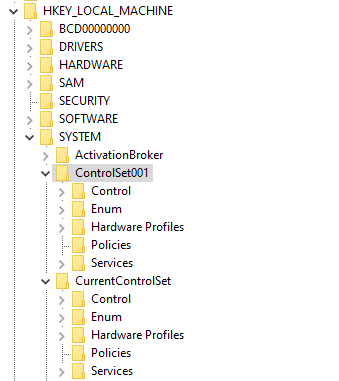
The standard Windows Registry contains some keys that are not real keys, but instead are symbolic links (or simply, links) to other keys. For example, the key HKEY_LOCAL_MACHINE\System\CurrentControlSet is a symbolic link to HKEY_LOCAL_MACHINE\System\ControlSet001 (in most cases). When working with the standard Registry editor, RegEdit.exe, symbolic links look like normal keys, in the sense that they behave as the link’s target. The following figure shows the above mentioned keys. They look exactly the same (and they are).

There are several other existing links in the Registry. As another example, the hive HKEY_CURRENT_CONFIG is a link to (HKLM is HKEY_LOCAL_MACHINE) HKLM\SYSTEM\CurrentControlSet\Hardware Profiles\Current.

But how to do you create such links yourself? The official Microsoft documentation has partial details on how to do it, and it misses two critical pieces of information to make it work.

Let’s see if we can create a symbolic link. One rule of Registry links, is that the link must point to somewhere within the same hive where the link is created; we can live with that. For demonstration purposes, we’ll create a link in HKEY_CURRENT_USER named DesktopColors that links to HKEY_CURRENT_USER\Control Panel\Desktop\Colors.

The first step is to create the key and specify it to be a link rather than a normal key (error handling omitted):

HKEY hKey;
RegCreateKeyEx(HKEY_CURRENT_USER, L"DesktopColors", 0, nullptr,
	REG_OPTION_CREATE_LINK, KEY_WRITE, nullptr, &hKey, nullptr);

The important part is that REG_OPTION_CREATE_LINK flag that indicates this is supposed to be a link rather than a standard key. The KEY_WRITE access mask is required as well, as we are about to set the link’s target.

Now comes the first tricky part. The documentation states that the link’s target should be written to a value named “SymbolicLinkValue” and it must be an absolute registry path. Sounds easy enough, right? Wrong. The issue here is the “absolute path” – you might think that it should be something like “HKEY_CURRENT_USER\Control Panel\Desktop\Colors” just like we want, but hey – maybe it’s supposed to be “HKCU” instead of “HKEY_CURRENT_USER” – it’s just a string after all.

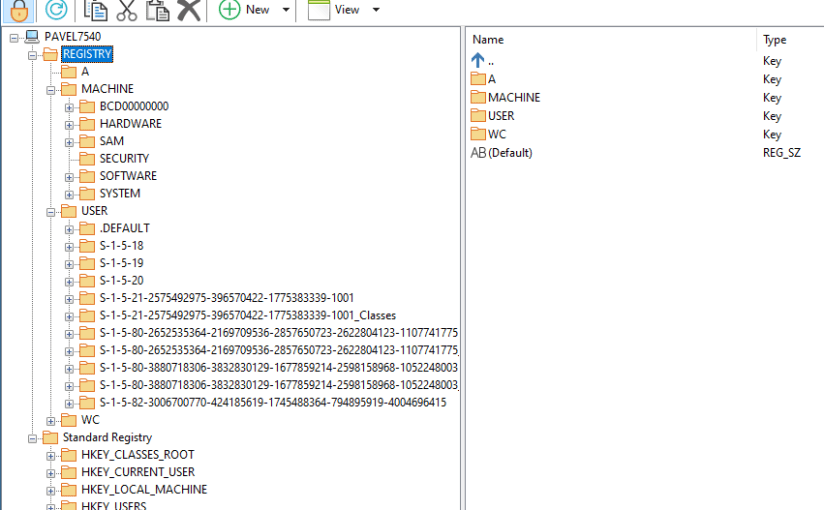
It turns out both these variants are wrong. The “absolute path” required here is a native Registry path that is not visible in RegEdit.exe, but it is visible in my own Registry editing tool, RegEditX.exe, downloadable from https://github.com/zodiacon/AllTools. Here is a screenshot, showing the “real” Registry vs. the view we get with RegEdit.

This top view is the “real” Registry is seen by the Windows kernel. Notice there is no HKEY_CURRENT_USER, there is a USER key where subkeys exist that represent users on this machine based on their SIDs. These are mostly visible in the standard Registry under the HKEY_USERS hive.

The “absolute path” needed is based on the real view of the Registry. Here is the code that writes the correct path based on my (current user’s) SID:

WCHAR path[] = L"\\REGISTRY\\USER\\S-1-5-21-2575492975-396570422-1775383339-1001\\Control Panel\\Desktop\\Colors";
RegSetValueEx(hKey, L"SymbolicLinkValue", 0, REG_LINK, (const BYTE*)path,
    wcslen(path) * sizeof(WCHAR));

The above code shows the second (undocumented, as far as I can tell) piece of crucial information – the length of the link path (in bytes) must NOT include the NULL terminator. Good luck guessing that 🙂

And that’s it. We can safely close the key and we’re done.

Well, almost. If you try to delete your newly created key using RegEdit.exe – the target is deleted, rather than the link key itself! So, how do you delete the key link? (My RegEditX does not support this yet).

The standard RegDeleteKey and RegDeleteKeyEx APIs are unable to delete a link. Even if they’re given a key handle opened with REG_OPTION_OPEN_LINK – they ignore it and go for the target. The only API that works is the native NtDeleteKey function (from NtDll.Dll).

First, we add the function’s declaration and the NtDll import:

extern "C" int NTAPI NtDeleteKey(HKEY);

#pragma comment(lib, "ntdll")

Now we can delete a link key like so:

HKEY hKey;
RegOpenKeyEx(HKEY_CURRENT_USER, L"DesktopColors", REG_OPTION_OPEN_LINK, 
    DELETE, &hKey);
NtDeleteKey(hKey);

As a final note, RegCreateKeyEx cannot open an existing link key – it can only create one. This in contrast to standard keys that can be created OR opened with RegCreateKeyEx. This means that if you want to change an existing link’s target, you have to call RegOpenKeyEx first (with REG_OPTION_OPEN_LINK) and then make the change (or delete the link key and re-create it).

Isn’t Registry fun?